Every lawyer I know has the same complaint. They spend more time managing their practice than actually practicing law.
The billing takes hours.
The file organization becomes a nightmare. Clients call asking about case status because information lives in three different places.
I started looking at Clio Manage because the inefficiency problem keeps getting worse as firms grow. One attorney can juggle paper files and spreadsheets.
Five attorneys cannot.
This Clio Manage review examines whether the software actually solves these problems or just creates new ones.
The short answer is that it works, but only if you pick the right pricing tier and commit to the setup process. Let me show you what I found.
Clio also has:
What You Get With Clio Manage
Clio Manage is a cloud-based system that puts your entire practice in one place. You access it from any device with internet.
No downloads.
No complicated installations.
The platform handles case management, time tracking, billing, document storage, and client communication. Everything connects together instead of living in separate systems.
You track time on a case. That time automatically flows into invoicing.
The invoice goes to the client portal.
The client pays online. The payment records in your accounting software.
No manual entry at any step.
That automation is where the value lives.
The Pricing Reality
This is where most law firms get stuck. The pricing looks expensive until you calculate what disorganization actually costs.
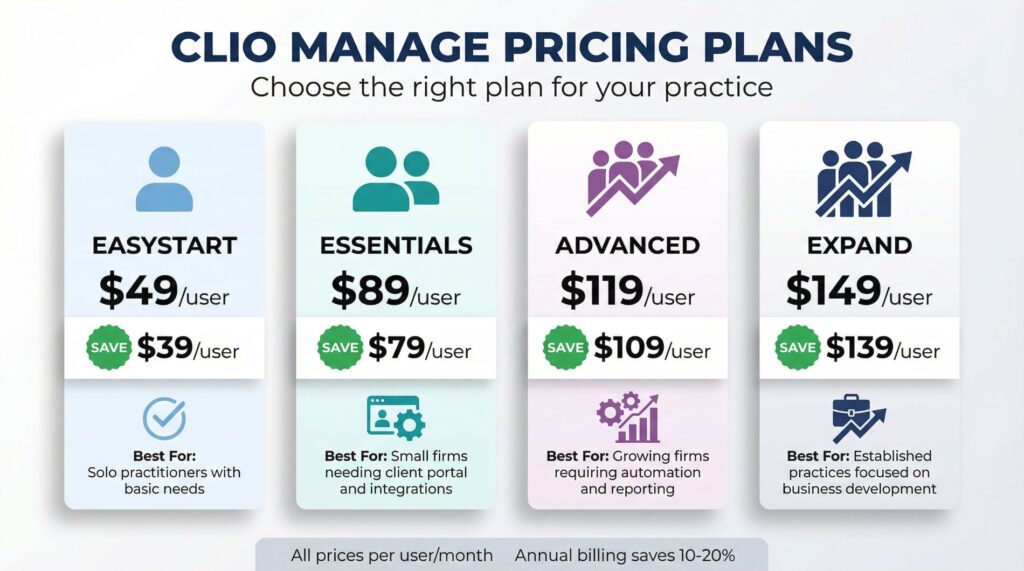
| Plan | Monthly Price | Annual Price | Best For |
|---|---|---|---|
| EasyStart | $49/user | $39/user | Solo practitioners with basic needs |
| Essentials | $89/user | $79/user | Small firms needing client portal and integrations |
| Advanced | $119/user | $109/user | Growing firms requiring automation and reporting |
| Expand | $149/user | $139/user | Established practices focused on business development |
A three-attorney firm on the Essentials plan pays $237 per month with annual billing. That seems like a lot until you add up the hours your staff spends hunting down billing information, answering client status questions, and reconciling financial records.
Most firms recover that cost in the first two weeks just from captured billable time that would have fallen through the cracks.
The annual billing discount matters. You save $10 per user per month by paying yearly instead of monthly.
For a five-person firm, that adds up to $600 per year.
That money stays in your pocket.
Special Offer: Start your 7-day free trial with Clio Manage here. You get access to every feature across all pricing tiers. Most firms figure out their best fit within the trial period because the right tier becomes obvious once you start using it.
Time Tracking That Actually Works
The biggest revenue leak in any law firm is unbilled time. You work for 15 minutes researching a client issue.
You forget to log it.
That time disappears.
Clio Manage runs a timer in your browser. You start it when you begin client work.
It runs in the background while you work.
You stop it when you finish. The time automatically attaches to the fix matter.
No manual logging. No forgotten hours.
No revenue disappearing into thin air.
The mobile app does the same thing. You take a client call while away from your desk.
You start the timer on your phone.
The billable time captures automatically.
This feature alone pays for the software. When you stop losing 5-10 hours per week of unbilled time, the subscription cost becomes invisible.
Document Management Without the Chaos
Legal work creates documents constantly. Contracts.
Discovery.
Correspondence. Court filings.
Emails.
Every matter generates hundreds of documents.
Clio Manage stores unlimited documents with full-text search. You type “breach of contract 2024” and get every document containing those words across all your matters.
You find what you need in seconds instead of digging through file cabinets or nested folder structures.
The document templates speed up routine work significantly. You create a template for your standard engagement letter.
The template pulls client information automatically.
You review it, send it for e-signature, and move on.
You stop recreating the same documents over and over.
The Client Portal Changes Everything
Your clients want updates. They call your office asking about case status.
They email asking for copies of documents.
They wonder about their bill.
Every one of those inquiries creates work for your staff. Someone has to answer the phone, pull the file, explain the status, and follow up.
The Clio for Clients portal eliminates most of this. Clients log in securely.
They see their matter status.
They review documents. They check their invoices.
They upload files you requested.
Most client questions get answered without involving your staff. That frees up hours every week for work that actually generates revenue.
This review found that firms report the client portal as one of the highest-value features. The time savings compound quickly once clients learn to use it.
Integration Capabilities That Matter
Clio Manage connects with over 250 other applications. This matters because you probably already use other software for accounting, communication, or document creation.
The platform combines with QuickBooks and Xero for accounting. Your billing flows directly into your financial records without manual entry.
It connects with Google Workspace and Microsoft 365. Your emails sync.
Your calendar syncs.
Your documents sync.
It links with Slack and Microsoft Teams. You get matter notifications in your communication tools without switching applications.
The Zapier integration opens up thousands of additional automation options. You can build custom workflows that connect Clio to practically any other software you use.
These connections prevent information silos. Everything talks to everything else.
You enter data once and it flows where it needs to go.
Ready to streamline your practice? Explore Clio Manage pricing and find your optimal tier here. Annual billing is available immediately. You can upgrade or downgrade your tier at any time as your needs change.
Where Different Firm Sizes Find Value
Solo Practitioners
The EasyStart plan at $39 per month (annual billing) covers the basics. Time tracking, invoicing, calendar management, and e-signatures.
You manage 15-30 active matters without spreadsheet maintenance or billing leakage. The learning curve stays minimal.
Most solo attorneys become productive within a few days.
The platform gives you what you need without overwhelming you with features you will never use.
Small Firms With 2-5 Attorneys
The Essentials tier at $79 per month per user (annual billing) adds substantial value. Document templates save hours.
The client portal reduces administrative burden.
The 250+ app integrations connect your existing software together.
This tier is where most small firms find the best balance between cost and capability. The features justify the investment through time savings and captured revenue.
Growing Firms With 6-15 Attorneys
The Advanced plan at $109 per month per user (annual billing) introduces automation and custom reporting. These features prevent work from falling through cracks as complexity increases.
Automated task assignment routes new matters to the right attorneys based on practice area or current workload. Nobody gets overwhelmed while others sit idle.
Custom reporting shows profitability by matter type, attorney productivity metrics, and origination credit allocation. These insights help you make better business decisions about where to focus your practice and how to allocate resources.
Established Practices
The Expand tier at $139 per month per user (annual billing) includes Clio Grow. This client relationship management system captures leads and automates follow-up.
For firms actively focused on business development and client acquisition, this tier justifies its cost through improved lead conversion rates. The marketing automation tools help you grow without hiring additional business development staff.
Real Limitations You Should Know About
This review needs to be honest about friction points. No software is perfect for every situation.
Setup Takes Time and Effort
Moving from paper files or a legacy system needs work. You need to import your existing matters, contacts, and documents.
Clio provides migration support, but guided migration only comes with Essentials and above.
If you choose EasyStart, you handle data import yourself. Budget at least a few days for setup even with a small practice.
Learning Curve for Technology-Resistant Attorneys
If your firm includes attorneys who resist new technology, expect training challenges. The platform is intuitive compared to legal software from five years ago.
But it still needs orientation and practice.
Plan for active training sessions. Budget time for questions and support during the first few weeks.
Cost Scales Quickly for Larger Firms
The per-user pricing model becomes expensive as headcount grows. A 25-person firm on the Advanced tier costs $32,625 per year.
Enterprise pricing is available but needs negotiation. Larger firms should contact Clio directly to talk about volume discounts.
Document Collaboration Limitations
Clio stores and organizes documents well. But real-time collaborative editing does not exist within the platform.
You still use Google Docs or Microsoft Word for multi-attorney drafting, then upload the final version to Clio.
This creates an extra step compared to platforms with built-in document collaboration.
Limited E-Filing Availability
Court e-filing only works in California, Texas, and Georgia now. Attorneys in other states continue managing court filings outside the platform.
This gap means you still need separate processes for court document submission in most jurisdictions.
Support When You Need It
Clio provides 24/5 support through chat, email, and phone. Response times for chat inquiries typically fall under 30 minutes.
The company maintains an active user community and offers regular training sessions. Higher-tier subscribers get access to more frequent training opportunities.
This support structure matters when you face a critical deadline and something breaks. Responsive support prevents small issues from becoming major problems.
The knowledge base includes detailed articles, video tutorials, and step-by-step guides for common tasks. Most questions get answered through self-service before you need to contact support.
Making the Right Decision
The decision comes down to your current pain points and your firm size.
You should seriously consider Clio Manage if:
You lose billable hours because time tracking feels burdensome. You spend hours answering client questions that could be self-service.
Your billing process takes days instead of hours.
You cannot find documents when you need them. Your current systems do not talk to each other.
You might want to look elsewhere if:
You run a very large firm where per-user costs become prohibitive. You need extensive court e-filing capabilities outside California, Texas, and Georgia.
You need real-time document collaboration within the platform.
You operate in a highly specialized practice area with unique workflow requirements.
The 7-day free trial eliminates guesswork. You can create test matters, track time, generate invoices, and invite clients to the portal.
The trial shows whether your specific workflow aligns with how Clio structures work.
Most firms make their tier decision during the trial because the differences become obvious through hands-on use.
Take action now: Begin your 7-day free trial today. You access every feature across all tiers. This gives you a complete picture of what different pricing levels offer.
Most firms identify their best fit within the trial period.
Advanced Tips for Getting Maximum Value
Once you commit to Clio Manage, these strategies help you extract most value from your investment.
Customize Your Workflows Immediately
Take time during setup to customize matter stages, task templates, and document templates for your specific practice areas. Generic setups waste the platform’s power.
Tailored workflows save hours every week.
Train Clients on the Portal
Client adoption of the portal decides how much administrative time you save. Send clear instructions.
Offer a brief walkthrough call.
The 15 minutes you invest in client training saves hours of future staff time.
Use Automated Task Triggers
Set up automated task creation when matters reach certain stages. When a case moves to discovery, automatically create all standard discovery tasks.
This prevents forgotten steps and keeps cases moving efficiently.
Review Reports Weekly
The custom reporting shows problems before they become crises. Review attorney utilization, aging accounts receivable, and matter profitability every week.
Early visibility prevents revenue issues.
Integrate Everything You Can
Connect every compatible application. The more systems talk to each other, the less manual data entry you do.
Each integration saves small amounts of time that compound significantly over months.
The Final Thoughts on This Review
Clio Manage solves real problems for law firms serious about operational efficiency. The pricing reflects genuine value for firms that commit to using the features.
The best fit depends on your firm size and needs. Solo practitioners and small firms benefit most from eliminated administrative friction and captured billable time. Growing firms gain value from automation and insights.
Larger practices may need enterprise pricing to make the numbers work.
The real cost of practice management is not the software subscription. The real cost is the inefficiency of not having it.
Disorganized files drain profitability.
Forgotten deadlines create malpractice risk. Unbilled hours disappear forever.
Those costs exceed any legitimate software investment by a wide margin.
Final recommendation: Compare Clio Manage with other practice management solutions using the Clio comparison tool. This helps you understand how Clio stacks against choices. Most firms find Clio offers the best balance of features, usability, and cost.
The 7-day trial stays the best way to make an informed decision. You see exactly how the software handles your specific workflows before spending money.
Take advantage of it.