Clio Grow is a client relationship management system built specifically for law firms. It handles the intake process from the moment someone fills out a contact form on your website through the point where they sign an engagement letter and become a paying client.
The software automates appointment scheduling, follow-up emails, and data entry so you can spend less time on administrative tasks and more time practicing law.
The platform came from Clio’s acquisition of Lexicata and combines directly with Clio Manage, their practice management software. You get intake forms, pipeline tracking, automated workflows, and reporting all in one place.
This clio grow review covers what you need to know before subscribing.
Clio also has:
How Clio Grow Actually Works
You start by creating custom intake forms that match your practice areas. Someone visits your website, fills out the form asking about their legal issue, and their information automatically enters Clio Grow.
No manual data entry required.
From there, you can set up automated workflows. The system sends a welcome email immediately after form submission.
It can schedule a consultation based on your calendar availability.
It sends reminder emails before the appointment. All of this happens without you touching anything.
The pipeline view shows every prospect as a card you can drag between columns. You might have columns labeled “New Lead,” “Consultation Scheduled,” “Sent Engagement Letter,” and “Converted to Client.” Your whole team can see where each potential client stands at a glance.
When someone becomes a client, their information syncs directly into Clio Manage if you use that platform. Everything transfers over automatically so you never enter the same data twice.
Pricing That Makes Sense (Or Doesn’t)
Clio Grow costs $59 per user per month when you pay annually, or $69 per month if you pay monthly. This is for the standalone product if you already use different practice management software.
The better option for most firms is Clio’s Complete plan at $149 per user per month (annual billing) or $159 monthly. You get Clio Grow plus full case management, time tracking, billing, document automation, and client portals all included. If you already use Clio Essentials or Advanced and want to add Grow, it costs an extra $69 per user monthly, which makes upgrading to Complete more economical.
Here’s where the math gets tricky. A solo attorney pays $149 monthly for everything.
A five-person firm pays $745 monthly.
A ten-person firm pays $1,490 monthly. The per-user pricing adds up fast as you grow, which is the biggest complaint from firms trying to scale.
Annual billing saves you 10% across all plans compared to monthly billing. For a mid-sized firm, that’s real money over the course of a year.
Start your 7-day free trial of Clio Grow here to test intake forms and automation with your actual practice before committing to a subscription.
Features That Actually Save Time
Online Intake Forms
You build forms using Clio’s drag-and-drop builder. Add fields for name, contact info, case type, and any custom questions specific to your practice.
The forms work on mobile devices, which matters because plenty of people search for attorneys on their phones.
You can embed these forms on your website or send them as direct links via email or text message. When someone finishes the form, you get a notification and their information populates into your system automatically.
The Quick Intake button let’s you manually add a prospect and schedule an appointment in about 60 seconds when someone calls instead of filling out the online form.
Automation That Works While You Sleep
Set up email templates for different stages of your intake process. Welcome emails go out immediately after form submission.
Follow-up emails send three days later if someone hasn’t scheduled a consultation.
Reminder emails send 24 hours before scheduled appointments.
You can automate engagement letter generation using templates that pull in client information automatically. When someone agrees to hire you, the system can send the letter for e-signature without manual intervention.
The automation isn’t perfect based on user feedback. Some firms report workflows that don’t trigger correctly or need technical support to troubleshoot.
The promise of completely hands-off automation doesn’t always match reality, but it still saves significant time compared to handling everything manually.
Pipeline Management
The visual pipeline shows every prospect as a card. You create custom statuses that match your firm’s workflow.
Drag cards between columns as prospects move through your intake process.
You can assign prospects to specific team members, add notes, set task reminders, and track communication history. Everything related to that potential client lives on their card.
The system flags prospects who haven’t been contacted recently so nothing falls through the cracks. You can filter by practice area, lead source, or team member to focus on specific segments.
Lead Source Tracking
Tag each prospect with their source when they enter your system. Sources might include Google Ads, website contact form, referral from another attorney, or networking event.
The reporting dashboard shows which sources generate the most leads, which sources convert to paying clients at the highest rate, and the estimated value of your pipeline by source. You can calculate ROI for your marketing spend and make decisions about where to invest.
Real User Experiences
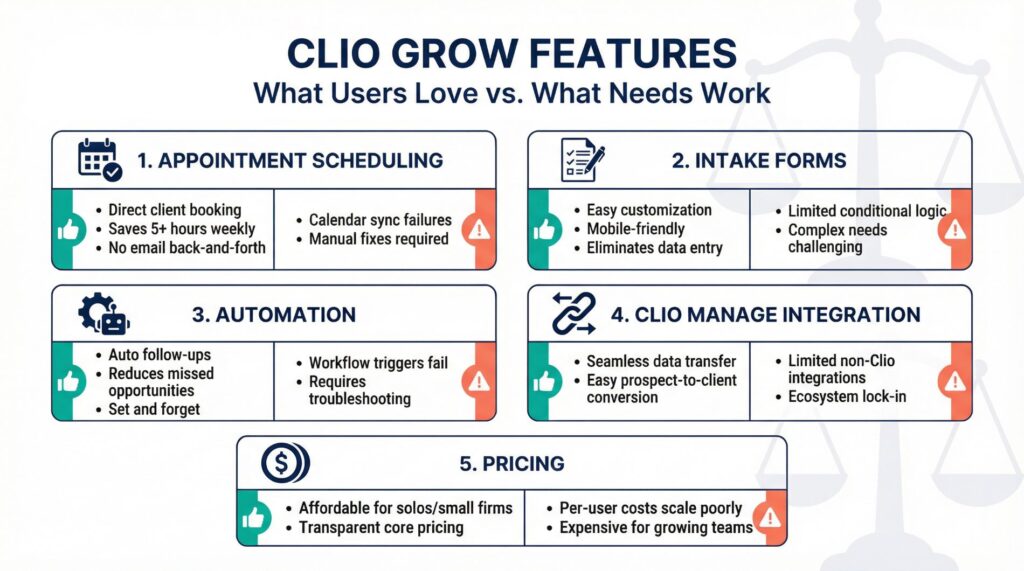
| Feature | What Users Like | What Users Dislike |
|---|---|---|
| Appointment Scheduling | Clients book directly without back-and-forth emails, saves 5+ hours weekly | Calendar sync occasionally fails, needs manual fixes |
| Intake Forms | Easy to customize, mobile-friendly, eliminates data entry | Limited conditional logic for complex intake needs |
| Automation | Follow-ups happen automatically, reduces missed opportunities | Workflows sometimes don’t trigger, needs troubleshooting |
| Clio Manage Integration | Seamless data transfer when converting prospects to clients | Limited integration with non-Clio practice management systems |
| Pricing | Reasonable for solos and small firms, no hidden fees for core features | Per-user cost becomes expensive as team grows |
Solo attorneys consistently report that appointment scheduling alone justifies the cost. Instead of exchanging 5-7 emails to find a meeting time, clients pick a slot from your available times and book instantly.
Small firms using Clio Manage appreciate that intake information transfers automatically when prospects become clients. You avoid duplicate data entry and the errors that come with retyping information.
The main frustration centers on per-user pricing for growing firms. A practice with 15 team members faces substantial monthly costs, and some question whether everyone needs full access to justify the expense.
Check out the Complete plan pricing to see if bundling Grow with practice management makes financial sense for your firm size.
What Works Best for Different Practice Areas
Estate planning and family law firms get the most value from Clio Grow. These practices handle high intake volume with relatively straightforward initial consultations.
The ability to automate scheduling and follow-ups directly impacts conversion rates.
General practice attorneys benefit from the customizable intake forms. You can create different forms for different practice areas and direct prospects to the right one based on their legal issue.
Contract and business law practices use the pipeline tracking to manage longer sales cycles. Corporate clients often take weeks to decide on representation, and the CRM functionality helps you stay organized during extended nurture periods.
Personal injury firms often find Clio Grow limiting. PI intake needs detailed case evaluation, medical record tracking, and damage calculations that the platform doesn’t handle well.
You might need specialized PI intake software instead.
Integration with Your Current Setup
Clio advertises integration with 250+ apps through their marketplace. You can connect to Gmail, Outlook, Zapier, QuickBooks, LawPay, and many other tools.
The catch is that deep integration works best within the Clio ecosystem. If you use Clio Manage as your practice management system, everything syncs beautifully.
If you use a competitor’s case management platform, you’ll likely need workarounds or middleware tools like Zapier to connect systems.
Email integration pulls your Gmail or Outlook messages into Clio Grow automatically. When you email a prospect, that communication appears on their card in the system.
This keeps everything organized instead of scattered across your inbox.
Calendar integration let’s prospects book appointments based on your actual availability. The system checks your Google Calendar or Outlook calendar in real-time and only shows open slots.
Payment integration with LawPay means you can collect retainers as part of the intake process. Clients can sign the engagement letter and pay the retainer in one workflow.
Setup and Learning Curve
You can get basic intake forms running within an hour of signing up. The form builder uses drag-and-drop functionality that needs no technical knowledge.
Create fields, add your questions, embed the form on your website or copy the direct link.
Automation setup takes longer. You need to map out your intake workflow, write email templates, and configure triggers for when each automation should run.
Plan on spending 3-5 hours building out comprehensive automation for your practice.
Clio offers training webinars, documentation, and support to help with setup. Some firms hire Clio-certified consultants to handle initial configuration and customize the system to match their specific processes.
The user interface follows standard CRM design patterns. If you’ve used Pipedrive, HubSpot, or similar tools, you’ll recognize the layout immediately.
If this is your first CRM system, expect a week or two before everything feels natural.
Clio Grow: The Bottom Line
You save 5-10 hours weekly on intake tasks if you now handle everything manually. Appointment scheduling, follow-up emails, and data entry all happen automatically once you configure the system properly.
The ROI calculation is straightforward for small firms. If you bill $200 per hour and save 8 hours weekly, that’s $1,600 in billable time recovered. The software costs $149 monthly for the Complete plan, giving you roughly 10x return just from time savings.
This doesn’t account for the additional clients you convert because follow-ups happen consistently and prospects don’t fall through the cracks.
The software works best if you already use or plan to use Clio Manage. The integration between Grow and Manage eliminates friction in your workflow.
If you’re committed to a different practice management system, assess whether the intake features justify adding another tool to your stack.
Firms handling fewer than 10 intakes monthly probably don’t need this level of automation. The setup time and learning curve outweigh the benefits when intake volume stays low.
Practices processing 20+ monthly intakes see immediate returns.
The per-user pricing model becomes a real consideration as your team grows beyond 10 people. Calculate the total monthly cost for your full team before committing, and consider whether everyone needs a license or if you can function with fewer seats.
Getting Started
Request a personalized demo of Clio Grow to see the platform with your practice’s specific workflow and intake process.
The 7-day free trial gives you full access to test everything. Build intake forms, set up automation, try the pipeline management, and see if the interface fits your needs. You can cancel before the trial ends if it doesn’t work for your practice.
Most firms know within the first week whether Clio Grow solves their intake problems. The system either saves you substantial time immediately or it doesn’t fit your workflow.
You won’t need months to figure out if the investment makes sense.
The decision ultimately depends on your current pain points. If you’re losing prospects because follow-ups don’t happen consistently, if you’re spending hours scheduling appointments, or if intake information gets lost between systems, Clio Grow directly addresses these problems.
If your intake process already works efficiently and you’re not losing prospects or wasting time on administrative tasks, you probably don’t need to change anything.
For everyone else managing significant intake volume, the automation and organization justify the monthly cost within the first billing cycle.