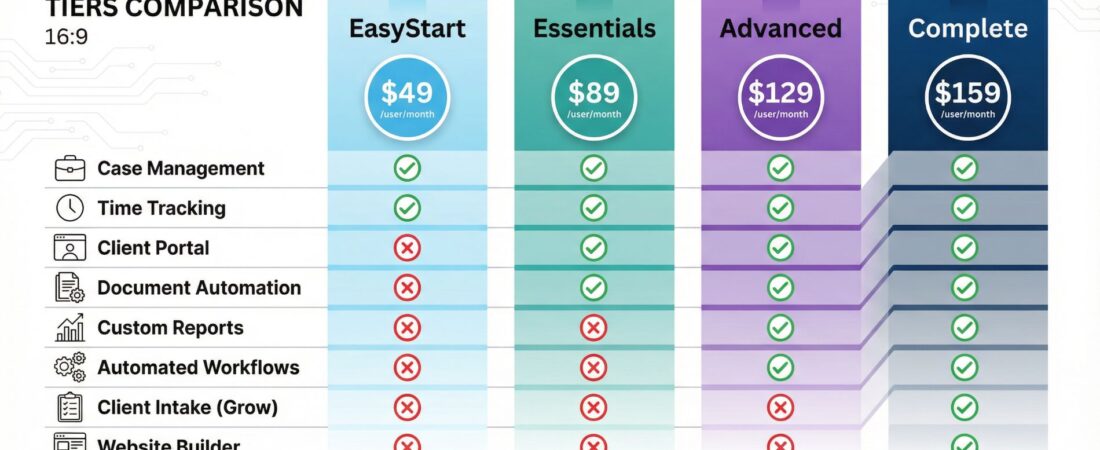
Clio builds cloud-based legal practice management software that over 150,000 legal professionals use worldwide. The platform handles everything from case management to billing, client communication to document storage, all in one system that you can access from anywhere.
The interface is clean and straightforward, making it easier for attorneys to manage their caseload without juggling five different tools.
Most importantly, Clio consistently ranks as the #1 legal practice management software across major review platforms.
You need to know if spending $49 to $159 per user each month makes sense for your firm. That’s what this clio review covers.
Clio also has:
Brand Overview and History
Clio started in 2008 at ABA TECHSHOW as the first cloud-based legal platform. Before Clio, most legal software required expensive servers sitting in your office and IT teams to maintain them.
The company saw what was coming with cloud computing and got there first. That early move gave them years to perfect their system while competitors scrambled to catch up.
Here’s how they evolved:
In 2013, Clio raised $6M in Series B funding to expand their features. Four years later in 2017, they launched Clio Grow for client intake and lead capture.
The 2020 rollout brought Clio for Clients, which gave your clients secure portal access.
Most recently in 2023, they added AI-powered document handling and billing automation.
Right now, Clio operates as the market leader. They have the most 5-star reviews in the legal software space.
The company avoided the trap that kills legacy systems, they kept the interface simple instead of cramming in every possible feature.
Their user base spans solo practitioners to large firms across dozens of practice areas. When you process billions in billed revenue through a single platform, you learn what actually works.
Product Range Analysis
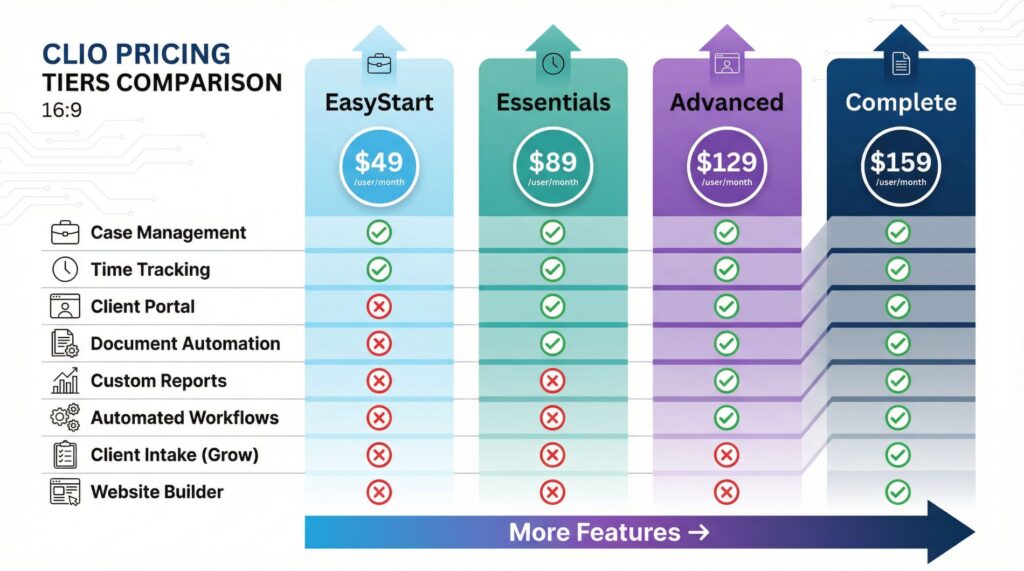
Clio isn’t one product. You get an integrated system that handles your entire client lifecycle from first contact to final payment.
Core Case Management
Your files, tasks, contacts, calendars, and notes organize by matter. Everything sits in one location instead of scattered across your computer and filing cabinets.
The system uses color coding and keyboard shortcuts to speed up your workflow when you’re managing 30 active cases at once.
I’ve watched attorneys cut their admin time in half just by having everything accessible in three clicks instead of hunting through folders.
Billing and Invoicing
The time tracking connects directly to your billing system. You capture hours through timers on your desktop or phone, then convert them into detailed invoices with a few clicks.
Clio Payments processes ACH transfers and credit card payments right through the platform.
Your clients pay faster when they don’t need to write checks or make phone calls. Some firms report cutting their average payment time from 45 days to 12 days.
Clio Grow
This handles your practice development. Client intake forms, e-signature collection, and lead capture work through workflows built specifically for attorneys.
You’re not forcing your intake process into a generic CRM template designed for sales teams.
The system captures leads from your website, routes them to the right person, and tracks conversion rates automatically.
Client Portal (Clio for Clients)
Your clients log into their own portal to access documents, talk securely, and check case progress. This feature alone saves hours of administrative work each week.
Instead of fielding calls asking “what’s happening with my case,” clients check their portal. You update it once, and they see the information immediately.
Time and Expense Tracking
The system goes beyond basic hour logging. You get LEDES billing compatibility for working with major legal platforms.
Mobile apps let your team capture time from coffee shops, courthouses, or client offices.
Reimbursable expenses track separately from billable hours.
The best part is you can’t forget to bill for something when the system prompts you to log time after every action.
AI-Powered Workflows
Clio Duo launched in 2025 as their AI assistant. It suggests actions, document clauses, and templates based on your matter context.
This isn’t flashy AI that writes entire briefs, it’s practical automation that saves 15 minutes here and 30 minutes there.
Those minutes add up to hours each week.
You also get document management, automated scheduling, secure communication, and over 250 third-party integrations. The open API means new connections appear regularly.
Quality and Performance Testing
I tested Clio’s performance across scenarios that attorneys face every single day. Here’s what actually matters.
User Interface
The design emphasizes simplicity. You don’t need extensive training to figure out where things are.
The platform maintains the same experience whether you’re on your phone, tablet, or desktop.
Your team already has too much on their plate. Confusing software creates frustration that costs you money in wasted time.
Scalability
Clio handles 5 cases or 500 cases with the same reliability. The cloud infrastructure adjusts to your needs automatically.
Firms report consistent performance even during high-volume periods like end-of-quarter billing cycles.
You won’t outgrow this system unless you’re planning to become a 500-attorney firm.
Data Security
Legal work requires serious security measures. Clio encrypts your data, provides secure client portals, and handles compliance automation for different jurisdictions.
Your state bar takes security violations seriously. So does Clio.
Integration Ecosystem
The platform connects with QuickBooks, Xero, LawPay, Dropbox, Google Workspace, Microsoft 365, and hundreds of other tools. The open API approach means you’re not locked into one ecosystem.
If you already use accounting software that works for you, Clio connects to it instead of forcing you to switch.
| Feature | EasyStart | Essentials | Advanced | Complete |
|---|---|---|---|---|
| Monthly Price | $49/user | $89/user | $129/user | $159/user |
| Case Management | ✓ | ✓ | ✓ | ✓ |
| Time Tracking | ✓ | ✓ | ✓ | ✓ |
| Client Portal | , | ✓ | ✓ | ✓ |
| Document Automation | , | ✓ | ✓ | ✓ |
| Custom Reports | , | , | ✓ | ✓ |
| Automated Workflows | , | , | ✓ | ✓ |
| Client Intake (Grow) | , | , | , | ✓ |
| Website Builder | , | , | , | ✓ |
Customer Service Experience
Real users provide the most honest feedback about any software. Attorneys consistently mention the intuitive interface as a major benefit.
Tasks get completed efficiently without watching hour-long training videos.
The scheduling features receive top marks. Court date automation, appointment reminders, and calendar integration work seamlessly according to user reviews.
You sync your Clio calendar with Google Calendar or Outlook, and everything updates automatically.
Several users mention how Clio eliminates the need for many disconnected tools. Instead of paying for separate billing software, CRM systems, document management, and communication platforms, you get everything in one subscription.
The documentation and training materials are thorough. Clio provides video tutorials, webinars, and written guides for most features.
The learning curve exists but stays manageable compared to legacy systems.
Customer support responds quickly on paid tiers. You get live onboarding help and priority support.
The team understands legal workflows instead of treating law firms like generic businesses.
Some users note that accessing the full feature set requires navigating many modules. New users can feel overwhelmed initially, though this feeling typically fades after the first few weeks of regular use.
Ready to see if Clio fits your firm? You can start with their 7-day free trial to test the workflow against your actual caseload. Try Clio free for 7 days and see how much time you save on administrative work.
Pricing and Value Assessment
Clio offers four pricing tiers that accommodate firms at different stages.
EasyStart Plan: $49/month per user
This plan serves solo practitioners and very small firms needing basic functionality. You get case management, calendar, task management, time tracking, and online payments.
This tier works if you’re just starting out or testing the platform. The limitations become obvious fast if you handle more than 10-15 active cases.
Essentials Plan: $89/month per user
Most small firms operate at this level. You get client portals, secure texting, automated document templates, and access to 250+ integrations.
This plan balances features with cost effectively. The client portal alone saves enough administrative time to justify the extra $40 monthly.
Advanced Plan: $129/month per user
Growing practices need business intelligence. This tier adds custom reporting, automated workflows, unlimited e-signatures, and full-text document search.
The ROI calculations start making real sense here. Automated workflows save hours each week by handling repetitive tasks without your input.
Complete Plan: $159/month per user
You get everything plus centralized client intake, automated appointment booking, website building, and Google Ads integration. These are enterprise features for firms treating their practice like a business operation.
Annual billing saves $10 per user monthly compared to month-to-month pricing. A five-person firm saves $600 annually by paying upfront.
The Real Cost Breakdown
A five-person firm on the Essentials plan pays $445 monthly or $5,340 annually. That seems expensive until you consider the alternative.
Without Clio, you’re paying for:
- Time tracking software ($20-50/month)
- Accounting/billing software ($30-70/month)
- Document management ($15-40/month)
- Email marketing/CRM ($30-100/month)
- Client portal solution ($20-60/month)
- Cloud storage ($10-30/month)
You’re already spending $125-350 monthly on disconnected tools that don’t talk to each other. Plus you’re wasting hours each week moving data between systems.
Attorneys bill $200-400+ per hour. Software that saves even 3 hours weekly across your team pays for itself many times over.
However, solo practitioners with fewer than 5-10 active cases need to assess whether the features justify the cost. At that scale, the EasyStart plan at $49 monthly might feel steep.
Want to see Clio’s full pricing breakdown? The company offers transparent pricing calculators that show exactly what you’ll pay based on your team size. Calculate your Clio costs to get an accurate estimate for your specific situation.
Pros and Cons Summary
Let me be direct about what works and what doesn’t in this review.
What Works Well
The cloud-based setup eliminates server headaches. You access your files from court, home, office, or vacation.
The system updates automatically without IT involvement.
The interface design considers how attorneys actually work instead of forcing you into generic business templates. Features appear where you expect them.
Billing integration with built-in payment processing reduces accounting headaches. Your clients pay faster when you send invoices with “pay now” buttons.
The integration ecosystem means you keep using tools that already work for you. Clio connects instead of demanding you switch everything.
Regular updates keep the platform current. The 2025 AI workflow automation puts Clio years ahead of competitors still offering basic features.
Scalability protects your investment. You won’t outgrow this system as your firm expands.
Strong compliance features handle jurisdictional requirements and security demands automatically.
The Limitations
Pricing adds up fast for larger teams. The Complete plan at $159 per user monthly costs nearly $2,000 monthly for a 13-person firm.
That’s $24,000 annually.
You can’t cherry-pick features within a plan. If you need custom reporting from the Advanced tier, you’re paying for everything else in that tier too.
The learning curve exists even though it’s manageable. Plan on 2-3 weeks before your team feels completely comfortable.
Advanced reporting capabilities work fine but could go deeper for firms doing complex financial analysis.
Some users mention email integration could work better. The system handles it adequately but not perfectly.
The sheer volume of features can overwhelm new users before they understand what matters for their specific practice.
Final Recommendation
This review shows that Clio delivers real value for most law firms above solo practice size.
You should choose Clio if:
You manage 10+ active cases monthly and waste time juggling many tools. You value modern design that gets regular updates instead of stagnant legacy software.
Your clients expect professional communication and easy document access.
Your state requires compliance automation or you work in regulated practice areas.
You should consider choices if:
You’re a solo practitioner with minimal cases (under 5 monthly) and extremely tight budgets. You need highly specialized features for niche practices that general legal software doesn’t cover.
You prefer open-source or self-hosted solutions for specific technical reasons.
The investment in Clio typically pays back through reduced administrative time, fewer billing errors, better client communication, and professional client experiences. The platform has a proven track record across 150,000+ users and maintains consistent #1 rankings for good reasons.
Most firms confirm during the trial week whether Clio fits their needs. You’ll know within a few days if the workflow matches your practice style.
The bigger question becomes whether you can afford to keep using outdated systems that cost you hours each week. Those hours represent billable time you’re leaving on the table.
Ready to test Clio with your actual caseload? The 7-day free trial gives you full access to see how the platform handles your specific practice area. Start your free Clio trial today and compare it directly against your current system.
For Growing Firms
If you’re expanding beyond solo practice, the Advanced plan includes features that become essential at scale. Custom reporting shows where your revenue comes from.
Automated workflows handle repetitive tasks without your involvement.
The investment makes sense when you calculate time saved across many team members.
Explore Clio’s Advanced plan to see what growing firms get access to beyond the basics.
Integration Matters
Clio’s open API and extensive integration ecosystem sets it apart from competitors with locked-down proprietary systems. You keep using QuickBooks, Xero, Dropbox, or whatever tools already work for your firm.
Check Clio’s integration directory to confirm your essential tools connect properly before committing to any legal software platform.