Running a law practice means juggling case files, billing, client communication, calendars, and document storage across many platforms. Clio puts all of these functions in one cloud-based system.
The interface connects time tracking directly to invoicing, pulls court dates into your calendar automatically, and gives clients a portal where they can check case status without calling your office.
You get fewer errors when data flows between connected tools instead of being manually transferred across disconnected systems.
The platform launched in 2008 and has grown into one of the most recognized names in legal practice management. That longevity matters because the company has spent years refining how lawyers actually work instead of how software engineers think they should work.
Clio also has:
What You Actually Get with Clio
Clio consolidates the core operations of a law firm into a single platform. You can manage cases, track billable hours, generate invoices, store documents, communicate with clients, and sync your calendar without switching between different software.
The system runs entirely in the cloud. You access it through a web browser or mobile app. Nothing gets installed on your computer.
That means you can work from anywhere with an internet connection, and your data stays backed up automatically.
The company offers different pricing tiers based on which features you need. Small practices can start with basic tools and add more functionality as they grow. Larger firms can get the full suite with automation, advanced reporting, and client relationship management.
Breaking Down the Pricing
This review needs to address what you will actually spend each month. The marketing says “starts at $39” but that number rarely reflects what firms actually pay once they add the features they need.
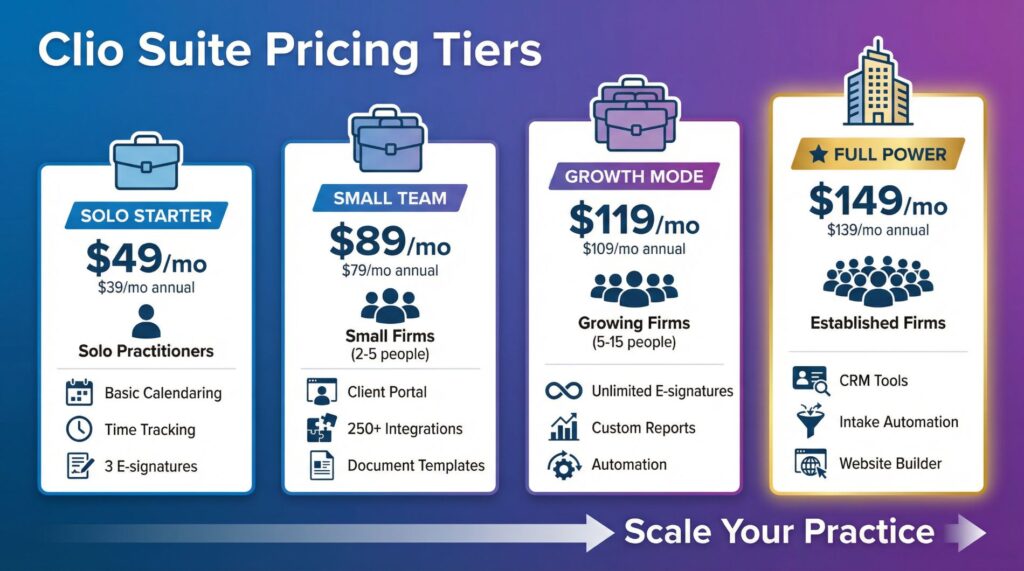
Here are the four main pricing tiers. All prices are per user per month, and you save about 20% by paying annually instead of monthly.
EasyStart: $39-$49 per user
You get basic calendaring, task management, document storage, and time tracking. The plan includes three e-signatures total and limited integrations.
This works for solo practitioners who handle everything manually and just need a place to organize their work.
Essentials: $79-$89 per user
This tier adds the client portal, access to 250+ app integrations, document templates, and automated court calendaring. Most firms find this level is where the software becomes genuinely useful instead of just functional.
Advanced: $109-$119 per user
You get full-text document search, unlimited e-signatures, custom reports, and automated workflows. The productivity gains from automation typically justify the price increase for firms with many team members.
Complete: $139-$149 per user
The top tier includes everything plus client intake automation, website building tools, and integrated CRM for lead generation. Some sources list this as “Expand” with growth-focused features.
A five-person firm on Essentials pays $395-$445 monthly. Add Clio Grow for client intake at $59-$69 extra per user, and you are spending around $700 monthly.
That is not necessarily expensive compared to paying for five separate subscriptions, but it represents a real budget commitment for small practices.
Core Features That Matter
This review separates the features that sound impressive in demos from the ones that actually improve your daily work.
Time and Expense Tracking
The timer runs while you work on a case, and those hours feed directly into invoicing. You can track billable and non-billable time, add expenses as they occur, and see everything itemized on the invoice automatically.
This eliminates the manual data entry that causes billing errors.
Client Portal
Clients log in to see their case status, upload documents, review invoices, and make payments. You stop getting constant emails asking for updates.
The portal handles routine communication automatically, which frees up hours each week.
Document Automation
Clio Draft creates documents from templates you set up. Standard contracts, pleadings, and letters get generated automatically with client information filled in. This is not advanced AI writing legal briefs.
This is template-based automation that handles repetitive paperwork.
Automated Workflows
You can set up task sequences that trigger automatically when certain events happen. Opening a new case might automatically assign tasks to team members, create necessary folders, and schedule deadline reminders.
The system follows your established process without anyone having to remember each step.
Court E-Filing
The platform supports electronic filing in select states including California, Texas, and Georgia. You can submit documents to the court directly from Clio without switching to a separate e-filing service.
This saves time if your practice operates in supported jurisdictions.
Integrations
Clio connects with over 250 third-party applications. Accounting software like QuickBooks and Xero sync with billing data.
Email platforms connect to case files.
Document signing services combine with workflows. The extensive integration library means you can usually connect tools you already use.
One important note: many specialized features cost extra. The AI tools through “Manage AI” require extra payment.
Medical records management for personal injury practices costs extra.
The base subscription gets you the core platform, but a fully-featured setup can double or triple your monthly spend.
Who Should Consider Clio
Solo Practitioners
If you run a practice alone, EasyStart or Essentials provides solid organization without overwhelming complexity. You need to be realistic about whether you will actually use automation features.
If you handle everything manually anyway, the basic tier works fine.
Growing Firms (5-15 People)
Teams this size typically need Advanced or Complete. The automation and reporting features become necessary to stay efficient as you add more cases and staff members.
Manual processes that worked with two people break down at seven people.
Personal Injury Practices
The specialized add-ons for medical records and settlement tracking work well for PI firms, but costs increase quickly when you add these modules. Calculate the total expense before committing.
Firms Needing Heavy Integration
If you use specific tools and need them to connect with your practice management software, verify that Clio supports those integrations before signing up. The platform has 250+ integrations, but not every tool is included.
Location-Independent Teams
The cloud-based nature works perfectly if your team works remotely or across many office locations. Everyone accesses the same data in real-time regardless of where they physically work.
Real Advantages You Will Notice
This review should highlight what actually distinguishes the platform from choices you might consider.
Support is available 24/5 through chat, phone, and email on most plans. That matters when something breaks during a client deadline.
You get help quickly instead of waiting days for a ticket response.
Data migration from your existing system includes guided assistance. Higher tiers include live onboarding training.
The company helps you switch instead of leaving you to figure it out alone.
The uptime guarantee is 99.9%, which translates to roughly 43 minutes of downtime per year. The platform stays accessible when you need it.
Integration with accounting systems keeps your financial data in sync with billing activity automatically. This is not flashy, but it eliminates reconciliation headaches at month-end.
The client portal actually works well. Some legal software treats client portals as afterthoughts with clunky interfaces.
Clio’s portal feels reasonably polished, which matters because clients form opinions about your firm partly through these interactions.
Limitations You Should Know About
No review is finish without addressing the frustrations that actual users mention.
Limited Reporting in Lower Tiers
EasyStart offers only basic financial reporting. Custom profitability analysis by practice area or detailed productivity metrics require Advanced or Complete.
You need to upgrade to get meaningful business intelligence.
Learning Curve Exists
Clio handles many functions, which means the interface contains many features. New users typically need several weeks to feel comfortable.
Your team works slower during this transition period while everyone learns the system.
Add-On Costs Multiply
A finish implementation with Manage AI, Clio Draft, Clio Grow, and specialized modules can double or triple the base subscription cost. The advertised starting price does not reflect what fully-featured implementations actually cost.
Mobile App Limitations
The mobile app handles basic tasks like time tracking and calendar checks, but complex work still needs a desktop. You cannot do serious document work or detailed reporting from your phone effectively.
Template Building Requires Process Knowledge
Setting up automated workflows sounds simple until you actually do it. You need to understand how your firm’s process works step-by-step.
The automation is not magic that figures out your workflow.
You have to build it yourself.
How Clio Compares to Alternatives
A thorough review needs to show how it stacks up against realistic choices you should consider.
MyCase and PracticePanther start at similar prices around $49 monthly but offer fewer features in base tiers. They work well if your firm needs minimal complexity and you want straightforward case management without extensive automation.
Lawcus positions itself as more affordable with plans starting at $39 monthly. The tradeoff is a smaller integration ecosystem and less comprehensive feature set.
You save money but get fewer capabilities.
Rocket Matter and Smokeball serve specific practice types better. If you focus on criminal defense or immigration law, these specialized platforms might outperform Clio’s generalist approach.
Clio offers solid middle-ground pricing with legitimate comprehensiveness. The platform is neither the cheapest nor the most expensive option.
Value depends entirely on whether you will actually use the features beyond basic case management.
Pricing Comparison Table
| Plan | Monthly Price | Annual Price | Best For | Key Features |
|---|
| EasyStart | $49/user | $39/user | Solo practitioners | Basic calendaring, time tracking, 3 e-signatures |
| Essentials | $89/user | $79/user | Small firms (2–5 people) | Client portal, 250+ integrations, document templates |
| Advanced | $119/user | $109/user | Growing firms (5–15 people) | Unlimited e-signatures, custom reports, automation |
| Complete | $149/user | $139/user | Established firms focused on growth | CRM tools, intake automation, website builder |
Advanced Tips for Getting Real Value
This review should include practical insights that improve your implementation success.
Map Your Current Process First
Document exactly how your firm operates right now before you start setting up Clio. Do not let automation features tempt you into reorganizing everything at once.
Copy your existing process into the software first.
Process reorganization is a separate project that should happen after you feel comfortable with the tool.
Choose Annual Billing
The 20% savings adds up quickly, especially for multi-person firms. Annual billing also commits you to actually using the system instead of abandoning it after three months when the initial learning curve feels frustrating.
Connect Accounting Software Immediately
Set up the QuickBooks or Xero integration on day one. Do not run parallel systems where you manually transfer financial data.
The automatic sync is one of Clio’s genuine advantages.
Use it from the start.
Customize Templates to Match Your Firm
The built-in templates are starting points, not final answers. Your firm uses specific language and follows particular processes.
Build templates that match how you actually work instead of adapting your work to generic templates.
Use the Portal to Reduce Communication Volume
Train clients to check the portal for case updates instead of calling or emailing. The return on investment is invisible until you realize you are not getting 50 status update emails daily.
Push clients toward the portal consistently from their first interaction with your firm.
Is Clio Worth the Investment?
This review comes down to practical fit assessment for your specific situation.
Clio works well if you operate a law firm with 2-50 people, need solid integration infrastructure, want responsive support, and can justify $500-$1,500 monthly in practice management spending. The software delivers what it promises without flashy AI features that sound impressive but do not add real value.
The platform is not the best fit if you run a solo practice trying to minimize expenses, require specialized features for niche practice areas, or strongly prefer on-premise solutions where you control all data locally.
The pricing is fair relative to the comprehensiveness you get, even though it costs more than absolute budget alternatives. You pay for stability, integration depth, and support reliability, not just feature count.
I have spent years watching law firms struggle with fragmented systems where data does not sync between tools. The time wasted on manual data transfer and the errors that result from disconnected systems cost more than most firms realize.
Clio solves that specific problem effectively.
If you are serious about moving forward, Clio offers a 7-day free trial. Test the software against your actual workflows and team needs before committing to a paid plan.
Seven days gives you enough time to set up a few cases, run through your billing process, and see if the interface matches how your team works.
Ready to Test Clio for Your Firm?
Start your free 7-day Clio trial here to assess the software against your actual workflows before committing to a paid subscription.
For firms focused on growth and lead generation, learn how Clio Grow combines with practice management to streamline client intake and marketing.
Need to calculate exact costs for your team size? Use this pricing calculator to see what your firm would pay at different tier levels.