I’m just going to talk through this the way I’d explain it to a colleague, so the flow won’t be perfect. Anyway—Smokeball. If you’ve ever had one of those days where you swear you were busy from 8 a.m. to 6 p.m. and somehow only managed to record 2.4 billable hours on the sheet (happens all the time), then you already know the core issue this thing tries to fix. You do the work, then you forget you did the work, and then the work doesn’t get billed. And then you get annoyed with yourself later because you KNOW you actually handled like twelve micro-tasks that nobody except you remembers.
Smokeball’s whole angle is basically: “Look, stop trying to remember everything. We’ll do it.” The software sits there like a quiet intern jotting down everything you touch. That’s their pitch. Whether that’s good or creepy depends on your personality, I guess, but people say it honestly catches stuff.
Before I ramble too far: background. They started in Australia, moved here later. Nothing dramatic about the origin story. They aimed straight at small firms first—family law, estate planning, real estate, PI, probate. Anything with lots of forms and repetitive documents. If you’re doing complex litigation or criminal defense that’s 50% strategy and 50% chaos, you can use it, but the template library won’t feel as magical.
One huge thing I should mention before I forget: this program absolutely expects you to use Microsoft Word + Outlook. Yes, it runs in a browser, but if you think you’re going to run your firm on Google Docs + Gmail and then slot Smokeball in without friction… nope. It’s not built for that ecosystem.
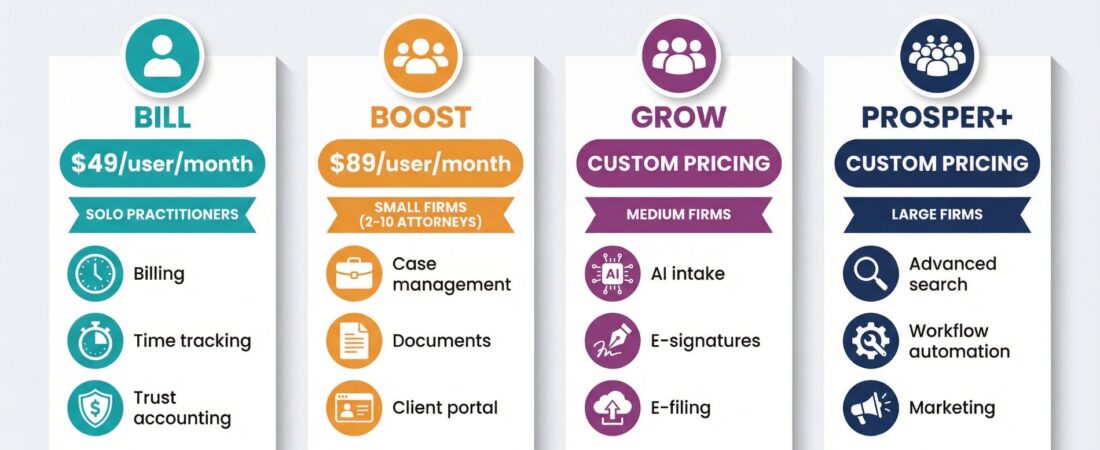
Pricing—let me just spill it out without trying to format:
Bill is $49/user, Boost is $89/user (this is the real one), and the higher two tiers are “talk to sales,” which everyone hates because you can’t budget ahead. A five-person team on Boost is roughly $445/month. Ten people? Just over $10.5k per year. Not catastrophic, but it’s not cheap software.
Does it work? The automatic time thing is honestly the part people talk about most. If you spend an hour bouncing between four matters and sending a handful of emails you’ll never remember later, it grabs that. I’ve seen lawyers say they recover 5–10% more billable time a month, which seems believable if you’re not great at logging things as you go. It’s not magic though—it’s watching what you open, what you edit, how long you sit in a document, etc.
Document automation: huge library. Real estate people probably get the most out of it. Estate planning too. If you’re in a specialty area… well, the library is only as good as the templates they have.
The search tool is fine. Fast enough. The portal is fine. Calendar sync with Outlook works. Calendar sync with Google feels like duct tape.
Setup is where the pain is. You will NOT just “turn it on.” It’s a good 10–20 hours of messing with templates, fixing little settings, renaming things, teaching your team how to actually use the features. The first few weeks feel clunky and you’ll question whether it was a good idea. Around week 4–6, most people say it settles in and feels natural.
Support is one of the better parts. Their reps don’t sound like copy/paste robots. They actually know the software. You will call them a lot during setup but that’s normal.
As far as actual dollar value: simple math. Three attorneys on Boost → $267/mo. If each attorney bills $250/hr and Smokeball helps them catch ONE hour they missed, that’s $750 of recovered time. Subtract cost → $483 profit. Easy win if you actually lose track of time. If you’re one of those ultra-organized people who tracks everything already, then you won’t get that benefit.
Alternatives like Clio/MyCase/PracticePanther start cheaper. Those are better if you just want case management and basic billing. Smokeball is “more” than that, but you pay for it.
Pros, very loosely: it catches forgotten time, templates save hours, Outlook integration is good, all your matter stuff is in one place, support is solid, reporting helps you see which practice areas actually make you money.
Cons, loosely: price adds up fast as your team grows, steep learning curve, macOS users are out of luck, Google Workspace users will swear at it, and the top tiers require a price negotiation.
Who should use it?
Firms losing time, firms doing templated work, firms on Windows, firms billing at least mid-range rates, and firms willing to spend a couple weekends setting it up.
Who shouldn’t?
Google-only firms, ultra-low hourly rates, people who hate software onboarding, anyone who wants something they can learn in an evening.
Honestly the 30-day trial is the whole decision. Put a few of your real files into it, let AutoTime run, generate some documents, and see if you actually get value. If you don’t? Easy: uninstall and move on.