
Table of Contents
Legal work involves mountains of paperwork. You spend hours reviewing contracts, organizing discovery documents, and tracking down case law.
Your inbox fills with asks faster than you can respond.
The administrative work never stops.
Paralegal AI tools promise to change that. These platforms use artificial intelligence to handle document review, automate workflows, and speed up legal research.
Some of them actually deliver on those promises.
I looked at the top paralegal AI platforms to see which ones solve real problems and which ones just add another login to remember.
What Paralegal AI Actually Does
The technology handles specific tasks well. Document analysis, contract review, legal research, and workflow automation represent the main use cases.
These platforms scan documents, extract key information, flag potential issues, and organize everything into usable formats.
You still need to review the output. The AI handles the time-consuming grunt work while you apply your legal knowledge to make decisions.
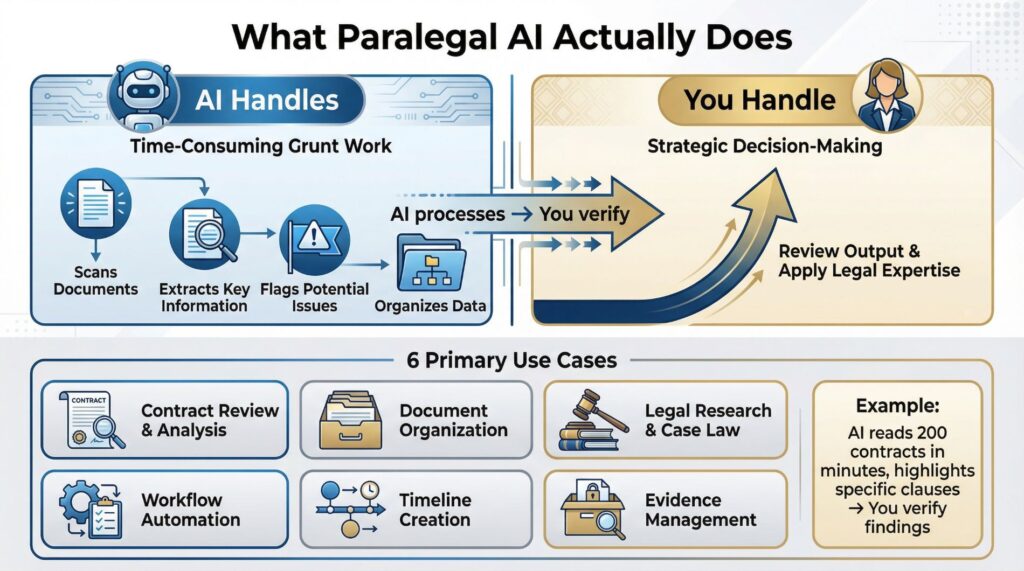
Think of it this way: Instead of reading 200 contracts yourself to find specific clauses, the AI reads them in minutes and shows you exactly where those clauses appear. You verify the findings and move forward with your work.
The tools work best for:
- Contract review and analysis
- Document organization and management
- Legal research and case law searches
- Workflow automation and request tracking
- Timeline creation from case materials
- Evidence management for litigation
They work poorly for tasks requiring judgment, strategy, or client interaction. You handle those parts.
Top Paralegal AI Platforms Worth Your Time
Streamline AI: Best for High-Volume Workflows
Streamline AI focuses on legal request management and workflow automation. The platform handles intake, triage, assignment, and reporting across your entire team.
The interface connects with tools you already use. It combines with Microsoft Office, document management systems, and e-signature platforms.
You access AI capabilities without switching between many applications.
The security features meet enterprise requirements. End-to-end encryption, granular access controls, and detailed audit trails protect confidential information.
The platform maintains SOC 2 Type II certification and GDPR compliance.
You can deploy it on-premise if your organization needs that level of control. Most users opt for cloud-based access.
Time savings happen fast. Teams report 60-70% reductions in administrative coordination work within the first few weeks. That means you spend less time sorting asks and more time on substantive legal work.
💡 Real Implementation: A corporate legal department with 15 paralegals implemented Streamline AI and recovered 150 hours weekly that before went to manual request sorting and status updates. Those hours shifted to contract analysis and case preparation.
Check Current Pricing for Streamline AI →
Legora: Built for Document Analysis
Legora specializes in contract and document review. The platform analyzes agreements, identifies risky language, highlights missing standard clauses, and compares terms across many contracts simultaneously.
It works directly within Microsoft Word. You review and edit documents in your familiar environment while accessing AI-powered analysis.
No need to export files or learn a completely new system.
The tool excels at spotting inconsistencies and potential compliance issues. You upload a contract, and Legora flags sections that need attention.
It explains why each section matters and suggests choice language.
For paralegal AI work involving heavy contract loads, this platform delivers consistent results. It processes agreements faster than manual review while maintaining high accuracy.
The learning curve stays minimal. If you use Word daily, you already know most of what you need.
CoCounsel by Thomson Reuters: Research Powerhouse
CoCounsel functions as your research assistant. It searches case law, identifies relevant precedents, summarizes complex legal documents, and suggests arguments during case preparation.
The platform understands legal context. When you ask for case law on a specific issue, it returns relevant results instead of every document containing your keywords.
You write your question in plain language. CoCounsel processes the request and delivers organized results with source citations.
The response quality depends on how specific you make your prompt.
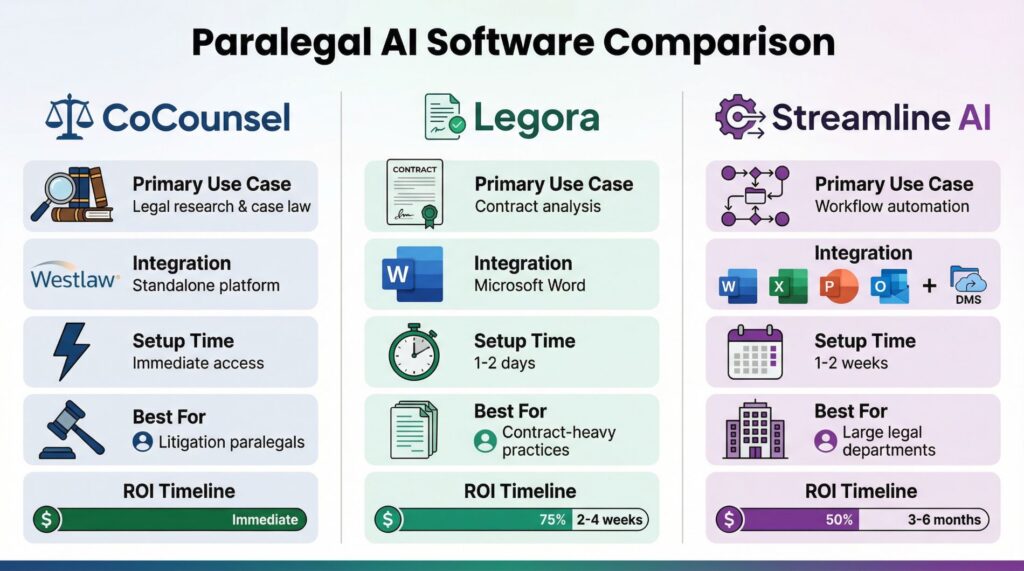
| Feature | CoCounsel | Legora | Streamline AI |
|---|---|---|---|
| Primary Use Case | Legal research & case law | Contract analysis | Workflow automation |
| Integration | Westlaw, standalone platform | Microsoft Word | Full Microsoft suite, DMS |
| Setup Time | Immediate access | 1-2 days | 1-2 weeks |
| Best For | Litigation paralegals | Contract-heavy practices | Large legal departments |
| Typical ROI Timeline | Immediate | 2-4 weeks | 3-6 months |
Litigation paralegals get the most value here. Building case chronologies, finding supporting precedents, and organizing evidence becomes substantially faster.
How to Actually Use These Tools
Getting value from paralegal AI needs more than signing up. You need to learn how to interact with these systems effectively.
Write Better Prompts
The AI responds to what you ask. Vague questions produce vague answers.
Specific questions with clear context produce useful results.
Instead of: “Find contract issues”
Try: “Review this employment agreement for non-compete clauses that exceed 12 months or cover territories outside California”
The second version tells the AI exactly what to look for. It returns focused results you can immediately use.
Set Up Quality Control
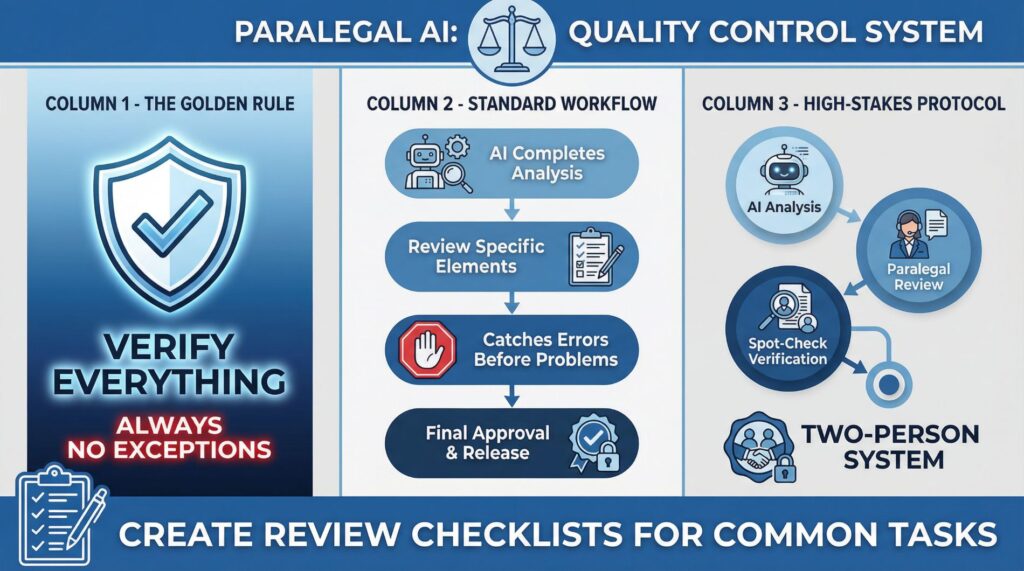
You verify everything the AI produces. Always.
No exceptions.
Create a review checklist for common tasks. When the AI completes document analysis, you check specific elements before considering the work finished. This catches errors before they become problems.
Some firms use a two-person verification system for high-stakes work. The AI completes the initial analysis, one paralegal reviews the output, and another spot-checks the results.
Train Your Team
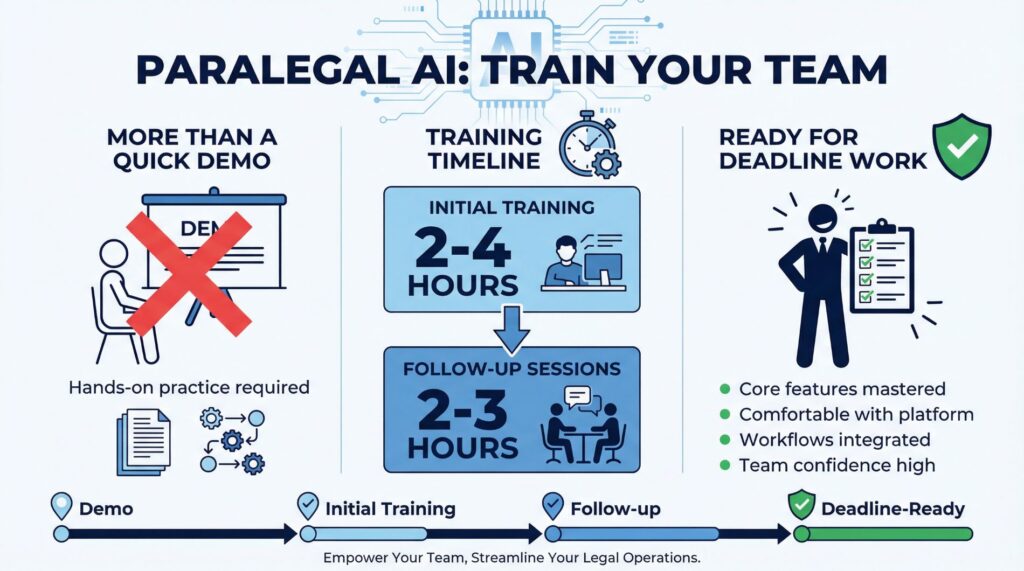
Everyone using the platform needs proper training. This means more than a quick demo.
It means hands-on practice with your actual workflows and documents.
Budget 2-4 hours for initial training and another 2-3 hours of follow-up sessions. Team members should feel comfortable using core features before you rely on the tool for deadline-driven work.
What You Need to Know About Costs
⚖️ Paralegal AI ROI Calculator
Calculate your potential time and cost savings from implementing AI tools in your legal workflow
Your investment pays for itself in less than 2 weeks
Most paralegal AI platforms price based on number of users or document volume. Expect to pay $50-150 per user monthly for person tools, or $200-500 monthly for comprehensive workflow platforms.
Enterprise deployments with custom integrations cost more. Those typically need implementation fees ranging from $2,000-10,000 depending on complexity.
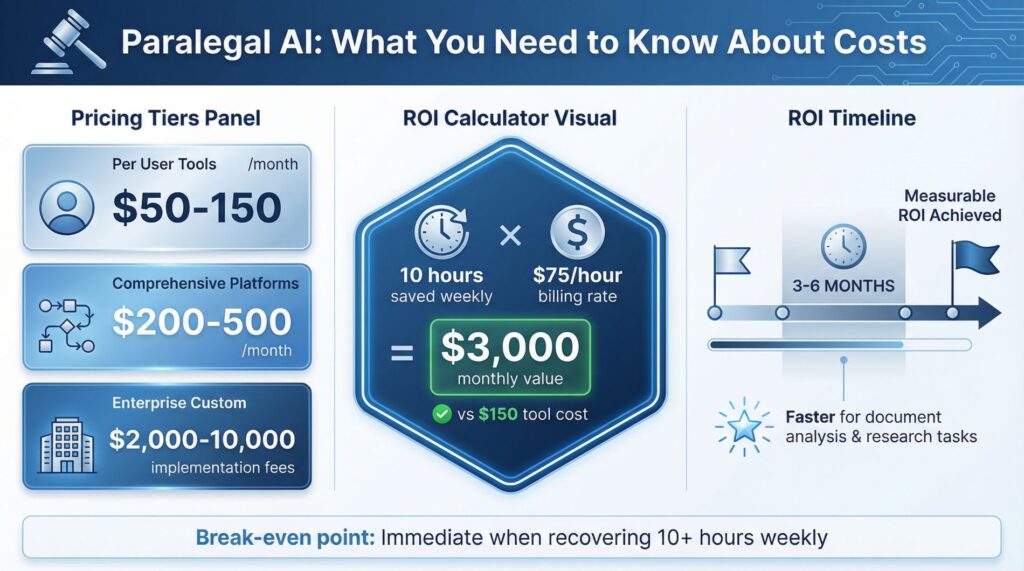
The math works like this: If you bill at $75 per hour and recover 10 hours weekly through AI automation, you generate $3,000 monthly in additional billable time. A $150 monthly tool cost pays for itself immediately.
Most legal departments see measurable ROI within 3-6 months. Some tools deliver value faster, particularly those handling simple document analysis or research tasks.
Problems You Might Face
Information Silos
AI works best with finish information. When relevant documents live in different systems, the AI analysis misses critical context.
You get confident-sounding results that overlook important facts.
Fix this by centralizing documents before analysis, or choosing platforms that mix with your existing document management system.
Overconfidence in AI Output
The technology makes mistakes. It misinterprets language, overlooks exceptions, and occasionally returns wrong information presented with finish confidence.
You catch these errors through careful review. Never submit AI-generated work without verifying accuracy against source materials.
Resistance to Change
Some team members resist new technology. They find the current process acceptable and see AI as unnecessary complication.
Address this by starting with clear pain points. Show how the tool solves specific frustrating problems in their daily work.
Let early adopters show value to skeptical colleagues.
⚠️ Important: AI platforms need active engagement to deliver results. A tool sitting unused because nobody learned it properly represents wasted money and missed opportunity.
Picking the Right Platform
Your choice depends on your specific situation. A two-person practice needs different capabilities than a 50-person corporate legal department.
Choose Streamline AI if: You manage high volumes of diverse legal work and need comprehensive workflow automation across your entire team.
Choose Legora if: Contract analysis represents your primary bottleneck and you want seamless integration with existing Word-based workflows.
Choose CoCounsel if: Legal research and case law searches consume significant time and you need faster access to relevant precedents.
You might need more than one tool. Many firms mix a research platform with a contract analysis tool, or pair workflow automation with specialized document review capabilities.
Start with your biggest pain point. If document review takes 20 hours weekly and creates frequent bottlenecks, start there.
If legal research delays case preparation, address that first.
Security Concerns You Should Ask About

Legal work involves confidential information. Your paralegal AI platform needs enterprise-grade security.
Ask vendors about:
- Data encryption standards (both in transit and at rest)
- Access control granularity
- Audit trail capabilities
- Compliance certifications (SOC 2, GDPR, etc.)
- Data retention policies
- Incident response procedures
Find out where your data lives. Some organizations need on-premise deployment for the highest sensitivity matters.
Most cloud platforms provide adequate security for standard legal work.
Read the vendor’s terms of service carefully. Understand who owns the data you upload, how the vendor uses it, and whether your documents train their AI models.
Your Job Changes, Not Disappears
Paralegal AI changes what you spend time on. You handle routine work faster, creating capacity for higher-value contributions that need actual legal knowledge.
The paralegal who learns to use these tools effectively becomes more valuable. You finish work faster, take on more complex projects, and contribute strategic insights instead of just processing documents.
The profession has always adapted to new technology. Law firms moved from typewriters to word processors, adopted legal research databases, and implemented case management software.
Each change shifted paralegal work toward more substantive tasks.
This change follows the same pattern. You spend less time on manual document sorting and more time on litigation planning, case strategy, and client-facing work.
Getting Started This Week
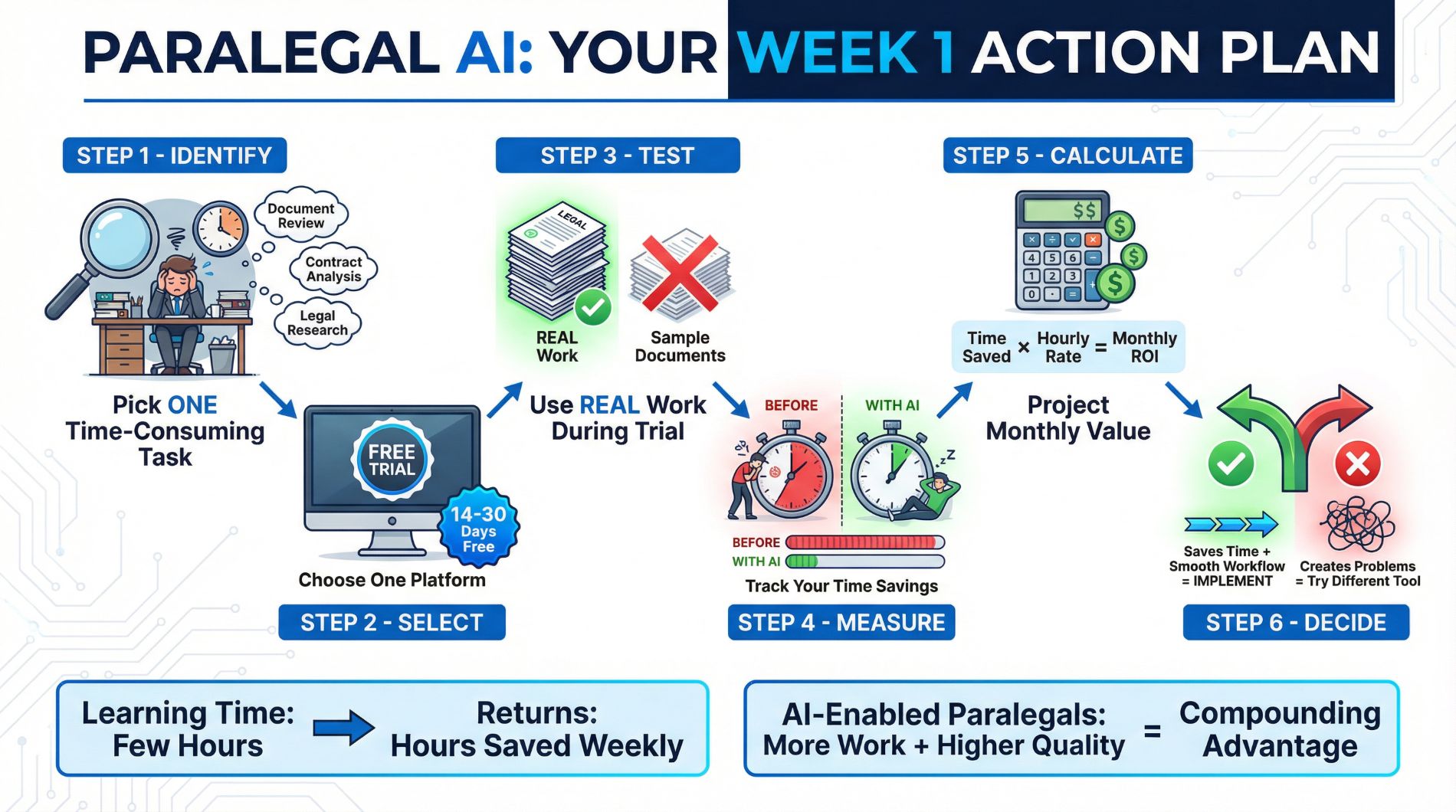
Pick one specific task that consumes excessive time and produces frustration. Document review, contract analysis, or legal research represent good starting points.
Try one platform that addresses that specific pain point. Most vendors offer free trials lasting 14-30 days.
Use the full trial period to test the tool with real work, not sample documents.
Track your time during the trial. Measure how long tasks take with and without the AI tool.
Calculate actual time savings and project the monthly value.
If the tool saves significant time and combines smoothly with your current workflow, implement it. If it creates more problems than it solves, try a different platform.
You will spend a few hours learning any new tool. That initial investment pays back quickly when the tool handles tasks that before took hours.
The legal profession moves fast. Paralegals using AI effectively finish more work at higher quality levels than those working manually.
That advantage compounds over time.