The platform handles everything from lead capture to email sequences without needing constant oversight.
What really stands out is how the interface feels designed for actual legal workflows instead of forcing you to adapt to generic business software.
The conflict checking works smoothly, the document automation eliminates repetitive work, and the marketing attribution finally shows which advertising dollars actually bring in clients.
But the pricing stings if you run a small operation, and some features feel incomplete compared to what you might expect at this cost.
This lawmatics crm review breaks down exactly what you get, what you pay, and whether the platform makes sense for your specific practice needs.
NOTE: If you haven’t seen it yet, check out our list of the 15 Best Legal AI Software Tools right now
What You Actually Get with Lawmatics
Lawmatics functions as a centralized system for running the business side of your law firm. Instead of juggling separate tools for intake, client management, marketing, and scheduling, everything lives in one platform.
The software handles client relationship management, automated intake workflows, marketing campaigns, document generation, and performance tracking. You can see your entire client pipeline, track where leads come from, and automate the repetitive tasks that normally eat up your day.
The system targets small to mid-sized law firms, though larger practices can scale up through enterprise pricing tiers. The core design focuses on automating routine work so your team spends more time on actual legal work and client relationships.
Breaking Down the Pricing
Lawmatics uses three main pricing tiers. Each tier multiplies by the number of users, and you need at least three users to get started.
Essential Plan
The Essential Plan gives you the foundation for managing clients and intake. You get 2,500 contacts, client intake tools, lead management, calendaring, custom forms, e-signatures, SMS messaging, and task management.
This tier includes 20 automations, which sounds like a lot until you start building workflows. You can automate basic intake sequences and follow-ups, but you hit the limit faster than expected if you get creative with your processes.
The plan works for firms that want better client onboarding but don’t need extensive marketing features.
Premium Plan
The Premium Plan includes everything from Essential plus marketing automation, email marketing, advanced conflict checking, round-robin scheduling, and detailed analytics.
Your contact limit jumps to 10,000, and you get unlimited automations instead of 20. This makes a huge difference when you start building complex workflows based on client actions, practice areas, or lead sources.
Try Lawmatics Premium, Request a Demo to see how the unlimited automations could streamline your specific workflows.
The marketing tools let you segment audiences, track which campaigns convert, and build sophisticated email sequences. For firms doing active marketing, this tier delivers the most value.
Enterprise Plan
The Enterprise Plan needs contacting sales for custom pricing. You get full feature access and a dedicated account manager who helps with implementation and ongoing optimization.
This tier makes sense for larger firms with complex workflows or many practice areas that need customized solutions.
Time & Billing Add-On
You can add time tracking, invoicing, and payment processing to any plan. This connects your client management with billing, so you don’t need separate software for tracking hours and generating invoices.
The Real Cost Compared to Alternatives
This review needs to address the pricing reality. Lawmatics sits in the mid-to-premium range compared to other legal CRM options.
Lawcus starts at $34 per month per user. Clio’s entry plans begin at $39 per user monthly.
Both let solo practitioners pay for single seats.
Lawmatics needs three users least, which raises your baseline investment. You pay more upfront, but you get legal-specific automation and tighter integrations with practice management tools.
The question becomes whether the specialized features justify the higher cost. For firms doing serious marketing and client acquisition, the attribution tracking and automation often pay for themselves by revealing which marketing efforts actually work.
For smaller practices with limited marketing budgets, the cost creates a harder sell.
Core Features That Make a Difference
Client Intake and Automation
The intake automation is where Lawmatics shows real strength. Instead of manually entering information from contact forms, the platform captures leads through customizable web forms, schedules appointments automatically, and runs conflict checks.
You can build conditional workflows that route leads based on practice area, case value, or urgency level. A personal injury lead might trigger one sequence, while a family law inquiry follows a different path.
The automation extends beyond initial intake. You can create workflows triggered by specific client actions.
Someone fills out an intake form, receives confirmation emails, gets scheduled for consultation, receives SMS reminders, and triggers internal tasks for your team.
All of this happens without anyone touching it manually.
Start Your Free Lawmatics Trial to test the intake automation with your actual lead flow.
CRM and Client Management
The CRM component organizes all client interactions in one searchable database. Communication history, task assignments, and pipeline stages live here.
The round-robin scheduling distributes leads fairly across team members based on availability and workload. This prevents one attorney from getting overwhelmed while others sit idle.
Advanced conflict checking prevents you from accidentally engaging with opposing parties or entities that create ethical problems. The system flags potential conflicts before they become real issues.
The interface feels logical as opposed to cluttered. Information sits where you expect to find it, which matters when you manage dozens of active clients.
Marketing Automation
The marketing tools separate Lawmatics from basic CRM systems. You can build email campaigns, create automated sequences, segment audiences by dozens of criteria, and track which marketing efforts generate actual clients.
The HTML email builder let’s you customize designs without coding knowledge. You can create branded templates and reuse them across campaigns.
The platform tracks marketing attribution, showing exactly which channels, campaigns, and touchpoints convert leads. This reporting addresses what most practice managers need: understanding ROI on marketing spend.
You can see that Google Ads brought in 47 leads last month but only 3 converted to clients, while your newsletter generated 12 leads with 5 conversions. That data drives smarter spending decisions.
Document Automation and E-Signatures
Lawmatics handles document generation and bulk sending. You create templates, automatically populate client information, and send documents for e-signature without leaving the platform.
The e-signature feature includes unlimited requests across all plans. This saves money compared to per-signature services that charge $0.50 to $2.00 per signature.
You can set up workflows that automatically send engagement letters, questionnaires, or intake documents based on case type or client status.
Integration Ecosystem
Lawmatics connects with popular legal software. It combines natively with Clio Grow for practice management, MyCase for case management, and hundreds of tools through Zapier.
Your data flows between systems instead of getting trapped in silos. Updates in Lawmatics sync to your practice management software, and changes in your accounting system reflect in client records.
The integration capability matters because most firms already use many tools. Lawmatics orchestrates these platforms as opposed to forcing you to replace everything.
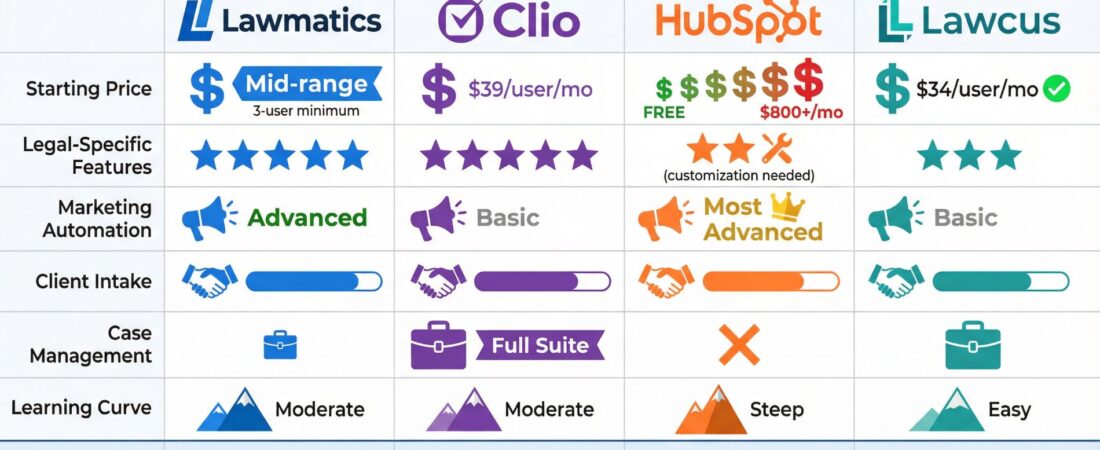
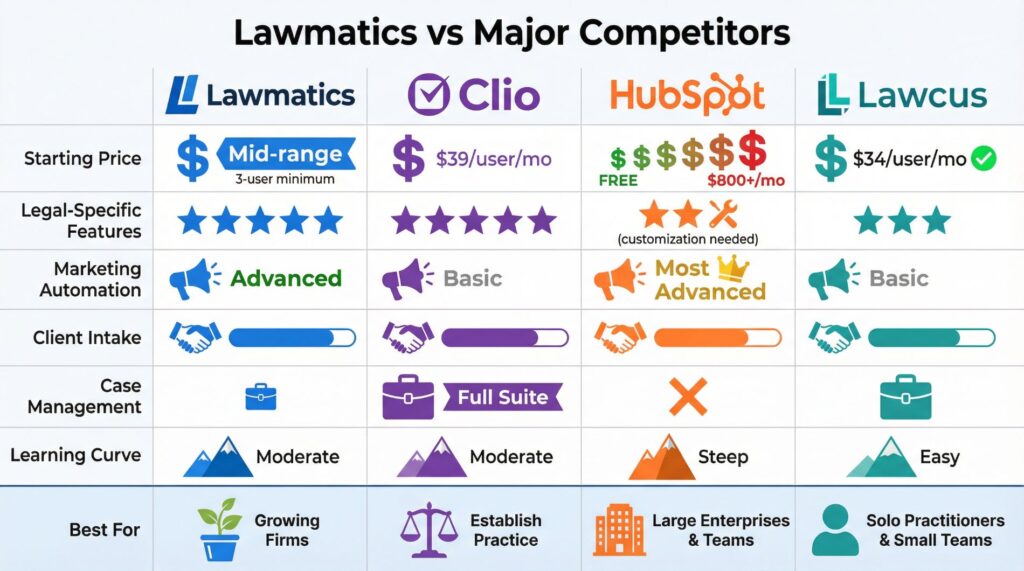
Comparison Table: Lawmatics vs Major Competitors
| Feature | Lawmatics | Clio | HubSpot | Lawcus |
|---|
| Starting Price | Mid-range (3 user least) | $39/user/month | Free (limited) to $800+/month | $34/user/month |
| Legal-Specific Features | Extensive | Extensive | Requires customization | Moderate |
| Marketing Automation | Advanced | Basic | Most advanced | Basic |
| Client Intake | Advanced | Moderate | Requires setup | Good |
| Case Management | Limited | Full suite | None | Good |
| Learning Curve | Moderate | Moderate | Steep | Easy |
| Best For | Growing firms with active marketing | Full-service practice management | Large firms with tech resources | Solo practitioners and small firms |
The Honest Drawbacks
No review would be finish without addressing the limitations. The appointment booking feature works, but it lacks the sophistication of dedicated scheduling tools like Acuity Scheduling.
The calendar handles basic scheduling and reminders. You can set availability, allow clients to book online, and sync with Google Calendar or Outlook.
But you can’t do complex scheduling scenarios like buffer times between appointments, many service types with different durations, or equipment/resource booking.
If calendar management represents a core part of your practice, you might need to keep a separate tool.
The Learning Curve Problem
The platform needs time to learn. Setting up complex automations means understanding conditional logic and spending hours in the interface.
Teams without technical experience often find the initial setup overwhelming. You need someone who can think through “if this happens, then do that” scenarios and translate them into workflow rules.
The onboarding helps, but you still face a few weeks of trial and error before your automations run smoothly.
Limited Payment Processing
Payment processor integration focuses primarily on LawPay. The platform works with LawPay for compliance and trust accounting, but options beyond that feel limited.
If you already use a different payment system and want to keep it, you face integration challenges. Some firms report needing Zapier workarounds to connect their preferred payment processors.
The Three-User Minimum
The three-user requirement excludes truly small operations. Solo practitioners and two-person firms pay for seats they don’t need, which makes the total cost harder to justify.
Competitors like Lawcus and some Clio plans let you pay for exactly what you use. Lawmatics forces you into a higher baseline investment regardless of firm size.
Compare Lawmatics Pricing to Your Current Costs to see if the ROI makes sense for your specific situation.
Who Should Actually Use Lawmatics
Personal injury firms benefit heavily from the marketing automation and lead tracking. You can see which advertising sources produce quality cases and which waste money.
Family law practices gain from the intake automation and client communication tools. The ability to nurture leads through long decision-making processes helps convert more consultations.
Any firm scaling from one or two attorneys to larger operations finds value in workflow automations that keep processes consistent. As you add team members, the platform ensures everyone follows the same procedures without constant oversight.
The software makes sense for firms doing outbound marketing. If you generate leads through advertising, content marketing, SEO, or paid channels, the attribution tracking pays for itself by revealing what actually works.
Lawmatics works less well for firms with minimal marketing that rely on referrals or institutional clients. If your practice doesn’t involve ongoing client intake and marketing optimization, you pay for features you won’t use.
Setting Up and Getting Support
Lawmatics provides support through email, phone, and live chat during business hours. Response times for simple questions typically fall within a few hours.
More complex issues take one to two business days.
The support team gets consistent praise for patience and knowledge, though some users mention phone wait times during peak hours.
The onboarding process includes structured guidance to configure your account. You won’t be entirely on your own, but expect to spend time getting the system to match your workflows.
Advanced Tips for Maximum Value
Don’t rely on default settings. Customize intake forms to ask the specific questions your attorneys actually need answered. This saves time during consultations and creates better client information from the start.
Build automations around real bottlenecks. Don’t automate something just because you can.
Target the repetitive tasks consuming the most attorney time, whether that’s appointment reminders, follow-up sequences, or document asks.
Use the analytics to drive decisions. Review monthly what marketing channels and campaigns convert leads to clients.
Adjust spending on underperforming channels and increase investment in what works.
Connect all your existing tools through the integration network. The real power emerges when data flows seamlessly between Lawmatics and your practice management software, accounting system, and other platforms.
Test your automations thoroughly before going live. Send test leads through your workflows to catch errors before they reach real clients.
Nothing damages credibility faster than automated emails with wrong names or broken links.
The Final Verdict on This Review
Lawmatics delivers real value for growing law firms managing substantial client intake and marketing operations. The automations work, the interface makes sense, and legal-specific features save you from extensive customization.
The cost needs justification. You need enough client volume and marketing activity to make the investment worthwhile.
If you do sophisticated marketing and struggle with manual intake processes, Lawmatics addresses those problems effectively.
For smaller practices or firms with minimal marketing needs, the pricing pushes toward other solutions. The three-user minimum and mid-range cost make it tough to justify for solo practitioners.
For firms ready to systematize their growth and client acquisition, the platform speeds up that process considerably. The time saved on automation and the insights from marketing attribution often justify the monthly investment.
Ready to Test Lawmatics for Your Firm?
Request a Customized Lawmatics Demo to see the platform in action with your specific workflows. Most firms spend 30 to 45 minutes on a customized demo, which gives concrete understanding of what you’d actually use daily.
If you compare many platforms, try free trials where available to test how each handles your actual intake process. The investment in evaluating options thoroughly pays off by ensuring you choose tools that solve real problems as opposed to adding complexity.
Start Your Free Trial Now and test the intake automation with your next 10 leads to see if it saves the time you need.
The right CRM decision depends entirely on your specific practice needs, marketing volume, and growth plans. This review gives you the information to make that call based on facts as opposed to marketing promises.