Clio and MyCase both handle case management, billing, document storage, and client communication for law firms. The platforms take different approaches to how they deliver these features.
Clio builds for customization and growth with extensive integrations and automation options.
MyCase focuses on simplicity with built-in features that work immediately after setup.
Your firm’s size, growth plans, and technical comfort level decide which platform serves you better.
Pricing Structure Comparison
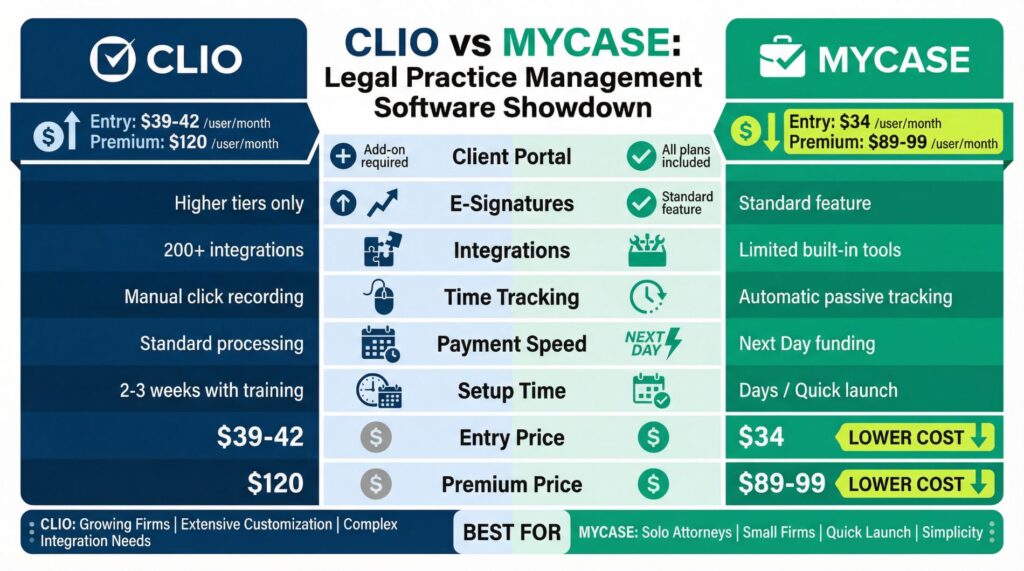
Both platforms start around $34-$42 per user per month when billed annually. The base pricing looks similar at first glance, but the total cost changes significantly as you add features.
Clio offers four pricing tiers ranging from approximately $39 per user per month up to $120 per user per month. Each tier adds more functionality.
You pay for exactly what you need, but essential features like e-signatures and advanced client portals often need higher-tier plans or add-on purchases.
MyCase provides three tiers maxing out around $89-$99 per user per month. More features come standard in lower-tier plans.
Time tracking, e-signatures, and client portals are included without extra costs.
For a three-attorney firm, MyCase typically costs $1,500-$2,000 less annually when comparing similar feature sets. The savings come from MyCase bundling features that Clio charges separately for.
The cost difference matters most for small firms where budget constraints are real. Larger firms often find Clio’s modular pricing useful because they only pay for features their team actually uses.
| Feature | Clio | MyCase |
|---|---|---|
| Starting Price (per user/month) | $39-$42 | $34 |
| Highest Tier Price | $120 | $89-$99 |
| Client Portal | Add-on required | Included all plans |
| E-Signatures | Higher tiers only | Included standard |
| Integrations Available | 200+ | Limited, more built-in |
| Automatic Time Tracking | Manual start/stop required | Passive automatic tracking |
| Payment Processing Speed | Standard processing | Next-day access |
| Setup Complexity | 2-3 weeks with training | Days, minimal training |
| Best For | Growing firms, customization needs | Solo/small firms, quick setup |
Document Management Capabilities
Clio connects with over 200 third-party applications through its document management system. You can set up automated workflows, create rules that trigger specific actions, and customize how documents display across your team.
Clio Drive centralizes storage and allows extensive tagging and organization options.
The system works well for firms managing complex litigation with thousands of documents per case. You can automate repetitive tasks like document filing, naming conventions, and client notifications.
MyCase keeps document management straightforward. Upload documents, organize them into cases, and share them through the client portal.
Version control tracks changes, and security measures protect sensitive information.
The system doesn’t offer the same automation depth, but it handles standard document management needs without configuration hassles.
Solo practitioners and small firms typically find MyCase’s approach enough. You spend less time setting up systems and more time working on cases.
Billing and Payment Processing
MyCase includes automated expense tracking and three-way reconciliation in standard plans. The passive time tracking feature captures billable hours automatically without requiring attorneys to start and stop timers constantly.
This feature alone saves significant administrative time.
Payment processing through MyCase provides next-day access to funds from credit cards, debit cards, and eChecks. You get your money faster, which improves cash flow for smaller firms.
Clio needs more manual involvement in billing processes. You need to actively start and stop timers for time tracking.
Expense tracking exists but needs hands-on management.
The benefit is that Clio supports multi-currency billing, complex trust accounting, and detailed billing scenarios that some specialized practices need.
For straightforward hourly or flat-fee billing, MyCase’s automation saves hours each week. A solo practitioner spending 10 hours monthly on billing administration can cut that time in half or more.
Firms handling complex contingency arrangements, many trust accounts, or international billing often need Clio’s granular controls.
Client Intake and Lead Tracking
Clio Grow is a separate add-on that provides sophisticated lead tracking and client intake automation. You can track where potential clients come from, measure conversion rates, and analyze which marketing efforts generate the most cases.
The system helps firms that invest significantly in marketing understand their return on investment.
MyCase includes basic intake forms in standard pricing. You collect client information, automatically create new cases, and move forward.
The system doesn’t track leads or marketing sources, but it handles the essential task of getting client information into your system efficiently.
Small firms relying primarily on referrals don’t typically need extensive lead tracking. You just need a simple way to collect initial information and start cases quickly.
Integration Options
The Clio vs MyCase comparison becomes stark when examining integrations. Clio offers connections to over 200 third-party tools including email clients, document automation software, legal research platforms, accounting systems, and specialized practice management tools.
This extensive integration ecosystem means you can build a customized tech stack that fits your exact workflow. If your firm uses eight different software tools, Clio can connect them so data flows between systems automatically.
MyCase takes the opposite approach by building features directly into the platform. CRM functionality, AI assistance, and e-signatures come standard as opposed to requiring separate integrations.
You need fewer third-party tools because more functionality exists within MyCase itself.
The trade-off is clear. Firms wanting flexibility to choose best-in-class tools for each function benefit from Clio’s integration options.
Firms preferring an all-in-one solution with less complexity benefit from MyCase’s built-in approach.
Reporting and Analytics
Clio provides customizable dashboards where you build reports tracking specific metrics that matter to your firm. You can analyze productivity by attorney, profitability by case type, and detailed performance metrics.
The reporting system accommodates firms making data-driven business decisions.
MyCase offers pre-built reports covering essential metrics like billing summaries, case status overviews, and basic productivity tracking. You don’t get Clio’s customization depth, but you access meaningful data without spending time building custom reports.
Law firms with dedicated business managers who analyze data regularly benefit from Clio’s reporting capabilities. Solo practitioners who mainly want to understand overall profitability find MyCase’s standard reports completely adequate.
Client Portal Experience
MyCase includes a client portal in every pricing tier with no extra setup required. Clients log in to view case details, upload documents, message your firm securely, and check billing status. The interface is simple and works immediately.
Clio offers a more polished client portal, but only as an add-on with separate costs and required configuration time. The Clio portal provides more customization options and a more professional appearance.
For firms where client-facing technology is a competitive differentiator, the extra investment makes sense.
Most small firms find that clients are perfectly satisfied with basic portal functionality. They want secure access to documents and case information without learning complicated systems.
MyCase’s included portal meets this need without extra costs.
Mobile App Functionality
Clio’s mobile app delivers nearly full functionality including calendar synchronization, task management, document access, and secure data viewing. The app works well on both iOS and Android devices.
Attorneys who work frequently outside the office can handle most tasks from their phones.
MyCase’s mobile app focuses on core functions like accessing documents, checking messages, and reviewing billing information. The interface is reliable and simple, though it doesn’t copy the finish desktop experience.
For attorneys spending significant time in court, at client meetings, or working remotely, Clio’s more robust mobile experience becomes valuable. For attorneys working primarily from their office, both apps handle the occasional mobile access needs just fine.
Setup Time and Learning Curve
MyCase needs minimal training and most users become productive within days. The interface is intuitive and doesn’t overwhelm you with configuration options.
You can start using the software almost immediately after signing up.
This speed to productivity matters significantly for small firms where staff time is limited. You don’t have weeks to dedicate to learning new software.
Clio needs more upfront time investment. The platform’s flexibility means making configuration decisions during setup.
Teams typically need formal training sessions and a few weeks to reach full productivity.
The learning curve is steeper, but you gain more control over how the system works.
Firms with part-time administrative staff benefit from MyCase’s simplicity. Firms with dedicated practice managers who enjoy optimizing systems benefit from Clio’s depth.
Which Platform Fits Your Firm
Stop comparing person features in isolation. Your firm’s specific situation decides which platform serves you better.
You’ll likely prefer Clio if:
Your firm plans to grow from 3 attorneys to 10+ in the next few years. The scalability and customization options accommodate growth without switching platforms later.
You need specialized automation or work with many other software tools. The 200+ integrations mean you can build exactly the tech stack you want.
You handle complex billing scenarios like multi-currency invoicing, detailed trust accounting, or specialized contingency arrangements.
Your firm has dedicated staff who can invest time in initial setup and training to improve the system long-term.
You want detailed analytics and custom reporting to make data-driven business decisions.
You’ll likely prefer MyCase if:
You’re a solo practitioner or small firm (under 5 attorneys) without plans for rapid expansion.
You want software that works immediately without weeks of configuration and training time.
Your billing is straightforward hourly or flat-fee work without complex trust accounting needs.
You prefer built-in functionality over connecting many third-party tools.
Budget constraints are real and saving $1,500-$2,000 annually per attorney matters to your bottom line.
You value simplicity over customization and want software that just works out of the box.
Making the Final Decision
The Clio vs MyCase decision comes down to where your firm stands right now and where you’re headed. Neither platform is objectively better. Each serves different firms with different priorities.
Small firms make mistakes by choosing Clio and then never using the advanced features they’re paying for. The customization options sit unused while they pay premium pricing for functionality they don’t need.
Growing firms make mistakes by choosing MyCase and then hitting limitations as they scale. When you reach 8-10 attorneys and need more sophisticated automation, switching platforms becomes disruptive and expensive.
Look honestly at your firm’s situation. If you’re a two-attorney practice focused on steady, sustainable work without plans to become a 20-attorney firm, MyCase saves you money and complexity.
If you’re building a practice with growth ambitions and increasingly sophisticated needs, Clio’s flexibility justifies the higher investment.
The firms happiest with their choice picked based on their actual daily needs, not features they thought they might use someday. Most practice management software gets used for basic functions regardless of the platform’s total capabilities.
Choose the platform that matches how your firm actually operates today while considering realistic growth over the next 2-3 years. Both Clio and MyCase handle the core functions well.
The difference is in how much flexibility you need and how much complexity you’re willing to manage.
Neither platform will improve your practice on its own. Both need consistent use and proper implementation.
The software that fits your firm’s workflow, budget, and technical comfort level will serve you better than the platform with the most features on paper.