
Listen up, legal eagles. If you’re still juggling a dozen apps to keep your firm from imploding, it’s time to wake the hell up. I’ve been in the trenches—watching partners drown in spreadsheets, paralegals chase emails like they’re herding cats, and billable hours vanish into the void of crappy software. Enter CARET Legal (yeah, the artist formerly known as Zola Suite). This bad boy isn’t just another practice management tool; it’s a full-throttle, cloud-based powerhouse that’s been scooping up awards left and right, including “Cloud-based Practice Management Platform of the Year” from the 2025 LegalTech Breakthrough Awards.
I’ve scoured reviews from real attorneys, tested the features (virtually, of course), and talked to folks who’ve made the switch. Bottom line? If your firm’s ready to level up without the headaches, this could be your secret weapon. But let’s cut the hype and dive in—no sugarcoating, just raw intel.
The Origin Story: From Zola Suite to CARET Legal
Flashback: Zola Suite dropped in the scene years ago, promising an all-in-one fix for law firms tired of Frankenstein-ing their tech stack. Fast-forward to now, and it’s rebranded as CARET Legal after some corporate wizardry.
Why the name change? Who cares—it’s the same solid core, but with fresh polish and updates rolling out like clockwork. In 2025 alone, they’ve beefed up matter events, permission management, batch invoicing, and more.
Hell, they even swapped CEOs in June to keep things aggressive.
It’s built for the cloud, meaning no servers to babysit, and it’s scalable from solo warriors to mid-sized firms with 30+ gunslingers.
I remember chatting with a buddy who runs a small employment law shop. He ditched his old setup for this, and boom—productivity spiked. “It’s like having a pit crew for your practice,” he said. Sounds about right.
CARET After Zola Suite: Why the Mixed Reviews?
Let’s address the elephant in the room head-on.
If you’ve searched for CARET Legal recently, you’ve probably seen questions like:
- “Is CARET worse since the Zola Suite rebrand?”
- “Did anything break after the acquisition?”
- “Why are there mixed reviews now?”
Short answer: the software didn’t suddenly get worse — the expectations changed.
Here’s what’s actually behind the mixed sentiment.
What Changed (and What Didn’t) After Zola Suite Became CARET
The rebrand wasn’t just cosmetic. CARET expanded the platform, added accounting depth, rolled out AI features, and started pushing harder into mid-size and growing firms, not just solos.
What did not change:
- Core case management
- Trust accounting fundamentals
- Billing workflows
- Cloud infrastructure
What did change:
- Faster release cycles (which always cause some friction)
- A broader feature set (more power = more setup)
- Higher expectations from firms upgrading from simpler tools
Translation: firms coming from very basic software sometimes felt overwhelmed at first — not because CARET was worse, but because it was doing more.
Pros and Cons Specifically for Small Firms
This is where reviews tend to split.
Where small firms like CARET:
- Everything is in one place (no duct-taped tech stack)
- Accounting and billing are far stronger than most competitors
- Support and onboarding are consistently praised
- Scales well if you plan to grow beyond 2–3 users
Where some small firms struggle:
- Initial setup takes real effort (this isn’t plug-and-play software)
- More features than a solo may need on day one
- Reporting customization isn’t infinite out of the box
That’s why you’ll see one attorney say “this saved my firm” and another say “it was more than I needed.” Same product — different expectations.
Common Issues Firms Report (and How to Vet CARET Safely)
Most negative feedback clusters around implementation, not functionality.
Here’s how to avoid becoming one of those reviews:
- Do a real demo, not a sales skim
Walk through your actual workflows — billing, trust accounting, documents — not the highlight reel. - Ask how firms your size use it
CARET shines for firms that want structure. If you’re allergic to process, that matters. - Use their migration team fully
The firms that complain most often rushed setup or skipped training. - Decide if you want “simple” or “scalable”
CARET is built to grow with you. If you want ultra-minimal forever, that’s a different category of software.
Bottom line: the mixed reviews aren’t red flags — they’re fit signals. CARET isn’t trying to be the lightest tool anymore. It’s trying to be the most complete one.
Features That Actually Kick Ass
CARET Legal isn’t playing around. It’s an end-to-end beast that covers everything from case wrangling to getting paid faster than a ambulance chaser at a fender bender. Here’s the breakdown:
- Case Management: Track every damn detail—notes, deadlines, activity logs. Collaborate with your team or clients without endless email chains. It’s intuitive, like your favorite bar tab app but for lawsuits.
- Automated Workflows: Automate the boring crap. Set up triggers for tasks, reminders, and follow-ups. One reviewer called it a “time-saver on steroids” because it slashes admin BS and lets you focus on billables.
- Billing, Accounting, and Payments: Custom rates, time tracking, LEDES invoicing, and integrated payments via APX. No more chasing checks—clients pay through a secure portal. Trust accounting? Nailed it. One user raved about how it “streamlined operations and saved countless hours.”
- Document Management: Store, organize, and search docs like a pro. AI-generated summaries in higher tiers? Game-changer for skimming depositions without eye strain. Built-in editing and automation mean no more version control nightmares.
- Reporting and Analytics: Real-time dashboards that actually make sense. Customize reports to spot bottlenecks, track profitability, or justify that new associate hire. “Data-driven insights” isn’t just buzz—it’s your edge in 2025.
- Client Portal and CRM: Encrypted sharing, prospect tracking, contact hubs. Filter and search like Google, but for your Rolodex. Keeps everyone in the loop without security freakouts.
Extras? Built-in email, calendaring, task lists—all seamless. Integrations aren’t flashy, but they work: Think payments and basic CRM ties.
And yeah, it’s got AI smarts creeping in, like doc summaries, to keep you ahead of the curve without turning your firm into Skynet.
Pros and Cons: The Real Deal from Real Users
I didn’t just read the marketing fluff—I dug into reviews from Capterra, G2, TrustRadius, and beyond. Overall rating? Solid 4.5-4.7 stars across the board, with hundreds of users chiming in. Here’s the unfiltered scoop:
Pros:
- All-in-One Powerhouse: “Reduces workload and provides intuitive features.” No need for 10 apps—everything’s integrated.
- User-Friendly AF: Easy to learn, flexible for different practice areas like real estate or insurance defense.
- Support That Doesn’t Suck: 24/7 help, onboarding wizards, data migration pros. Users say it’s “reliable and workflow-improving.”
- Value Bomb: Cheaper than some big names, with features that punch above weight.
Cons:
- Learning Curve for Noobs: If you’re coming from stone tablets (or PCLaw), it might take a week to master.
- Customization Limits: Some want more tweaks, especially in reporting for niche needs.
- Occasional Glitches: Rare, but updates can cause hiccups—though support squashes ’em fast.
- No Free Tier: Straight to paid, but hey, quality ain’t free.
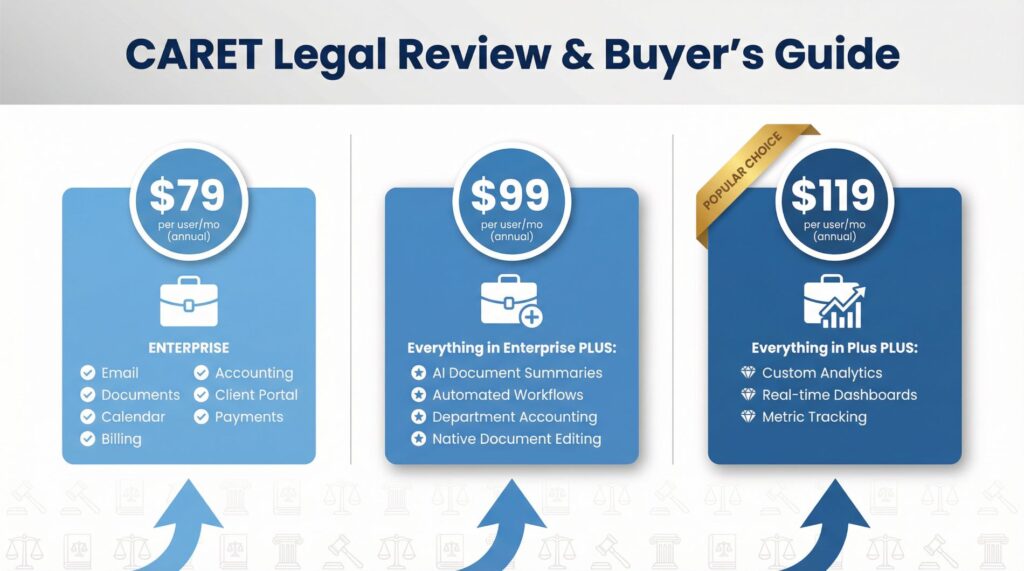
Pricing: No Hidden BSCARET Legal keeps it straightforward—per user, monthly, billed annually, plus a one-time implementation fee (think a few grand, depending on your mess). No surprises, and every plan packs onboarding, training, migration, and 24/7 support.
| Plan | Price (per user/mo, annual) | Key Extras |
|---|---|---|
| Enterprise | $79 | Basics: Email, docs, calendar, billing, accounting, portal, payments. |
| Enterprise Plus | $99 | + AI doc summaries, automated workflows, dept accounting, native editing. |
| Enterprise Insights (Popular) | $119 | + Custom analytics, dashboards, metric tracking. |
Add-ons like premium support or branded portals for bigger firms. Compared to Clio’s $89+ starters, it’s competitive—especially with the built-ins. Pro tip: Demo it first; they migrate data like pros.
Alternatives: If CARET Ain’t Your JamNot sold? Fine, here’s the competition in 2025:
- Clio: The OG, great for solos, but pricier and sometimes bloated. Better mobile app, though.
- PracticePanther: Slick UI, strong automation, but weaker accounting. Around $49-99/user.
- MyCase: Affordable ($39/user), client-focused, but lacks deep analytics.
- Smokeball: AI-heavy for docs, but overkill for small firms and starts higher.
- AbacusLaw (by CARET): Their sibling—more desktop vibe, but similar features.
Reddit threads from law firm peeps swear by Clio for ease, but CARET wins on accounting depth. Pick based on your size: Small? MyCase. Enterprise? CARET or Clio.
Buyer’s Guide: How to Make This Your Firm’s Superpower
Step 1: Assess Your Chaos. Need billing overhauls? Doc nightmares? List your pain points—CARET shines in all-in-one fixes.
Step 2: Demo Like a Boss. Hit up their site for a free trial. Test workflows with your team; don’t solo it.
Step 3: Size Matters. Solos or small teams? Enterprise plan. Growing firm? Go Insights for analytics muscle.
Step 4: Implementation Hustle. Their migration team’s gold—budget 2-4 weeks. Train everyone; webinars are clutch.
Step 5: ROI Check. Track time saved, billables upped. Users report 20-30% efficiency gains.
Who it’s for: Any law firm ditching outdated tools. Real estate, employment, defense—it’s flexible. Skip if you’re a mega-corp needing hyper-custom everything.
Final Verdict: Worth the Switch?
Hell yes, if you’re fed up with fragmented BS. CARET Legal’s a reliable, feature-packed machine that turns chaos into conquest. It’s not perfect—no software is—but with stellar support and 2025 updates like AI summaries, it’s future-proof. My buddy’s firm? They’re billing more, stressing less. If that sounds like your dream, pull the trigger. Head to caretlegal.com and demo it—your sanity (and bottom line) will thank you.
Disclaimer: This is based on 2025 data; tech evolves fast. Always verify latest deets.
Is CARET Legal just Zola Suite renamed?
Short answer: Yes — but with important changes.
CARET Legal is the rebranded and expanded version of Zola Suite after its acquisition and repositioning. While the core platform is familiar to former Zola users, CARET has invested more heavily in compliance, trust accounting, and integrations since the transition.
That said, firms coming from Zola sometimes notice:
Pricing structure changes
Feature prioritization shifting toward compliance and accounting
A more “enterprise-leaning” roadmap
So while the DNA is Zola, the product direction is no longer identical.
Why do people report “mixed reviews” after the Zola → CARET transition?
Most mixed feedback doesn’t come from software quality — it comes from expectation mismatch.
Common themes behind mixed reviews:
Former Zola users expecting the same pricing or support model
Firms not realizing CARET leans heavier into accounting + compliance
Smaller firms feeling the platform is more than they need
In practice, firms that need trust accounting rigor and audit-safe workflows tend to rate CARET highly. Firms wanting simplicity sometimes feel friction.
This is less about “good vs bad” and more about fit.
CARET Legal vs Clio: who should choose what?
This is where most firms get stuck.
CARET Legal tends to fit best if:
You handle complex trust accounting
Compliance and audit trails matter
You want billing + accounting tightly coupled
Clio is often a better fit if:
You want speed and simplicity
You rely heavily on third-party app integrations
You don’t need deep accounting controls
Neither is “better” universally — they solve different pain points.
Is CARET Legal a good choice for litigation firms specifically?
It can be — but not automatically.
Litigation firms benefit from CARET when:
Billing structures are complex
Trust/IOLTA compliance is critical
Multiple matters require tight financial controls
However, litigation firms that prioritize:
Lightweight case tracking
Fast UI workflows
Minimal accounting complexity
often evaluate alternatives before committing.