Let me get straight to the point. CasePeer markets itself as the finish solution for personal injury law firms, promising to handle everything from case management to client communication in one cloud-based platform.
The interface looks clean, the feature list appears comprehensive, and the medical treatment tracking capabilities stand out as genuinely useful for PI practices.
After researching user feedback from firms that have implemented this software, patterns emerge quickly. Some practices love it.
Others abandoned the platform after months of migration tries.
The difference comes down to whether your firm fits the specific mold CasePeer was designed for.
This casepeer review breaks down what the software actually delivers, where it falls short, and who should seriously consider investing in it.
Brand Overview and History
CasePeer operates as specialized legal practice management software built exclusively for personal injury attorneys. The company focuses narrowly on PI work as opposed to trying to serve all legal practice areas.
The platform runs entirely in the cloud, which eliminates traditional software installation headaches. You access everything through a web browser from any location.
This setup works well for firms with remote staff or attorneys who work from many offices.
The company positions itself as understanding the specific workflow challenges of personal injury cases. Medical records tracking, statute of limitations alerts, settlement demand calculations, and litigation timeline management sit at the core of what CasePeer handles.
The software combines with common tools like Google Drive and OneDrive, though user reports suggest these integrations can be temperamental depending on your IT infrastructure.
Product Range Analysis
CasePeer offers three pricing tiers that decide which features you access. The Basic plan includes basic case management, contact management, task management, a client portal, and settlement negotiation tools.
The Pro plan adds client intake management, two-way texting functionality, and expanded automation features. Most firms find they need this middle tier to get essential capabilities for daily operations.
The Advanced plan includes dedicated account management and additional templates. Larger firms with complex needs typically choose this top tier.
Core Features Breakdown
The case management system tracks clients, opposing parties, insurance companies, medical providers, and case status through one central dashboard. You see where each case stands without checking many systems.
Document automation generates letters and forms based on case status changes. When you mark a case as “demand sent,” the system can automatically populate follow-up tasks and generate tracking documents.
The medical treatment tracking feature consistently receives praise from actual users. You watch which medical records have been ordered, received, and incorporated into case files.
For firms managing dozens of active PI cases, this visibility saves significant time.
Settlement tracking tools include demand calculators that factor in medical expenses, lost wages, and pain and suffering calculations. The system keeps demands and responses organized without separate spreadsheet tracking.
The litigation event plans feature automates task sequences based on specific milestones. When you file suit, the software populates related tasks automatically, service of process deadlines, discovery schedules, and motion filing reminders.
Expense tracking monitors both firm costs and client costs through an integrated system. Time tracking and billing functionality exist, though users consistently note these accounting features feel underdeveloped compared to dedicated legal accounting software.
The AI capabilities focus on document assistance, helping with writing, summarizing, and editing legal documents. The system converts notes into more polished work product, reducing formatting and initial drafting grunt work.
Check Current CasePeer Pricing and Features to see which plan fits your firm’s specific needs.
CasePeer for Personal Injury Firms: Practice Management
CasePeer was built specifically for personal injury law firms, and that focus shows most clearly in its practice management design.
Unlike general legal software that tries to adapt to PI workflows, CasePeer assumes you are handling injury claims from intake through settlement or litigation. Case status progression, medical provider tracking, demand preparation, and statute deadline monitoring are all treated as first-class features rather than add-ons.
For firms handling auto accidents, premises liability, slip and fall, and standard injury claims, this approach reduces the need for manual tracking systems. Case milestones trigger task sequences automatically, which helps teams avoid missed deadlines without constant oversight.
Where this works well:
- Firms with consistent PI case types
- Practices that follow standardized workflows
- Teams that want fewer decisions about configuration
Where it can struggle:
- Firms with hybrid or non-standard PI matters
- Practices that require heavy backend customization
- Offices handling insurance structures outside CasePeer’s assumptions
In short, CasePeer practice management works best when your firm already operates in a predictable PI framework and wants software that enforces consistency rather than flexibility.
CasePeer Document Management for PI Cases
Document management is one of the areas where CasePeer performs strongest for personal injury firms.
The system organizes documents around case stages rather than just folders. Medical records, treatment notes, correspondence, and demand packages stay tied to specific phases of the case lifecycle. This structure reduces the risk of missing critical documents when cases move quickly.
Medical record tracking stands out in real-world usage. Firms consistently report that the visibility into which records are requested, received, or outstanding saves meaningful administrative time. Instead of manually reconciling files, staff can see document status across dozens of cases from a central view.
Document automation supports common PI correspondence, including demand letters and follow-up communications. When case statuses change, the platform can automatically generate related documents and tasks.
Limitations to note:
- Document workflows are rigid by design
- Custom document logic is limited
- Firms with highly specialized document needs may feel constrained
For firms managing volume PI cases with standard documentation requirements, CasePeer’s document management reduces chaos. For firms requiring bespoke document logic, it may feel restrictive.
Pros and Cons for Personal Injury Law Firms
This section matters because most mixed reviews stem from fit, not quality.
Advantages for PI Firms
CasePeer excels when used by firms that match its design assumptions.
- Purpose-built for personal injury workflows
- Strong medical treatment and records tracking
- Reliable settlement demand organization
- Automated litigation task sequences
- Centralized case visibility for growing teams
Firms with established processes often report faster case movement and reduced administrative overhead after implementation.
Limitations That Affect Some PI Practices
The same structure that helps some firms frustrates others.
- Limited backend customization
- No support for PIP, third-party, or workers’ compensation subrogation
- Insurance coverage types are locked to predefined options
- Accounting and billing are functional but basic
- Migration can fail for firms with heavily customized legacy systems
Firms handling atypical PI cases or complex insurance arrangements may find themselves working around the software rather than with it.
Who CasePeer Is (and Is Not) Built For
Best fit:
- 1–10 attorney PI firms
- High-volume, standard injury cases
- Teams with documented workflows
- Firms prioritizing medical records visibility
Poor fit:
- Multi-practice firms
- PI practices with heavy customization needs
- Firms handling complex subrogation scenarios
- Offices expecting software to define their processes
Quality and Performance Testing
Real user feedback reveals specific strengths and limitations that marketing materials gloss over. The medical treatment tracking genuinely performs as advertised. Firms report it simplifies managing which records are outstanding and which are incorporated into case strategy.
The client portal receives mixed reviews. The functionality works securely for document sharing, but some users wish the interface felt more intuitive.
The two-way texting feature generates consistent approval, direct client communication through the platform reduces email clutter.
Backend Limitations That Matter
The honest review addresses the rigid backend structure. The software does not handle PIP subrogation, third-party subrogation, or workers compensation subrogation.
Insurance types lock to UM, UIM, and Umbrella coverage, which excludes many PI case variations.
Firms attempting to migrate from other systems have abandoned the process after months of effort. The customization options simply do not exist.
One user described it like buying a home where everything comes pre-installed and nothing can be changed. The kitchen drawers are full of predetermined items you cannot remove or replace.
If your practice handles case types outside the standard personal injury templates, you face real problems. The software assumes specific workflows and case progressions.
When your cases do not match those assumptions, you work around the software as opposed to with it.
The reporting capabilities improved in recent updates according to user feedback. The platform includes 50+ turnkey reports, which help if your case types align with built-in options.
If your practice needs custom reporting for unusual case variations, you face limitations.
Performance Patterns
The software works best for firms with established, documented processes that align with standard personal injury workflows. If you handle primarily auto accidents, slip and fall cases, and straightforward workers compensation claims, CasePeer accommodates your needs efficiently.
Firms lacking documented workflows struggle during implementation. You essentially build your processes while configuring the software, which creates confusion and extends the learning curve significantly.
The cloud-based structure performs reliably for remote access. Mobile functionality works adequately for field work, though the mobile experience feels less polished than the desktop interface.
| Feature Category | Performance Rating | Notes |
|---|---|---|
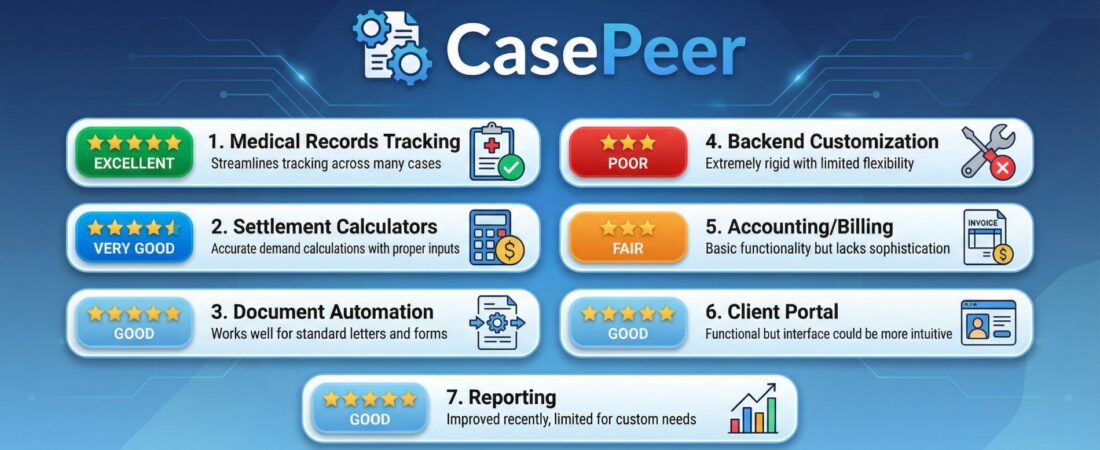
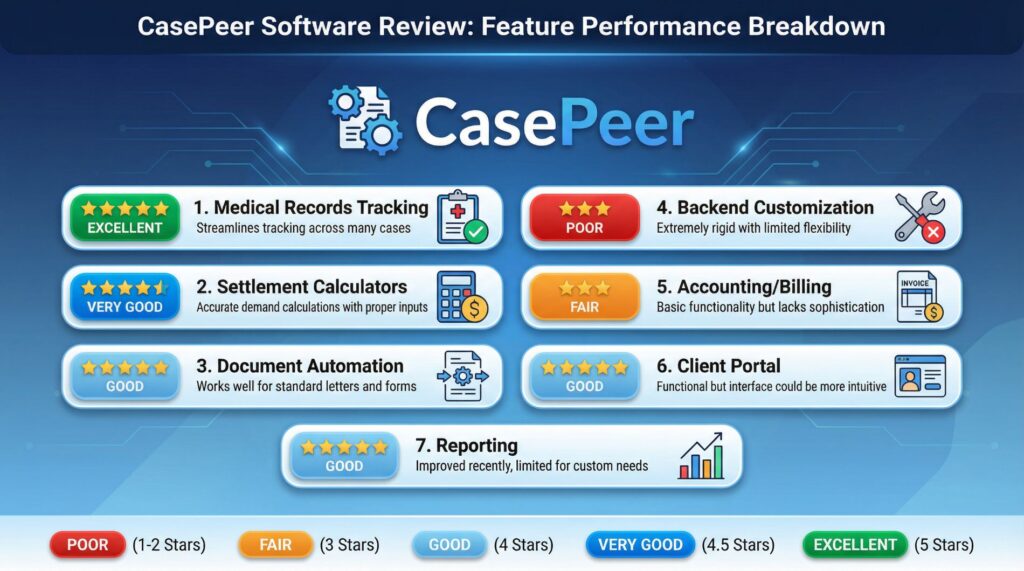
| Medical Records Tracking | Excellent | Streamlines tracking across many cases |
| Settlement Calculators | Very Good | Accurate demand calculations with proper inputs |
| Document Automation | Good | Works well for standard letters and forms |
| Backend Customization | Poor | Extremely rigid with limited flexibility |
| Accounting/Billing | Fair | Basic functionality but lacks sophistication |
| Client Portal | Good | Functional but interface could be more intuitive |
| Reporting | Good | Improved recently, limited for custom needs |
Start Your CasePeer Demo to test these features with your actual case types before committing.
Customer Service Experience
Implementation requires substantial time investment and support access matters significantly during the initial setup phase. User feedback shows support responds adequately when contacted, but the learning curve means you will need that support often in early months.
Setup complexity represents a legitimate barrier. The software works best when you already have established systems and documented processes.
If your practice lacks clear workflows, implementation becomes complicated because you build processes while learning the software simultaneously.
One user’s feedback stands out as particularly relevant: firms with existing systems see performance improvements within the first few months of implementation. That timeline assumes your systems fit CasePeer’s assumptions about personal injury work.
Training resources include video tutorials and documentation, though some users report the materials assume more familiarity with legal software than smaller firms possess.
Pricing and Value Assessment
CasePeer uses per-user-per-month billing across three tiers. Understanding the real cost matters because this represents a significant ongoing investment.
Basic Plan: $79 per user per month
This entry tier includes case management, contact management, task management, client portal, and settlement negotiation tools. A three-attorney firm pays $237 monthly or $2,844 annually.
This tier works for testing the platform, but most firms quickly realize they need additional features for actual daily operations.
Pro Plan: $119 per user per month
This middle tier adds client intake management, texting functionality, and additional automation features. The same three-attorney firm now pays $357 monthly or $4,284 annually.
Most practices choose this tier because the intake and texting capabilities become essential for client communication and case acquisition.
Advanced Plan: $149 per user per month
The top tier includes dedicated account management and expanded templates. Three attorneys cost $537 monthly or $6,444 annually.
Larger firms with complex needs and higher case volumes typically choose this option.
Real Cost Considerations
The annual per-user cost ranges from $948 to $1,788, which falls in the middle range for specialized legal software. The sting comes from needing the Pro tier to access features most firms consider essential as opposed to optional.
You rarely choose Basic for actual operational use. You probably need Pro at least, which pushes the real starting cost to $119 per user monthly.
No free trial appears officially listed, though some vendors mention trial availability. Contact CasePeer directly about trial access before committing to ongoing monthly costs.
Value Assessment
The value equation depends entirely on whether your practice fits the software’s design assumptions. For firms with standard PI cases and established workflows, the time saved on medical records tracking, automated letters, and settlement calculations justifies the cost.
For firms needing extensive customization or handling non-standard case types, you pay for features you cannot fully utilize. The investment makes less sense when you work around software limitations as opposed to benefiting from automation.
Compare CasePeer Plans to calculate costs for your specific firm size and needs.
Pros and Cons Summary
This review identified clear strengths and significant limitations based on actual user experiences.
What Works Well
The medical treatment tracking simplifies monitoring records across many cases. You see at a glance which providers have sent records and which are still outstanding.
Settlement demand calculations factor in many variables accurately. The system reduces manual calculation errors and tracks demand communications systematically.
Document automation saves time on repetitive letters and forms. Standard correspondence generates automatically based on case status triggers.
Litigation event plans populate task sequences automatically. When you hit specific case milestones, related tasks appear without manual entry.
Cloud-based access works reliably for remote teams. Staff access current case information from any location without VPN complications.
The two-way texting improves client communication. Direct messaging through the platform creates better engagement than email alone.
Significant Limitations
The backend rigidity creates real problems for firms with non-standard needs. You cannot customize fields, add insurance types, or accommodate case variations outside predetermined options.
PIP subrogation, third-party subrogation, and workers compensation subrogation are not supported. If your practice handles these arrangements regularly, CasePeer cannot accommodate your workflow.
Accounting and billing features lack sophistication compared to dedicated legal accounting software. Firms with complex billing needs often supplement CasePeer with additional tools, which defeats the all-in-one value proposition.
Migration complexity stops some firms mid-implementation. If you have extensive data in another system with custom fields and workflows, moving to CasePeer may prove impossible as opposed to merely difficult.
The learning curve requires honest time investment. Your team will not be productive immediately.
Budget for implementation time and training periods.
Intake features feel limited compared to specialized intake software. Firms focused on client acquisition may need supplemental tools.
Final Recommendation
The review conclusion comes down to fit. This software suits specific practices extremely well and frustrates others based on whether your needs match the platform’s design assumptions.
You should seriously consider CasePeer if:
Your practice focuses primarily on personal injury cases with standard workflows. You handle mainly auto accidents, slip and fall cases, premises liability, and straightforward medical malpractice claims.
You have established, documented processes that your team follows consistently. The software amplifies existing systems as opposed to creating them from scratch.
Your firm includes 1-10 attorneys with support staff who will benefit from centralized case information. The size range fits CasePeer’s feature set and pricing structure.
You value medical records tracking and settlement calculation accuracy. These specific features represent significant time savings for your current operations.
You should look elsewhere if:
Your practice handles many practice areas beyond personal injury. CasePeer does not serve general litigation or other legal specialties effectively.
You need extensive backend customization. The rigid structure will frustrate tries to accommodate unique workflows or case type variations.
Your cases regularly involve PIP subrogation, third-party subrogation, or complex insurance arrangements beyond UM/UIM coverage. The software cannot handle these scenarios.
You lack documented processes and need software to help establish workflows. CasePeer assumes you know how you want to work and automates existing processes as opposed to creating new ones.
Complex accounting and billing represent critical needs. The financial features work adequately for basic tracking but lack sophistication for complex arrangements.
Implementation Advice
Schedule a demo with your team before any commitment. Walk through three actual cases from your practice during the demo.
Ask specifically about your case types, insurance arrangements, and current workflows.
If those case examples fit smoothly into CasePeer’s structure, the software probably works well for your firm. If the demo requires workarounds or “that feature isn’t available” explanations, consider choices.
Request trial access if available. Spend time entering real case data and attempting actual workflows before making the financial commitment.
The learning curve reveals itself quickly once you move beyond demo scenarios.
Budget adequate implementation time. Plan for 2-3 months before your team reaches full productivity with the platform.
This timeline assumes dedicated training time and support access.
Schedule Your Free CasePeer Demo to test the platform with your specific case types and workflows before making a decision.
The software delivers genuine value for the right practices. The key is honestly assessing whether your firm fits that profile before investing in the platform.