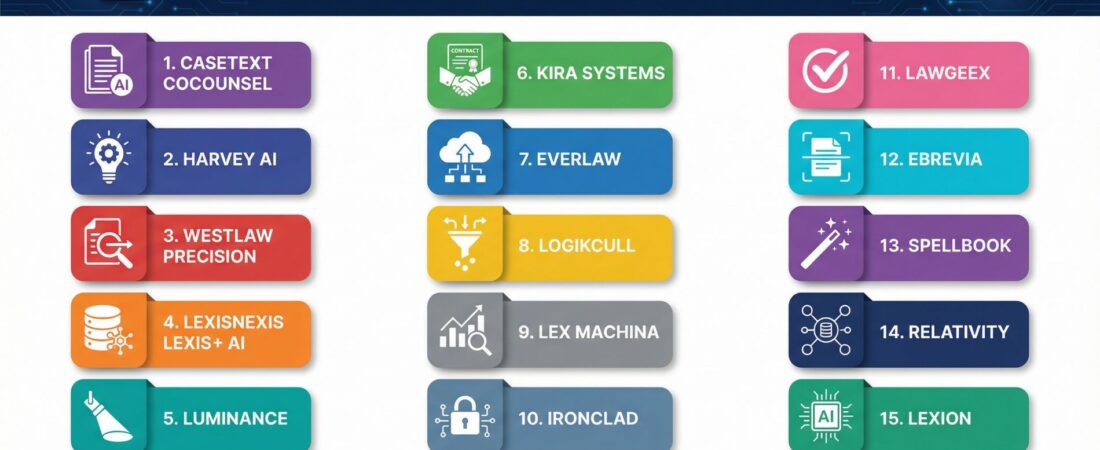
If you poke around the legal-tech universe these days — and honestly it is a universe, not just some tidy aisle of tools — you’ll notice this funny spread of stuff. Tiny hyper-focused AI gizmos that obsess over one job, like ripping into contract language or sniffing out case law patterns, sitting right beside these huge platforms that try to manage half your workflow in one long, slightly overconfident sweep. Strange mix, but it’s what we’ve got.
Jump to:
- Best Legal AI Tools for Litigation
- Best Legal AI Tools for Contracts and Transactional Work
- Best Legal AI Tools for Research and Drafting
And the prices? Kind of all over the map, which isn’t surprising. Some places stick you with a predictable per-user fee, simple enough. Others meter every click like you’re paying for electricity. Then there are the “call us for a quote” enterprise deals that, let’s be real, usually mean someone’s going to negotiate in a conference room for three weeks. I’m not judging; that’s just how it’s done.
But the one thing — and this keeps popping back into my head no matter where the conversation drifts — is that client data has to stay locked down. That part is non-negotiable. Even the slickest AI can trip up or get confused (and occasionally it will, so lawyers still need to keep their hands on the wheel). Anyway, that’s the backdrop for this set of 15 tools that basically show where legal AI sits right now.
The 15 Best Legal AI Software Tools (in no particular emotional order)
1. Casetext CoCounsel
CoCounsel, which Thomson Reuters scooped up, works like this freakishly capable legal sidekick. It’ll draft documents, comb through contracts, and crank through deep research without fuss. You talk to it in normal English — like actually normal English — and it fires back answers with citations from real cases. Works whether you’re prepping for trial or tightening up a business deal. Kind of everywhere at once.
2. Harvey AI
Harvey is the one big firms name-drop when they want to sound futuristic. It’s built to handle the heavy, stressful stuff: giant contract reviews, massive due-diligence piles, litigation planning, and compliance work where a missed detail could sink someone. Its custom models plug into whatever systems a firm already depends on. Top-tier firms across the globe use it for their “we absolutely cannot screw this up” matters.
3. Westlaw Precision
Westlaw baked AI directly into its core, so Westlaw Precision is basically the old product on rocket fuel. It fetches on-point cases and statutes for whatever question you toss at it. There’s even a brief checker that scans arguments — yours or the other guy’s — for weak spots and suggests better authorities. Feels a bit like having a meticulous research clerk hiding in your laptop.
4. LexisNexis Lexis+ AI
Lexis+ AI lets you chat your way to legal research the same way you’d talk to a colleague in the hallway. Ask a question, get a summary, follow the linked citations straight to the real materials. It also digs through briefs to spot holes and can generate draft documents out of thin air. The whole thing draws from LexisNexis’s enormous, decades-deep vault of content.
5. Luminance
Corporate lawyers lean on Luminance heavily during M&A due diligence. It’ll chew through mountains of agreements, flag odd clauses, and lay out contract terms side-by-side so you can see risk patterns. And because it learns from your team’s habits, it becomes better at noticing the specific red flags you care about. Oh — and it handles multiple languages, which is huge for cross-border deals.
6. Kira Systems
Kira is the clause-spotter of the bunch. It identifies over a thousand clause types right out of the box and can be trained to recognize custom ones too. Firms use it for due diligence, contract review, and compliance checks. It also plays nicely with the document management setups most legal teams already have glued into place.
7. Everlaw
Everlaw blends e-discovery with AI-driven analytics. It categorizes documents with predictive coding, identifies who’s who, lays out timelines, and surfaces key evidence. Litigation teams can collaborate inside the platform in real time. Since it’s cloud-based, you can pull up case files from anywhere — which is handy when someone calls you at 7 p.m. asking, “Do we have that email?”
8. Logikcull
Logikcull is the approachable e-discovery tool for smaller firms and corporate teams that don’t have full-time discovery specialists. It automates processing, uses AI to detect privileged communications, and helps you quickly toss irrelevant documents. Pricing is transparent and usage-based. You can spin up a new matter in minutes.
9. Lex Machina
Lex Machina delivers litigation analytics by crunching millions of cases. Want to know a judge’s tendencies? Or how an opposing counsel usually behaves? Or which venues lean a certain way? It models all that. Legal teams use it for strategy decisions, client counseling, and even business development. It covers federal courts plus a growing chunk of state systems.
10. Ironclad
Ironclad manages the entire contract lifecycle, start to finish. AI helps draft using approved templates, routes agreements for approval, and extracts key terms so you can track obligations. Business teams can generate simple contracts themselves, which frees lawyers up for more interesting work. Dashboards show where contracts get stuck so you can fix bottlenecks.
11. Lawgeex
Lawgeex focuses on fast contract reviews. It compares your agreements to your company’s playbook, flags deviations, and suggests changes with explanations. It handles common commercial contracts — NDAs, vendor agreements, sales deals — and compresses review time from hours to minutes. Good for teams drowning in routine paperwork.
12. eBrevia
eBrevia (from Onit) hunts down provisions like EBITDA adjustments, change-of-control clauses, indemnity caps — all the stuff that matters in M&A, real estate, and lending transactions. You can build custom extraction models for unusual document types. The accuracy is high, and the speed is ridiculous compared to manual review.
13. Spellbook
Spellbook lives inside Microsoft Word, which is nice because nobody wants another window open. It adds or suggests contract language, spots missing clauses, and flags aggressive terms. Built on GPT-4 and trained on billions of legal documents, it understands nuance without getting in your way until you need it.
14. Relativity
Relativity is still the heavyweight champion for massive e-discovery and investigations. Now it includes AI for clustering, communication mapping, privilege prediction, and TAR. It’s designed for huge document volumes — litigation, government inquiries, regulatory messes, all of it.
15. Lexion
Lexion helps corporate legal teams organize contract repositories and extract insights: renewal dates, financial details, obligations, all of that. Smart reminders keep you from missing deadlines. The whole repository becomes searchable and reportable, turning contracts into something resembling useful business intelligence.
Finding the Right Fit (which, weirdly, is never as simple as it sounds)
If I were picking one single tool for the broadest group of lawyers, CoCounsel would probably get the nod. It’s powerful enough for big-firm work but still attainable for solos, and the GPT-4 backbone gives it real depth. The conversational interface feels natural, and having built-in citations calms everyone’s nerves.
But — and here’s where people sometimes forget to pause — your practice area matters. Litigation teams might gravitate toward Everlaw or Lex Machina. Transactional lawyers drowning in deals? Luminance or Kira will save their sanity. In-house teams with towering stacks of contracts tend to reach for Ironclad or Lawgeex.
Most vendors offer demos or trials, and you should absolutely use your own documents when you test them. Not those weird sample files they hand out.
Check compatibility with your existing systems. Double-check confidentiality and security (this is one place where being paranoid makes sense). And maybe ask: Does this tool seem like it’ll still be updating itself next year? Because the market moves fast. Tools that felt cutting-edge last year already feel a little dusty.
If you’ve been on the fence about adding AI to your practice, 2026 is a pretty ideal year to start. The efficiency gains aren’t optional anymore — they’re competitive necessities, whether we like it or not.
Best Legal AI Tools for Litigation
Litigation teams do not just need AI. They need pattern recognition, document mastery, and strategic visibility, often across massive data sets.
The strongest litigation-focused AI tools specialize in eDiscovery, analytics, and outcome prediction rather than general productivity.
Top Legal AI Tools for Litigation Teams
- Everlaw
A modern eDiscovery platform with AI-assisted document review, clustering, and collaboration. Often preferred by teams that want speed and clarity without legacy complexity. - Relativity
Enterprise-grade litigation software with advanced analytics and technology-assisted review. Common in large firms handling complex, document-heavy cases. - Lex Machina
Litigation analytics focused on judges, courts, opposing counsel, and historical outcomes. Especially useful for case strategy and venue selection.
Best fit for:
Litigation-heavy firms, complex cases, and teams that rely on data-driven strategy.
Best Legal AI Tools for Contracts and Transactional Work
Transactional teams value AI that can read, extract, compare, and flag risk quickly and consistently.
These tools are strongest in due diligence, contract review, and large-scale agreement analysis.
Top Legal AI Tools for Contracts and Transactional Law
- Kira
Widely used for clause extraction and structured contract review. Common in M&A and diligence workflows. - Luminance
Uses pattern recognition to surface anomalies, inconsistencies, and risk across contract sets. Often positioned as an AI co-reviewer. - Ironclad
Focuses on end-to-end contract lifecycle management with AI embedded into drafting, negotiation, and approvals.
Best fit for:
Corporate law firms, in-house legal teams, and transaction-heavy practices.
Best Legal AI Tools for Research and Drafting
This is where most firms first experience real AI value. Faster research, cleaner drafts, and less time spent starting from scratch.
These tools integrate AI directly into legal reasoning, precedent analysis, and document creation.
Top Legal AI Tools for Research and Drafting
- CoCounsel
An AI legal assistant designed for research, summarization, and analysis across large document sets. - Westlaw Precision
AI-enhanced legal research with citation-aware drafting. Strong choice for firms already using Westlaw. - Lexis+ AI
Combines Lexis data with conversational AI for legal research and drafting support. - Spellbook
Popular with transactional lawyers for AI-assisted contract drafting inside Word-based workflows.
Best fit for:
Solo attorneys, small firms, and research-intensive practices seeking immediate productivity gains.
Frequently Asked Questions
u003cstrongu003eWhat exactly is legal AI software and how does it differ from regular legal technology?u003c/strongu003e
Legal AI software uses machine learning and natural language processing to understand legal concepts, analyze documents, and generate legal work product. Regular legal technology might include document management systems, billing software, or basic search tools that follow programmed rules.u003cbru003eAI tools actually learn from data, recognize patterns, and can handle tasks requiring judgment rather than just following instructions.u003cbru003eThe AI reads case law and contracts similarly to how a lawyer would, understanding context and nuance rather than just matching keywords.
u003cstrongu003eCan legal AI software make mistakes, and who is responsible if it does?u003c/strongu003e
Yes, legal AI makes mistakes. The technology operates probabilistically rather than with perfect accuracy.u003cbru003eHallucinations can occur where the AI generates plausible-sounding but incorrect information, including fabricated case citations.u003cbru003eThis is why human review remains essential for any AI-generated legal work. Responsibility for errors stays with the lawyer using the tool, not the software provider.u003cbru003eYou must verify citations, check reasoning, and apply professional judgment to AI outputs.u003cbru003eThink of these tools as extremely capable assistants rather than autonomous systems.
u003cstrongu003eHow much does legal AI software typically cost?u003c/strongu003e
Pricing varies dramatically based on the platform and your usage level. Basic AI research tools might start around $100-$200 per user monthly.u003cbru003eEnterprise platforms like Harvey or Luminance run thousands of dollars monthly and often need annual commitments.u003cbru003eE-discovery platforms like Everlaw and Logikcull typically charge based on data volume processed. Some providers, particularly those targeting larger firms, don’t publish pricing and need custom quotes. Many tools have been adding AI features to existing subscriptions at modest price increases rather than charging completely separate fees.
u003cstrongu003eIs my confidential client information safe when using legal AI tools?u003c/strongu003e
Reputable legal AI platforms understand attorney-client privilege and implement strong security measures including encryption, access controls, and data isolation. Most enterprise-grade tools don’t use your documents to train their general models, keeping client information confidential.u003cbru003eHowever, you need to read the terms of service carefully and understand each platform’s data handling practices.u003cbru003eSome consumer-grade AI tools absolutely should not be used for client matters because they may train on your inputs. Ask vendors direct questions about data security, storage location, and whether client information remains privileged when processed through their system.
u003cstrongu003eDo I need technical skills or programming knowledge to use legal AI software?u003c/strongu003e
Most modern legal AI tools are designed for lawyers without technical backgrounds. Platforms like CoCounsel and Spellbook use conversational interfaces where you type questions or requests in plain English.u003cbru003eMore specialized tools like Kira Systems or eBrevia need training to use effectively, but that’s learning the software interface rather than programming.u003cbru003eYou’ll become more effective with any AI tool as you learn how to phrase requests clearly and understand the platform’s capabilities and limitations. Think of it as similar to learning how to conduct efficient searches on Westlaw or LexisNexis when those platforms first appeared.
u003cstrongu003eWill AI replace lawyers or should I be concerned about my career?u003c/strongu003e
AI handles routine tasks, document review, research, and initial drafting increasingly well. It doesn’t replace the judgment, strategy, client counseling, negotiation, and advocacy that define legal practice.u003cbru003eThe technology is better understood as augmentation rather than replacement.u003cbru003eLawyers who learn to use AI tools effectively will have significant advantages over those who don’t, similar to how lawyers who mastered computerized legal research gained advantages over those still using books exclusively. Your career concern should be learning to work alongside AI rather than worrying about AI working without you.u003cbru003eThe billable hour model faces more disruption than lawyers themselves, as work that once took hours now takes minutes.
u003cstrongu003eWhich practice areas benefit most from legal AI tools?u003c/strongu003e
Litigation, contract law, and due diligence see the most dramatic benefits currently because these areas involve analyzing large document volumes and identifying relevant information. E-discovery has been AI-enabled longer than most legal work, and the technology has matured considerably.u003cbru003eTransactional lawyers reviewing contracts for Mu0026amp;A deals can move through due diligence much faster with AI assistance.u003cbru003eLegal research across all practice areas benefits from AI that understands questions posed conversationally. Regulatory compliance and risk assessment work well for AI analysis.u003cbru003ePractice areas requiring more interpersonal interaction, negotiation, and appearance work see fewer direct benefits from current AI capabilities, though even these areas benefit from AI handling research and drafting that supports the core work.