Legal professionals face mounting pressure to handle more cases with tighter deadlines. Lawyer AI chatbots have emerged as practical tools that process documents faster, conduct preliminary research, and automate routine tasks that once consumed billable hours.
These specialized platforms understand legal terminology, recognize contract clauses, and surface relevant case law without the manual slog of traditional research methods.
The technology has matured considerably. Early legal AI tools were basically generic chatbots with legal vocabulary tacked on.
Today’s platforms are trained specifically on case law, statutes, contracts, and legal procedures.
The difference shows up in accuracy, compliance features, and how well these tools combine with existing legal workflows.
What Makes Legal AI Different From Regular Chatbots
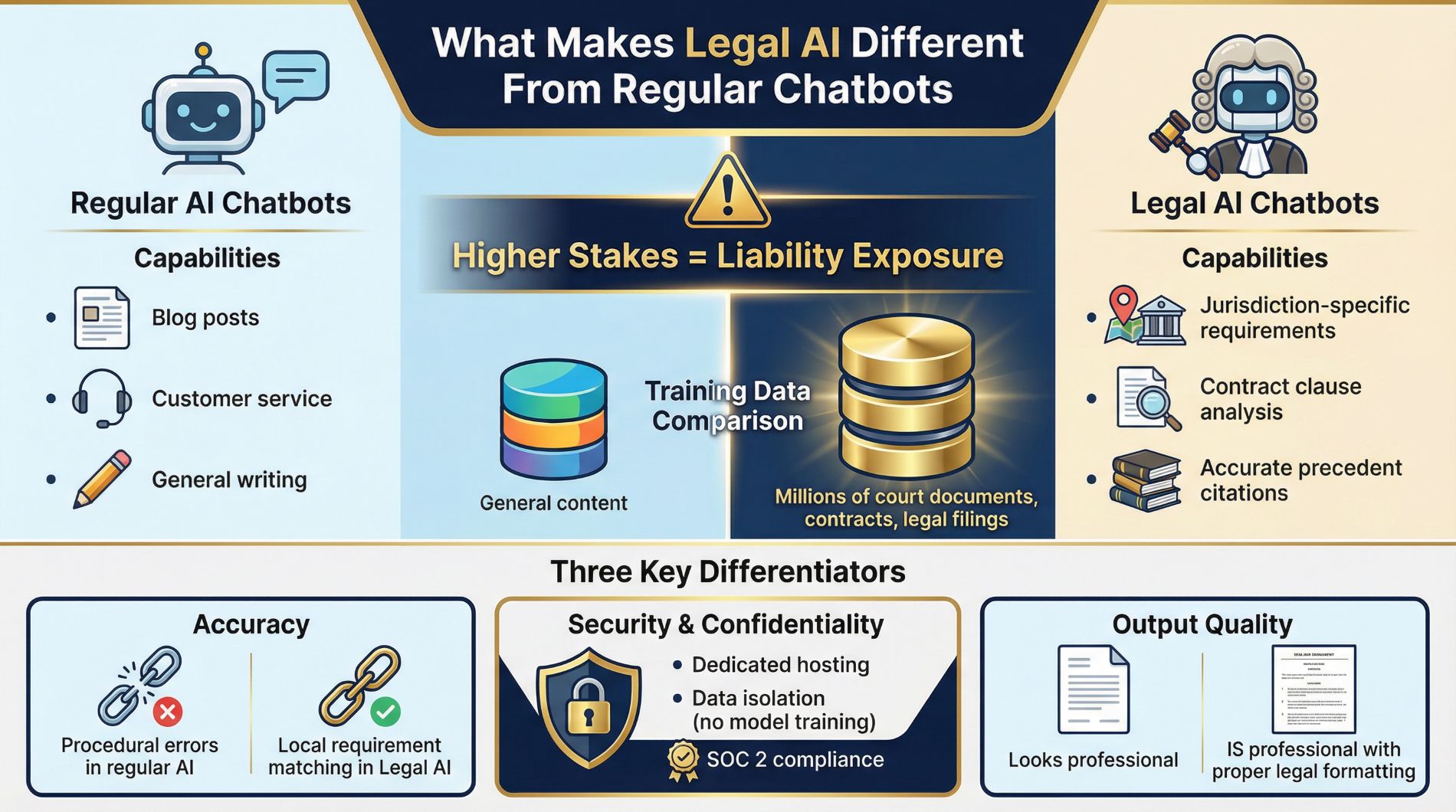
Regular AI chatbots can write blog posts and answer customer service questions. Lawyer AI chatbots need to understand jurisdiction-specific requirements, recognize subtle clause variations in contracts, and cite actual precedents accurately.
The stakes are higher because errors create liability exposure.
Legal-specific AI platforms train on millions of court documents, contracts, and legal filings. This specialized training produces outputs that reflect actual legal language and formatting standards.
When you ask a general chatbot to draft a motion, you might get something that looks professional but contains procedural errors.
A legal AI chatbot trained on your jurisdiction’s court filings will match local requirements automatically.
Security matters more in legal contexts too. Client data carries confidentiality obligations that exceed typical business privacy concerns.
The best lawyer AI chatbots offer dedicated hosting options, prevent your data from training their models, and maintain SOC 2 compliance.
The Top 10 Lawyer AI Chatbots for 2025
1. Harvey AI, Built by Lawyers, For Lawyers
Harvey AI was designed specifically for legal work by people who understood the industry’s actual pain points. The platform handles contract analysis, legal research, and litigation support with impressive accuracy because it trains exclusively on legal data sources.
The tool integrates with document management systems that law firms already use. You can upload contracts, case files, or research memos, and Harvey AI processes them within your existing workflow rather than forcing you to switch between platforms.
Best for: Large and mid-size firms handling complex litigation and transactional work
Pricing: Custom (typically enterprise-level investment)
The main limitation is cost. Harvey AI targets established firms with substantial budgets.
Solo practitioners and small shops will find the pricing prohibitive.
But for firms drowning in document review or research tasks, the time savings justify the investment quickly.
2. ChatGPT, The Accessible Starting Point
ChatGPT stays the most accessible entry point for lawyers testing AI capabilities. The platform handles legal document drafting reasonably well because its training included diverse text sources like cases, statutes, and contracts.
You can use it for brainstorming arguments, summarizing lengthy documents, and creating initial drafts of motions or briefs.
The security is solid, SOC Type 2 compliant with strong encryption. But ChatGPT lacks legal-specific grounding, which means you need to verify outputs against actual law.
This makes it perfect for preliminary work but risky for final deliverables.
Best for: Solo practitioners, small firms, and lawyers experimenting with AI for the first time
Pricing: Starts at $25 per user monthly
I see ChatGPT used most often for tasks like summarizing deposition transcripts, drafting routine correspondence, and generating research starting points. The low cost let’s you test whether AI fits your workflow before committing to specialized legal platforms.
Start with ChatGPT Plus today →
3. Clio Duo, AI Inside Your Practice Management System
Clio Duo lives inside Clio Manage, which means it integrates directly into workflows that many firms already use daily. The AI assistant retrieves case information, automates routine tasks, and handles billing-related inquiries without leaving your practice management platform.
The real advantage here is context. Clio Duo understands your firm’s specific data, client histories, and matter structures.
When you ask it to summarize a case status, it pulls from actual records in your system rather than making educated guesses.
Best for: Firms already using Clio who want AI without learning new software
Pricing: $49 per user monthly (added to Clio subscription)
The limitation is that you need to be a Clio user to benefit. But if you’re already managing cases in Clio, adding Duo makes more sense than adopting a standalone AI tool that needs manual data transfer.
Add Clio Duo to your subscription →
4. Spellbook, Contract Drafting That Learns Your Style
Spellbook focuses exclusively on transactional lawyers who draft contracts regularly. The platform learns from your firm’s existing templates and preferences, then applies that knowledge to new drafts.
This personalization matters because contracts need to match your firm’s risk tolerance and style, not just generic legal correctness.
The tool integrates directly with Microsoft Word, so you draft contracts the same way you always have, but with AI suggestions appearing inline. Spellbook can flag missing clauses, suggest alternative language, and confirm consistency across related documents.
Best for: Transactional practices with high contract volume
Pricing: Custom pricing based on firm size
For corporate lawyers spending hours editing contracts to match firm standards, Spellbook eliminates that friction. The AI adapts to how you work rather than forcing you to adapt to the tool.
5. Lexis+ AI, Legal Research Backed by the Lexis Database
Lexis+ AI combines LexisNexis’s comprehensive legal database with natural language AI capabilities. You can ask complex legal questions in plain English and receive contextually relevant answers with proper citations.
The platform includes predictive analytics that forecast case outcomes based on historical data and similar cases.
The value here is the underlying data quality. Lexis+ AI searches through the same authoritative sources lawyers have trusted for decades, but with modern AI speed and natural language understanding.
Best for: Law firms prioritizing research accuracy and comprehensive case law coverage
Pricing: Custom pricing (contact LexisNexis)
The predictive analytics feature helps with case evaluation and strategy planning. When you can see how similar cases have resolved, you make better decisions about settlement timing and litigation approaches.
Explore Lexis+ AI capabilities →
6. Everlaw, Document Review at Scale
Everlaw serves one purpose exceptionally well: processing massive document volumes for e-discovery and litigation. The AI assistant recommends document coding, organizes related materials conceptually, and generates summaries for individual documents.
If you’re reviewing millions of pages, Everlaw compresses what would take weeks into hours.
The platform combines e-discovery, document review, and trial presentation features in one system. You upload discovery documents, let the AI organize and code them, then use the same platform to present evidence at trial.
Best for: Litigation practices handling large-scale e-discovery
Pricing: Custom pricing based on data volume
For litigation-heavy practices, Everlaw pays for itself immediately through reduced review time. For contract-focused or transactional work, you’re paying for capacity you won’t use.
Know your needs before committing.
7. LawDroid, Automate Client Intake and Communication
LawDroid handles the front end of your practice: intake and client communication. The platform automates document generation, appointment scheduling, and lead qualification.
When potential clients contact your firm, LawDroid gathers initial information, schedules consultations, and populates your practice management system automatically.
The tool integrates with platforms like Clio and Lawmatics, so new client information flows directly into your existing systems without manual data entry.
Best for: Personal injury firms, immigration practices, and any firm managing high intake volume
Pricing: Various plans starting around $99 monthly
For firms where administrative bottlenecks cause leads to fall through the cracks, LawDroid prevents that loss. The AI qualifies leads 24/7, even when your staff has gone home.
8. CaseMine, Deep Case Law Research
CaseMine specializes in case law research and retrieval. The platform searches judgments, opinions, and citation contexts from legal databases.
The standout feature is visualization tools that show how precedents have evolved over time and filters that let you see specific judges’ opinions on particular issues.
For research-intensive work like appellate briefs or novel legal questions, CaseMine cuts search time significantly compared to manual database review.
Best for: Appellate practices and firms handling complex legal questions
Pricing: Contact for pricing
The visualization features help you spot trends in case law that would take days to identify manually. When you need to show how a legal principle has developed, CaseMine makes that argument construction straightforward.
9. Casetext (CoCounsel), Versatile Litigation Support
Casetext, also called CoCounsel, works across many litigation tasks rather than specializing narrowly. The platform conducts legal research, prepares for depositions, summarizes legal documents, and reviews for compliance.
This flexibility appeals to general practices juggling different case types and demands.
You can use CoCounsel to prepare deposition questions one day and conduct contract review the next. The AI adapts to whatever task you assign rather than forcing you to use different tools for different jobs.
Best for: General litigation practices and firms handling varied case types
Pricing: Contact for pricing
The versatility means you get value across your entire practice instead of paying for a tool that only helps with one specific task.
10. ThoughtRiver, Contract Risk Before You Sign
ThoughtRiver focuses specifically on contract risk assessment. The platform scans contracts and flags potential issues before agreements are finalized. Many in-house legal teams use ThoughtRiver as an early filter, the tool reviews contracts, raises red flags, and generates clear summaries of what needs closer legal attention.
This approach saves time by eliminating mindless document scanning and letting you focus on actual judgment calls. When ThoughtRiver flags a problematic indemnification clause, you spend your time negotiating the fix instead of hunting for problems.
Best for: In-house legal departments and firms with high contract volume
Pricing: Contact for enterprise pricing
The risk scoring helps prioritize which contracts need immediate attention versus which can go through standard review processes.
How to Choose the Right Lawyer AI Chatbot for Your Practice
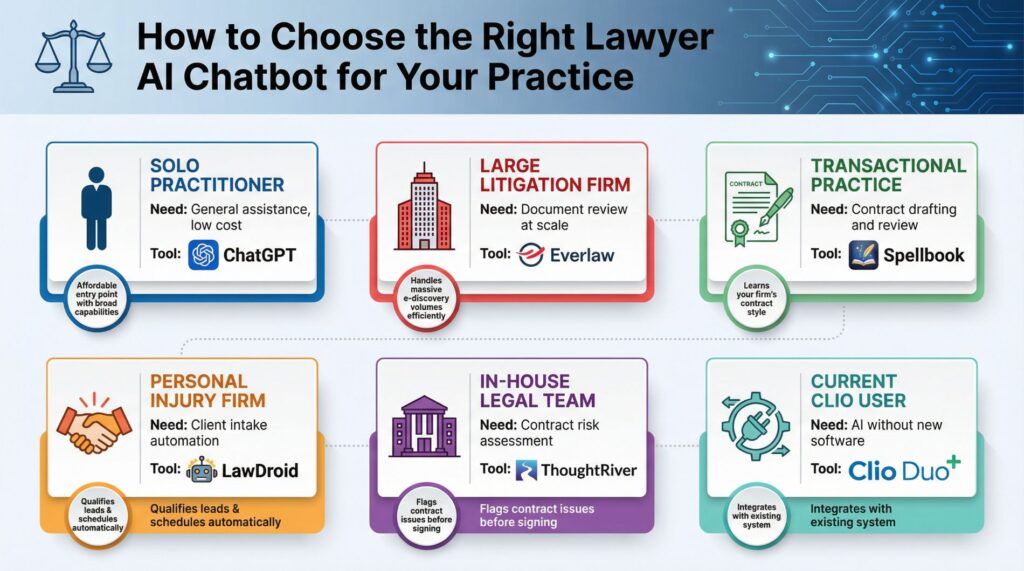
| Practice Type | Primary Need | Recommended Tool | Why It Fits |
|---|---|---|---|
| Solo Practitioner | General assistance, low cost | ChatGPT | Affordable entry point with broad capabilities |
| Large Litigation Firm | Document review at scale | Everlaw | Handles massive e-discovery volumes efficiently |
| Transactional Practice | Contract drafting and review | Spellbook | Learns your firm’s contract style and preferences |
| Personal Injury Firm | Client intake automation | LawDroid | Qualifies leads and schedules consultations automatically |
| In-House Legal Team | Contract risk assessment | ThoughtRiver | Flags contract issues before agreements are signed |
| Current Clio User | AI without new software | Clio Duo | Integrates with existing practice management system |
Your practice area decides which features matter most. Litigation practices need document review and research capabilities.
Transactional lawyers need contract drafting and analysis.
High-volume intake practices need client communication automation.
Start by identifying your biggest time drain. If you spend hours reviewing documents, look at Everlaw or Harvey AI. If contract drafting consumes your week, explore Spellbook.
If leads slip away because nobody answers phones after hours, try LawDroid.
Budget plays a role too. ChatGPT let’s you test AI capabilities for $25 monthly.
Enterprise tools like Harvey AI and Everlaw need substantial investment but deliver proportional value for firms with matching workloads.
What You Need to Know About Security and Compliance
Client data carries confidentiality obligations that exceed normal business privacy standards. The lawyer AI chatbots you choose must meet those requirements or you create ethical violations and liability exposure.
Look for platforms offering SOC 2 Type 2 compliance at minimum. This certification means the vendor has undergone independent security audits covering data handling, access controls, and system monitoring.
Some platforms, like Harvey AI and Juro, offer EEA hosting options and explicitly prevent your contract data from feeding into model training. This matters because you need assurance that client information stays confidential and doesn’t inadvertently appear in outputs generated for other users.
Read the terms carefully. Some AI platforms reserve the right to use uploaded data for model improvement.
That might be acceptable for public information but creates problems when you’re uploading privileged client documents.
Consider on-premise options if your clients demand it. Some tools offer self-hosted versions that keep all data within your firm’s infrastructure.
The trade-off is higher setup complexity and maintenance requirements, but it satisfies clients with extreme security concerns.
The Real-World Integration Challenge
The best AI tool fails if nobody uses it. Integration decides whether lawyer AI chatbots become productivity multipliers or expensive shelfware gathering digital dust.
Tools that embed into existing workflows see higher adoption. Clio Duo works because lawyers already spend time in Clio Manage.
Spellbook succeeds because it lives inside Microsoft Word where contracts get drafted anyway.
The friction to use these tools is minimal because they appear where work already happens.
Standalone platforms need conscious decisions to use them. You need to remember to open the tool, upload documents, and transfer results back to your working files.
That extra effort creates resistance, especially during busy periods when you need AI help most.
Training matters too. Set aside time for your team to learn the tool properly.
A half-hearted introduction where you forward the login credentials won’t produce adoption.
Schedule hands-on sessions where people practice using the AI for actual cases. Show specific examples of how the tool saves time on work they do regularly.
Designate an internal champion who becomes the go-to expert. When people hit confusion or questions, they need someone who can answer immediately rather than waiting for vendor support.
That champion also gathers feedback about what works and what causes friction, helping you adjust implementation over time.
Advanced Tips for Getting More Value
Start small and expand based on results. Pick one specific use case where AI can clearly save time.
Maybe you use it exclusively for summarizing deposition transcripts for two weeks.
Track how long that task took before and after. Calculate the time savings, then decide whether to expand usage.
Train the AI on your preferences where possible. Spellbook and similar tools that learn from your templates become more valuable over time.
The first contracts they help draft might need substantial editing.
After the AI has processed dozens of your agreements, outputs match your style much better.
Create internal templates and prompts that work well. When you find an effective way to ask the AI to perform a specific task, save that prompt. Build a library of proven prompts your team can reuse.
This consistency improves output quality and reduces the trial-and-error phase each time someone uses the tool.
Combine tools strategically rather than expecting one platform to solve everything. You might use ChatGPT for quick brainstorming, Spellbook for contract work, and CaseMine for research.
Each tool handles the task it was built for, producing better results than trying to force a general-purpose tool to do everything.
Never skip verification. AI outputs need human review before they become work product.
Check that case citations are real and relevant.
Confirm that contract language matches jurisdiction requirements. Verify that research conclusions align with current law.
The AI produces starting points faster, but you stay responsible for accuracy.
What This Means for Your Practice Going Forward
Firms using lawyer AI chatbots effectively have pulled ahead of competitors still relying entirely on manual processes. The speed difference matters to clients who expect faster turnaround times and lower costs.
You handle more cases with the same staff size. Routine tasks that consumed hours now take minutes.
That capacity let’s you take on extra clients or spend more time on complex strategic work that needs actual legal expertise.
The competitive advantage compounds over time. As you get better at using these tools and train them on your preferences, the efficiency gap between your firm and others widens.
Six months of consistent AI use produces noticeably different capacity than firms just starting their first experiments.
But the technology keeps improving. The lawyer AI chatbots available today will look primitive compared to what’s coming in the next few years.
Platforms will get better at understanding context, reducing errors, and handling more complex legal tasks.
Staying current with these developments becomes part of practice management.
The firms that thrive will be those that adopt AI early enough to develop expertise but carefully enough to avoid costly mistakes. You want to be learning and refining your processes now, so when even more powerful tools arrive, you already understand how to combine and deploy them effectively.
The time to start is now. Pick one tool that addresses your biggest time drain, commit to using it consistently for 30 days, and measure the results.
The data will tell you whether to expand AI usage across your practice or adjust your approach.
Either way, you’ll be building the skills and processes that define competitive legal practice going forward.