Managing cases, clients, documents, and deadlines can overwhelm even the most organized law firm. Legal case management software centralizes everything you need to run your practice efficiently, from intake forms and billing to document storage and client communication.
These platforms eliminate the chaos of scattered spreadsheets, overflowing email inboxes, and missed deadlines that plague busy attorneys.
The right system saves you hours each week while reducing errors that can damage client relationships or harm your reputation. The wrong choice creates frustration, wasted money, and a painful migration process down the road.
We’ve analyzed the leading platforms to identify which ones actually deliver value for different types of practices. These five legal case management software options represent the best solutions now available, each serving specific firm sizes and practice styles.
What Makes Legal Case Management Software Worth the Investment
Your firm handles sensitive information across dozens or hundreds of active matters. Client details get lost in email threads.
Billable hours slip through the cracks.
Documents live in many locations with no clear version control.
Legal case management software consolidates these scattered pieces into one secure system. You can track every interaction with a client, store all related documents in their matter file, and generate invoices based on automatically tracked time entries.
The efficiency gains compound over time. Attorneys report reclaiming 5-10 hours weekly after implementing proper case management systems.
Staff spend less time searching for information and more time on substantive work that moves cases forward.
1. Clio: The Industry Standard for Growing Firms
Clio dominates the legal tech market for good reasons. Over 150,000 legal professionals use this platform, and that massive user base means the software has been refined through countless real-world scenarios.
The platform handles client intake, matter management, document storage, time tracking, billing, and accounting within one interface. You can customize workflows for different practice areas, create templates for recurring tasks, and automate routine administrative work.
Clio combines with over 250 other applications including Outlook, Gmail, Dropbox, QuickBooks, and specialized legal research tools. This means you don’t have to abandon your existing tech stack when adopting Clio.
The interface needs some learning time, but most firms become productive within 2-3 weeks. The mobile app let’s you update case details, track time, and talk with clients from anywhere.
The pricing starts at $39 per user monthly for basic features, jumping to $89 for custom fields and client communication tools, and reaching $159 for the full suite. These price jumps catch some firms off guard during budget planning.
Clio works best for established firms handling many practice areas who need reliable performance and extensive integration options. Solo practitioners might find it overpowered for their needs.
2. MyCase: Straightforward Case Management Without Hidden Costs
MyCase takes a refreshingly transparent approach to pricing and features. The basic plan includes case management, document organization, time tracking, and billing for $39 per user monthly.
The platform automatically files emails to the fix case files, which solves one of the most common organizational headaches attorneys face. You can set up custom workflows, create client portals for secure communication, and generate invoices directly from tracked time.
Setup happens faster than most competitors. The interface prioritizes simplicity over feature overload, which means your team can start using it productively within days. Pre-built templates for common documents and workflows speed up the onboarding process.
The $79 monthly tier adds integrations, advanced automation, and intake forms. The pricing structure makes it easy to predict costs as your firm grows.
MyCase serves small to mid-sized firms that need solid core functionality without months of implementation. The straightforward design means less training time for new staff members.
One limitation to note, while MyCase advertises mobile access at all levels, full mobile functionality needs the higher pricing tier. Make sure to verify which features you need before committing to a plan.
Start Your MyCase Free Trial →
3. PracticePanther: Built for Solo Practitioners and Small Teams
PracticePanther targets the solo and small firm market with an interface designed for attorneys who don’t have dedicated IT support. The clean design presents only essential functions, avoiding the menu overload that makes some platforms feel overwhelming.
You get billing, invoicing, time tracking, document management, and task workflows on the basic plan. The mobile app works across all pricing tiers, which eliminates the frustrating restrictions some competitors impose.
Document templates come standard, saving you from creating common forms from scratch repeatedly. The task management system let’s you assign deadlines, set reminders, and track progress across all matters.
The platform offers email and chat support with one live training session on the basic plan. Higher tiers include extra training sessions and priority support access.
PracticePanther’s strength comes from its simplicity. You won’t find the deep customization options that enterprise platforms offer, but you also won’t spend weeks configuring workflows before you can start working.
This legal case management software excels when your practice handles similar clients with relatively standardized processes. Firms experiencing rapid growth might outgrow it faster than more robust platforms.
Pricing starts competitively and scales based on the features you need. The transparency in both pricing and functionality makes budgeting straightforward.
Try PracticePanther Free for 14 Days →
4. FileVine: Maximum Customization for Complex Workflows
FileVine stands apart through its customization capabilities. Instead of forcing your practice into predetermined workflows, FileVine let’s you build the system around how you actually work.
This matters substantially for firms with unique practice models or specialized processes that don’t match standard templates. You can create custom fields, design specific workflows for different matter types, and structure the interface to match your team’s preferences.
The platform centralizes notes, documents, client communication, calendar functions, and task management. FileVine combines with over 2,000 programs through broader integration platforms, extending its functionality well beyond native connections.
The customization power comes with a trade-off, you need more technical involvement during setup. Implementation typically takes 2-3 months because you must define your ideal workflow structure before fully utilizing the platform.
FileVine serves larger firms with dedicated practice management staff who can invest time in configuration and optimization. The flexibility becomes overwhelming as opposed to liberating for smaller teams without technical resources.
Document-heavy practices particularly benefit from FileVine’s organizational capabilities. The system handles large volumes of files while maintaining clear version control and access permissions.
This option makes sense when your workflows are complex or non-standard, and you have team members available to manage the initial setup and ongoing optimization.
5. Smokeball: Streamlined for Private Practice Attorneys
Smokeball focuses on private practitioners and small firms that need legal case management software without unnecessary complexity. The platform delivers automatic time tracking, document management with pre-built templates, and simplified integrations within a single subscription.
The automatic time tracking removes the friction of manual logging, which directly improves billing accuracy. Every document you create, email you send, or phone call you make gets tracked without requiring you to start and stop timers.
Pre-built legal document templates address a specific pain point for solo practitioners. Creating documents from scratch consumes significant time, and many attorneys lack dedicated support staff for template maintenance.
Smokeball’s approach saves real hours in daily operations.
The interface avoids bloat, presenting only the features most private practitioners actually use regularly. This focused design means less training time and faster adoption across your team.
Smokeball works exceptionally well for specific practice areas and firm structures. The platform shows strain when you operate outside its primary use cases or need sophisticated client communication features.
Growth can become challenging because scaling typically demands functionality that Smokeball doesn’t provide. Firms planning significant expansion should consider whether they’ll outgrow the platform within a few years.
For solo practitioners and small firms handling straightforward matter types, the efficiency gains provide genuine value. The time tracking automation alone often justifies the subscription cost.
Comparison Table: Key Features at a Glance
| Software | Best For | Starting Price | Key Strength | Main Limitation |
|---|---|---|---|---|
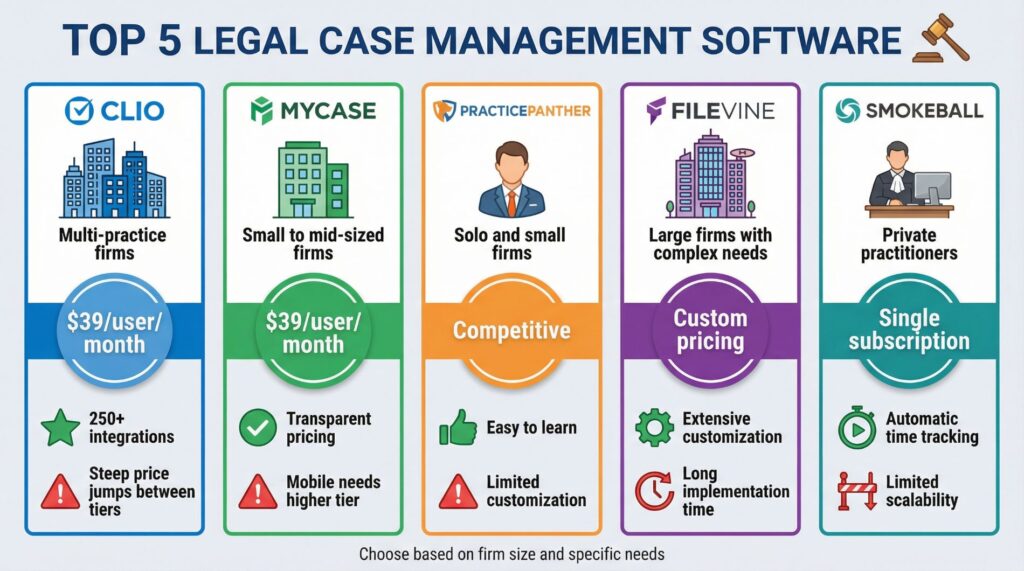
| Clio | Multi-practice firms | $39/user/month | 250+ integrations | Steep price jumps between tiers |
| MyCase | Small to mid-sized firms | $39/user/month | Transparent pricing | Mobile needs higher tier |
| PracticePanther | Solo and small firms | Competitive | Easy to learn | Limited customization |
| FileVine | Large firms with complex needs | Custom pricing | Extensive customization | Long implementation time |
| Smokeball | Private practitioners | Single subscription | Automatic time tracking | Limited scalability |
Making Your Decision
The selection process starts with honest assessment of your firm’s actual needs right now. Many firms purchase capabilities they never use while struggling with implementation challenges.
Consider your technical capacity for setup and maintenance. Underestimating this variable causes more failed implementations than feature gaps. If you don’t have dedicated IT support or tech-savvy staff, prioritize platforms with faster onboarding and simpler interfaces.
Look beyond the per-user monthly fee when analyzing costs. Hidden costs emerge through required tier upgrades for essential features, implementation fees, training charges, and integration add-ons.
Integration requirements should heavily influence your choice. Firms deeply invested in Microsoft or Google ecosystems will experience smoother implementation with platforms designed around those environments.
Implementation timelines vary dramatically. PracticePanther and Smokeball can be production-ready within weeks.
Clio and FileVine typically require two to three months of setup and data migration.
Think about where your firm will be in three years. Rapid growth means you need a platform that scales without requiring a painful migration.
Stable practices benefit from focused solutions that excel at core functions.
Common Implementation Mistakes to Avoid
Firms often rush into legal case management software adoption without proper planning. The most common mistake involves not enough data cleanup before migration.
Importing messy data from your old system creates problems that persist indefinitely.
Take time to organize your existing files, standardize naming conventions, and eliminate duplicate records before starting implementation.
Another frequent error occurs when firms don’t involve staff in the selection process. The attorneys and support staff who will use the system daily need input on which features matter most.
Their buy-in significantly affects adoption rates.
Inadequate training derails many implementations. Budget time for comprehensive training sessions, not just a single walkthrough. Staff need hands-on practice in a test environment before you switch over completely.
Some firms try to customize too much during initial setup. Start with the default configurations and workflows, then gradually adjust based on actual usage patterns.
Over-customization before you understand the system creates unnecessary complexity.
The Bottom Line
Each of these five platforms solves the case management challenge differently. Clio offers comprehensive features with extensive integrations for established multi-practice firms.
MyCase provides transparent pricing and straightforward functionality for small to mid-sized practices.
PracticePanther targets solo attorneys and small teams with its clean, simple interface. FileVine serves larger firms requiring deep customization for complex workflows.
Smokeball streamlines operations for private practitioners through automatic time tracking and pre-built templates.
The right choice depends on your firm size, technical capacity, budget, and growth plans. Most platforms offer free trials, take advantage of them to test the interface with your actual workflows before committing.
Legal case management software changes how efficiently your practice operates, but only when you choose the platform that matches your specific needs and circumstances.