From client intake to case closure, MyCase AI gives you a finish practice management system with artificial intelligence built right in. This cloud-based legal software combines case management, billing, document storage, and client communication tools with AI-powered features that summarize documents, draft communications, and generate tasks automatically. The platform runs on any device with internet access and includes unlimited eSignature, client portals, and time tracking that syncs with your calendar.
What You Get With MyCase AI
MyCase AI comes as part of the MyCase IQ feature set, which is available on the Pro and Advanced subscription tiers. You get the full practice management platform plus AI features that work directly inside your case files.
The AI tools include document summarization, text editing assistance, communication drafts, automatic translations, and task generation from your notes and documents. You can access all of this without leaving the platform or copying information between different programs.
Starting in early 2025, MyCase AI will also include a conversational interface. This means you can ask questions about your cases in plain English and get answers pulled from your case files, documents, notes, and communications.
The base platform gives you everything you need to run your practice. You get case management with custom fields, time tracking that captures billable hours, invoicing with payment processing, document management with unlimited storage, client portals where clients can access their information, calendar management with deadline tracking, and email integration with Gmail and Outlook.
Try MyCase AI free for 10 days, no credit card required
How MyCase AI Helps Your Daily Workflow
The AI features save time on repetitive tasks that eat up your day. Instead of spending hours on administrative work, you handle these tasks in minutes.
Document Summarization
Upload a contract, deposition transcript, or discovery document and MyCase AI will read through it and create a summary. The summary pulls out key facts, important dates, parties involved, and critical clauses.
Each summary includes citations that point back to specific sections in the original document. This means you can verify what the AI found and jump straight to the relevant sections when you need more detail.
For example, if you upload a 50-page contract, MyCase AI will give you a two-page summary highlighting payment terms, deadlines, termination clauses, and any unusual provisions. You review the summary in five minutes instead of reading the entire contract.
This works especially well when you have many documents to review in a short time. Review 10 contracts in an hour instead of spending all day on it.
Communication Drafting
MyCase AI can draft client emails, status updates, and invoice reminders based on information in your case files. You tell it what you need, and it creates a first draft.
The AI pulls relevant case details automatically, so you don’t have to look up dates, facts, or previous communications. You review the draft, make any changes you want, and send it.
This helps most with routine communications. When you need to send a case status update to 15 different clients, you generate the drafts in minutes instead of writing each one from scratch.
The text editing feature also helps you adjust tone, fix grammar, and shorten long paragraphs. If a draft sounds too formal or too casual, you can ask the AI to rewrite it in a different style.
Task Generation
When you upload a document or write case notes, MyCase AI scans the content and suggests follow-up tasks and calendar events. If a document mentions a filing deadline, the AI will flag it and suggest adding it to your calendar.
This catches details you might otherwise miss when you’re reviewing many documents quickly. The AI creates the task suggestions, and you approve the ones you want to add to your calendar or task list.
You can also ask the AI to generate tasks from meeting notes. After a client meeting, paste your notes into MyCase and let the AI identify action items, follow-ups, and deadlines.
The Pricing Breakdown
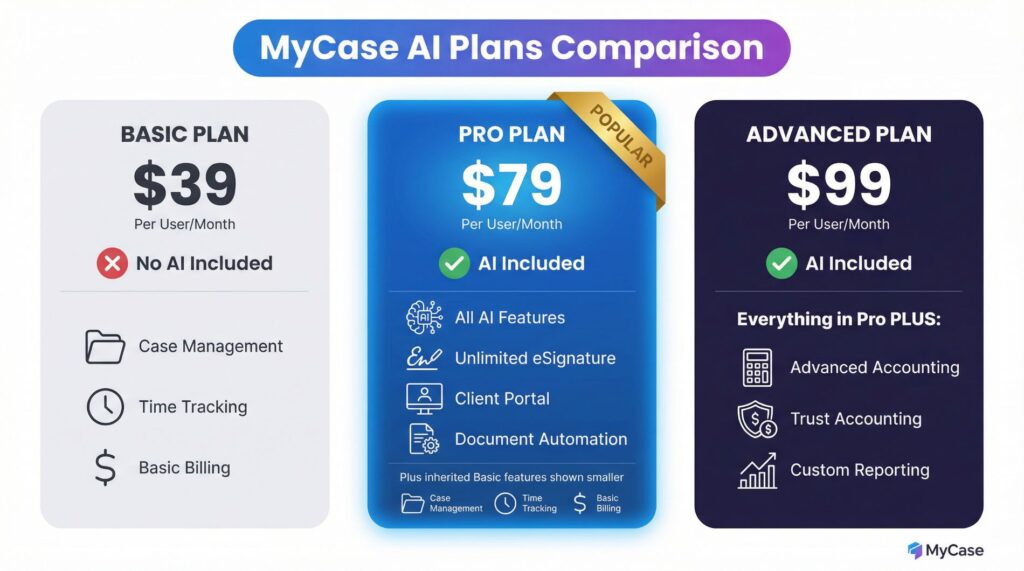
MyCase AI comes with specific subscription tiers. The pricing is straightforward, with no hidden fees for core features.
| Plan | Price Per User/Month | MyCase AI Included | Key Features |
|---|---|---|---|
| Basic | $39 | No | Case management, time tracking, basic billing |
| Pro | $79 | Yes | All AI features, unlimited eSignature, client portal, document automation |
| Advanced | $99 | Yes | Everything in Pro plus advanced accounting, trust accounting, custom reporting |
The prices shown are based on annual billing. Monthly billing costs slightly more per user.
You can add or remove users as your firm grows or contracts.
For a solo practitioner using the Pro plan, you pay $79 per month to get MyCase AI plus all the practice management features. For a five-person firm, the cost would be $395 per month on the Pro plan.
Payment processing fees are separate. MyCase charges 2.9% plus 30 cents per transaction for credit card payments through their integrated payment system.
You can also use your own payment processor if you prefer.
Get started with MyCase AI, claim your free trial
What Makes MyCase AI Different
Most practice management software requires you to buy AI features separately or use third-party tools that don’t connect to your case files. MyCase AI works directly inside your existing workflow.
When you’re looking at a case file, the AI tools are right there. You don’t copy documents to another program, summarize them, and then copy the summary back to MyCase.
You do everything in one place.
The AI also learns from your specific case information. When it drafts a communication or suggests tasks, it pulls from your actual case files instead of generic templates.
This makes the output more relevant and saves you editing time.
MyCase has strong security and data privacy. The platform is ABA-compliant and uses bank-level encryption.
Your client data stays protected, and the AI processing happens on secure servers.
The company doesn’t use your client information to train AI models for other users.
The customer support is available by phone, email, and live chat. Most users report getting help within minutes during business hours.
MyCase also includes training videos, setup assistance, and regular webinars on new features.
You get unlimited document storage, which matters when you’re storing years of case files. Many competitors charge extra once you hit a storage limit.
MyCase includes unlimited storage with every plan.
The client portal gives your clients 24/7 access to their case information, documents, and messages. This reduces the number of “where are we with my case?” phone calls and emails you get each week.
Clients can log in, check their status, and see recent activity without contacting you.
Real-World Use Cases
Personal injury firms use MyCase AI to summarize medical records, police reports, and insurance documents. Instead of having a paralegal spend days reviewing records, the AI creates summaries that highlight injuries, treatment timelines, and gaps in care.
The attorney reviews the summaries and identifies the key facts for settlement negotiations or trial prep.
Family law practitioners use the communication drafting feature to send client updates about hearing dates, document asks, and case progress. The AI pulls the relevant dates and facts from the case file, drafts the email, and the attorney reviews it before sending.
This saves 10-15 minutes per client update.
Immigration attorneys use the task generation feature to track deadlines across dozens of cases. When they upload government correspondence, MyCase AI identifies response deadlines and suggests calendar entries.
This prevents missed deadlines that could result in denied applications.
Estate planning attorneys use the document summarization to review existing wills, trusts, and estate plans for new clients. The AI identifies the current structure, beneficiaries, and any unusual provisions.
The attorney can then talk about updates with the client without spending hours reviewing old documents first.
Small firms with 2-5 attorneys use MyCase AI to standardize their client communications. The AI drafts follow similar formats, which gives clients a consistent experience regardless of which attorney is handling their matter.
This helps newer attorneys communicate at the same level as senior attorneys.
Who Should Use MyCase AI
You will benefit most from MyCase AI if you handle document-heavy cases, send frequent client updates, manage many deadlines across many cases, and want to reduce time spent on administrative tasks.
Solo practitioners and small firms get the best return on investment. The Pro plan at $79 per month gives you both practice management and AI features.
If you’re currently using separate tools for case management, billing, and document storage, MyCase AI consolidates everything and costs less than paying for many subscriptions.
Firms that already use MyCase without the AI features should consider upgrading. The difference between the Basic plan at $39 and the Pro plan at $79 is $40 per user per month.
If the AI features save you even two hours of administrative work per month, the upgrade pays for itself.
New firms benefit from starting with a finish system from day one. You build your workflows around MyCase AI from the beginning instead of trying to change habits later.
The client portal and automated billing help you look professional even when you’re just starting out.
Firms that need specialized legal research tools should know that MyCase AI focuses on case management, not legal research. If you need case law research, statute analysis, or legal writing assistance, you will still need Westlaw, LexisNexis, or similar tools.
MyCase AI works with the information you already have in your case files.
Start your free MyCase AI trial today
Getting Started
Sign up for a free trial on the MyCase website. The trial gives you full access to the Pro plan features, including MyCase AI, for 10 days.
You don’t need to enter credit card information to start the trial.
During setup, you will import your existing cases, clients, and documents. MyCase provides templates for common practice areas including personal injury, family law, criminal defense, immigration, and estate planning.
These templates include custom fields, workflow automation, and document templates specific to your practice area.
Connect your email account so all client emails sync with the relevant case files. This means every email related to a case is automatically attached to that case.
You can search by case to find all related communications instead of searching through your email inbox.
Set up your billing rates and time tracking preferences. MyCase can automatically track time based on calendar entries, emails, and phone calls.
When you spend 30 minutes on a client call, MyCase creates a time entry automatically.
You review and approve the entries before adding them to invoices.
Upload your existing documents to test the AI summarization feature. Start with contracts, correspondence, or discovery documents.
Review the summaries to see how accurate they are and how much time they save compared to reading the full documents.
Create a few client communications using the AI drafting tool. You will see how the AI pulls information from your case files and creates drafts.
Adjust the tone and content as needed until you’re comfortable with the output quality.
Most firms finish setup within a week. MyCase includes onboarding support to help you import data, configure settings, and train your team.
You can schedule setup calls with MyCase support staff who walk you through each step.
Common Questions About MyCase AI
The AI features need an internet connection since they run on cloud servers. You cannot use MyCase AI offline, but you can access the platform from any device with a browser and internet access.
Your data stays secure with bank-level encryption. MyCase does not use your client information to train AI models for other users.
The AI processes your documents and case information only for your use.
The AI works best when you use MyCase for all your case information. If you store some documents in MyCase but keep others in Dropbox or your email, the AI can only work with what’s in MyCase.
The more finish your case files are in the platform, the better the AI performs.
You maintain full control over what the AI generates. Every summary, draft, and task suggestion requires your review before you use it.
The AI provides a starting point, and you make the final decisions about what to use and what to change.
Integration with other tools is available. MyCase connects with QuickBooks for accounting, Google Calendar and Outlook for scheduling, Dropbox and Google Drive for document storage, and LawPay for payment processing.
You can also connect email accounts from any provider.
Final Thoughts on MyCase AI
MyCase AI gives you practical tools that save time on routine tasks. The document summarization, communication drafting, and task generation features help you handle administrative work faster so you can focus on legal work.
The platform works best when you commit to using it for all your case information. Partial adoption means the AI has less information to work with and produces less useful results.
Full adoption means the AI can pull from finish case files and give you better summaries and drafts.
The cost is reasonable for what you get. At $79 per month per user for the Pro plan, you receive practice management, billing, document storage, client portals, and AI features.
This replaces many separate tools and subscriptions that would cost more combined.
The 10-day free trial gives you enough time to test the AI features on real cases. Import some documents, draft some communications, and see how much time you save.
The trial includes full support, so you can ask questions and get help setting up features.
Click here to try MyCase AI risk-free for 10 days
For firms ready to reduce administrative overhead and improve client communication, MyCase AI delivers the tools you need in a single platform. The AI features are practical as opposed to experimental, and they work with your existing workflows instead of requiring you to change how you practice law.
Get MyCase AI now and start saving time on administrative tasks