Running a law firm means you’re buried in administrative work that has nothing to do with actual legal practice. Client intake forms, case management, billing, follow-ups, small teams waste hours on paperwork that should be automated.
Clio offers two different platforms to handle these problems. Understanding the clio grow vs clio manage comparison will help you avoid paying for features you don’t need while getting the tools your firm actually needs.
These two platforms handle completely different parts of your practice. They work together when integrated, but they also function as standalone systems.
You need to know exactly what each one does and which makes sense for your situation.
What Is Clio Grow
Clio Grow is a client intake and CRM system built specifically for law firms. It handles everything that happens before a case officially opens.
Think of Grow as your front door. When potential clients reach out, Grow captures their information through customizable online intake forms.
It automatically generates case-specific documents for e-signature.
Clients can book consultations directly through your calendar.
You’re not manually typing emails or creating intake templates from scratch every time someone contacts your firm.
The platform runs automated workflows that eliminate tedious early-stage client management. Email templates send automatically.
Follow-up sequences don’t need manual intervention.
Client information populates into custom fields instead of you retyping the same details across many systems.
Grow also includes basic CRM functionality. You can track leads, manage referral reporting, and organize your client pipeline before matters officially open.
Some firms use it specifically to track potential cases that haven’t converted yet.
One major advantage is that Clio Grow includes built-in marketing features. You get access to Google’s Local Services Ads (which costs a lot to set up separately), email marketing capabilities, and even a basic website builder in the higher tiers.
This makes Grow useful beyond just intake, it actually helps you attract clients in the first place.
Pricing starts at $59 per user per month when billed annually.
Start your free trial of Clio Grow to automate your client intake process and stop losing leads to manual follow-ups.
What Is Clio Manage
Clio Manage is the core practice management system that handles everything after a case opens. This is where actual work happens: case management, document storage, time tracking, billing, invoicing, and client communication.
Manage has four main pricing tiers starting at $49 per user per month for the basic EasyStart plan, going up to $149 for the Complete package. The differences between tiers are significant.
You’re not just paying for a few extra features, you’re getting entire workflows and reporting capabilities.
EasyStart Plan ($49/month)
You get basic calendar functionality, document and task management, online payment processing, time tracking, and email integration with e-signature capabilities (limited to 3 signatures). This handles the fundamentals for solo practitioners or very small practices managing straightforward cases.
Essentials Tier ($89/month)
This adds a secure client portal so clients can see their case status. You also get document templates to save time creating agreements, automated court scheduling rules, and access to 250+ app integrations.
Most growing practices land here.
Advanced Plan ($119/month)
This brings custom reporting on profitability and productivity, full-text document search, unlimited e-signatures, automated workflows, and live onboarding support. The reporting features here are substantial.
You can see exactly which practice areas, attorneys, or clients are most profitable.
Complete Package ($149/month)
This bundles in Clio Grow functionality directly. You’re getting both intake and case management in one package with all features enabled.
All Manage plans include trust account management, invoicing with customizable templates, automated bill reminders, and multi-currency billing options. The security includes encrypted backups, two-factor authentication, and a 99.9% uptime guarantee.
Core Differences Between Clio Grow and Clio Manage
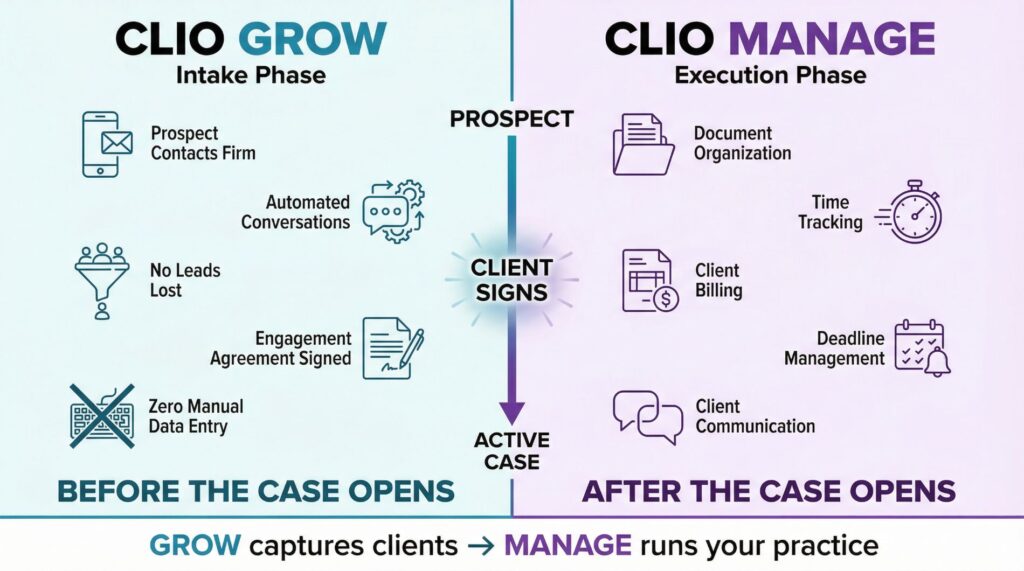
The basic difference is simple. Grow captures clients.
Manage handles cases.
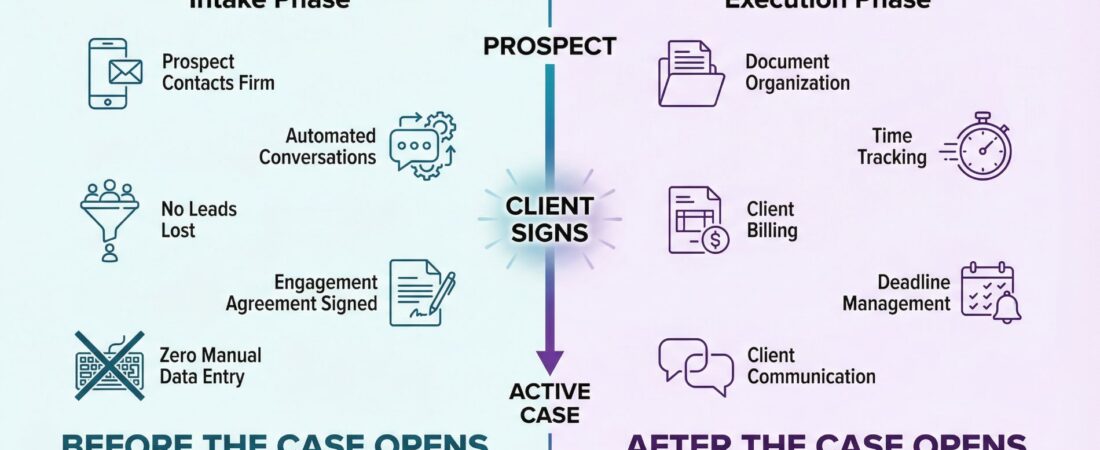
Clio Grow handles the intake phase. From the moment a prospect contacts your firm until they sign an engagement agreement, Grow automates everything. It removes friction from early conversations, makes sure no lead falls through the cracks, and eliminates manual data entry.
Clio Manage handles the execution phase. Once a case opens, you need to organize documents, track time, bill clients, manage deadlines, and maintain communication. Manage provides all the infrastructure for running an actual legal practice.
The crucial detail is that they’re designed to feed into each other. When someone finishes an intake form in Grow, that information syncs directly into a new matter in Manage with no duplicate entry required. Your calendar appointments, custom fields, and client data flow seamlessly between the two systems.
This prevents the nightmare scenario where your intake system has different information than your case management system.
Many firms use just one or the other depending on their size and needs.
Solo practitioners with simple client intake often skip Grow entirely and use Manage alone. Firms with high intake volume or those managing referral pipelines might use Grow without Manage if they’re still in the early stages.
But the firms getting the most value run both together.
Pricing: What You’ll Actually Pay
This is where precision matters because pricing varies based on billing frequency and whether you’re adding features on top of base plans.
Clio Grow stands at $59 per user per month (annual billing) or $69 per user per month (monthly billing). There’s no cheaper option for Grow.
It’s a fixed offering without different tiers.
Clio Manage offers flexibility:
| Plan | Annual Billing | Monthly Billing | Key Features |
|---|---|---|---|
| EasyStart | $49/month | $59/month | Basic calendar, document management, time tracking, 3 e-signatures |
| Essentials | $89/month | $99/month | Client portal, document templates, 250+ app integrations |
| Advanced | $119/month | $129/month | Custom reporting, unlimited e-signatures, automated workflows |
| Complete | $149/month | $159/month | Everything plus Clio Grow included |
Here’s what most people miss when comparing clio grow vs clio manage pricing: if you want Clio Grow standalone and also want Essentials or Advanced for Manage, you’re stacking costs. Grow costs $59, Essentials costs $89, so you’re paying $148 per user per month for both.
But if you jump to Complete at $149, you get both systems fully integrated.
For a firm with five users choosing annual billing:
- Grow + Essentials = $740/month ($8,880/year)
- Grow + Advanced = $890/month ($10,680/year)
- Complete alone = $745/month ($8,940/year)
The Complete plan often becomes the smarter financial choice at that user count, even though it has higher per-seat pricing.
Who Should Use Clio Grow
Clio Grow makes sense if your primary bottleneck is managing inbound leads and client onboarding. You need it if you’re receiving many client inquiries weekly and manually processing each one takes hours.
Lead follow-ups might be inconsistent. Prospects slip through because nobody is tracking them properly.
Your engagement agreement process requires back-and-forth emails and manual updates.
You spend time on repetitive client intake interviews that could be partially automated.
Grow specifically shines for practice areas with high intake volume: personal injury, employment law, family law, and immigration. If you’re handling dozens of initial consultations per month, Grow pays for itself by eliminating the manual work.
The marketing tools in Grow (local service ads, email marketing) make it especially valuable if you’re actively trying to grow client intake as opposed to just manage incoming leads. You’re not just organizing inquiries, you’re attracting them.
Standalone Grow works best for practices using a different case management system (like a legacy system or a specialized practice area tool) that they want to keep using. You get professional intake without switching your entire practice management infrastructure.
Try Clio Grow free for 7 days and see how many hours you save on intake management.
Who Should Use Clio Manage
Clio Manage is essential if you’re running any law practice that needs to track cases, bill time, manage documents, or talk with clients about case status.
You need Manage if you’re now managing cases in spreadsheets, emails, or no system at all.
You might be tracking time manually and losing billable hours because you forget to record work.
Clients are constantly asking for updates because they have no visibility into case progress.
You spend days preparing invoices and dealing with payment processing.
You need to report on which practice areas are profitable (most solo practitioners don’t actually know this).
Even the EasyStart plan handles the fundamentals. As your firm grows, you upgrade to get reporting, advanced automations, and security features that mature practices need.
Complete is the obvious choice if you’re starting from scratch or consolidating many systems. You get intake and case management in one ecosystem.
When You Need Both: Integration Benefits
Using clio grow vs clio manage together creates an operational machine. A typical client experience looks like this:
A prospect finds your firm’s website (possibly built in Grow) and finishes an intake form. They book a consultation.
They receive an automated engagement agreement for e-signature.
All of this happens in Grow.
That completed form and client information automatically flow into Clio Manage. Your attorney picks up the case there, tracks time against it, generates invoices, and the client can view progress through the client portal.
Zero duplicate data entry.
Zero manual transfers between systems.
One client record across both platforms.
This integration particularly benefits growing firms scaling from 3-5 attorneys to 10+. You’ve outgrown one-person intake management, but you haven’t built an operations team yet.
Automating intake (Grow) while managing execution (Manage) let’s you handle significantly more volume without hiring administrative staff.
Real Costs Beyond the Monthly Fee
Both platforms charge per user seat. A five-person firm running Clio Complete pays $745 monthly, not $149.
That’s $8,940 annually.
Additional costs to consider:
Court e-filing: Charged per filing when you use Manage’s built-in e-filing service (available in CA, TX, GA now)
Advanced Document Automation: Extra cost if you want AI-assisted drafting beyond templates
Manage AI (formerly Clio Duo AI): Additional monthly fee for AI-powered scheduling, task prioritization, billing automation, and document analysis
Clio Accounting: Separate cost for deeper financial management and reconciliation tools
These add-ons exist because the base plans are genuinely able without them. You’re not forced into expensive feature bundles.
The Decision Framework
Choose Clio Grow alone if intake is your only pain point and you’re using another system for case management (or don’t need formal case management yet).
Choose Clio Manage alone if your intake process is already handled but case management and billing are disorganized. You’re not drowning in new clients, so intake automation isn’t urgent.
Choose both Grow and Manage (or Complete) if you’re managing many attorneys, handling consistent intake volume, and want a fully integrated practice management system.
Choose Complete specifically if you’re starting a new firm, consolidating many systems, or want integrated client marketing tools without extra costs.
The actual choice depends on your bottleneck. Most law firms have many problems: disorganized intake, poor billing, no client visibility.
They’re looking for one system that handles all of it.
That’s where Clio Manage Complete wins.
But if your intake pipeline is the specific issue strangling your practice, Grow alone might be the faster, cheaper fix.
Making the Switch
Moving from whatever system you’re using now (even if it’s just spreadsheets and email) to Clio takes planning. You can’t just flip a switch on Monday morning and expect everyone to know what they’re doing.
The Complete plan includes live onboarding support. Someone actually walks you through setup instead of leaving you with tutorial videos.
Data migration is where most firms get nervous. You’re moving client information, case files, and financial records.
Clio provides migration tools and support, but expect to spend time cleaning up data before the transfer.
Your current system probably has duplicate entries, outdated contact information, and files saved in random places.
Training your team matters more than the software itself. The best practice management system in the world doesn’t help if nobody uses it correctly.
Block out time for proper training sessions, not just “figure it out as you go.”
Most firms see real productivity gains within 30-60 days after the initial learning curve. Time tracking becomes automatic.
Billing happens faster.
Client communication gets organized.
Start your free trial of Clio Manage to see how case management should actually work, or try Clio Complete if you want the full integrated solution.
Final Verdict on Clio Grow vs Clio Manage
The clio grow vs clio manage decision comes down to where your practice is bleeding time and money right now.
If leads are falling through the cracks and intake takes forever, start with Grow.
If case management is a mess and billing is inconsistent, start with Manage.
If both are problems (and let’s be honest, they probably are), Complete gives you everything in one system.
The math is straightforward. The cost of these platforms is typically lower than one extra administrative employee.
The time they save pays for itself within weeks for most practices.
The real question is whether you can afford to keep doing everything manually while your competitors automate and scale past you.