When I started researching legal practice management software, one feature kept coming up in discussions: client portals. Specifically, Clio for Clients caught my attention because it promises to solve one of the biggest headaches law firms face, scattered client communications.
Clio for Clients is the client-facing portal that comes with certain Clio legal practice management plans. It let’s your clients access case information, pay invoices, view documents, and message your firm securely, all without endless email threads or phone tag.
But here’s what you really want to know: does it actually work as advertised, and is the cost justified for your specific situation?
This Clio for Clients review breaks down exactly what you get, what it costs, and whether it makes sense for your firm.
What You Actually Get with Clio for Clients
Clio for Clients sits inside the larger Clio ecosystem. You can’t buy it separately.
It comes included with certain tiers of Clio Manage, which is their main legal practice management software.
Think of it this way: you run your law firm using Clio Manage on the backend. Your clients get their own simplified view through Clio for Clients on the frontend.
The system works on both web browsers and mobile apps for iOS and Android. Your clients download the app, log in with credentials you set up, and they can access everything related to their case from their phone.
The core promise is simple: stop using regular email for client communications and centralize everything in one secure location.
The Features That Matter Most
Let me walk you through what Clio for Clients actually does on a practical level.
Secure Messaging Between You and Clients
Instead of sending sensitive information through Gmail or Outlook, you message clients directly through the portal. Everything stays encrypted and stored within Clio’s system.
Your client gets a notification when you send a message. They log in, read it, and respond.
You see their response in your Clio Manage dashboard.
This creates a searchable record of every conversation. No more digging through email threads trying to find what someone said three months ago.
Document Sharing That Actually Works
You upload a document in Clio Manage and share it with your client. They see it immediately in their portal.
For firms handling sensitive files (medical records, financial documents, confidential agreements), this beats email attachments by a mile. You control who sees what, and you can revoke access if needed.
The system keeps an audit trail showing when documents were uploaded, who viewed them, and when.
Invoice Management and Payments
Your clients can view invoices directly in the portal. They see what they owe, what they’ve paid, and their payment history.
More importantly, they can pay invoices without leaving the interface. The payment processing connects directly to Clio’s billing system, so everything updates automatically.
Some firms report faster payment cycles because clients can pay immediately when they see an invoice, as opposed to putting it off until they get to their computer to write a check.
Case Information Organization
You control exactly what case information your clients can see. Maybe you want them to see court dates and filing deadlines.
Maybe you don’t want them seeing internal notes about case strategy.
The permission settings let you customize what each client views. For complex cases with hundreds of documents, this organization becomes essential.
Mobile Access for Modern Clients
The mobile apps provide full functionality, not stripped-down versions. Clients checking case status from their phone see the same information as they would on a computer.
If you work with tech-savvy clients who expect to manage everything from their phone, this matters. Younger clients especially expect this kind of access.
The Pricing Reality You Need to Know
Here’s where this review gets into the complicated part: pricing.
You don’t pay separately for Clio for Clients. Instead, it comes included with certain Clio plan tiers.
The catch is you need to pay for a higher tier to get access to it.
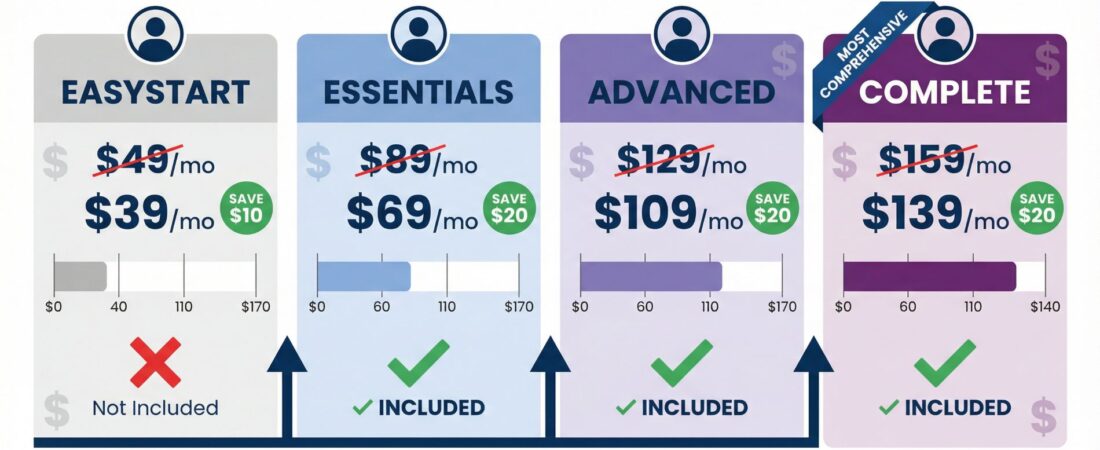
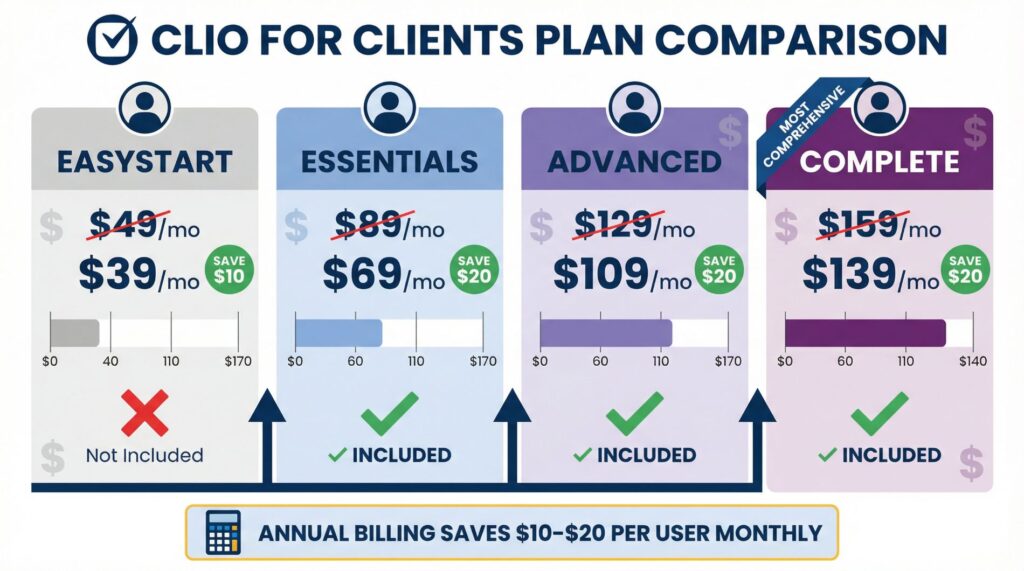
| Clio Plan | Price (Monthly Billing) | Price (Annual Billing) | Clio for Clients Included? |
|---|---|---|---|
| EasyStart | $49/user/month | $39/user/month | No |
| Essentials | $99/user/month | $89/user/month | Yes |
| Advanced | $139/user/month | $119/user/month | Yes |
| Complete | $169/user/month | $149/user/month | Yes |
The base EasyStart plan at $49/month looks affordable, but it doesn’t include the client portal. You need to jump to Essentials at $99/month to get Clio for Clients.
That’s a $50 per user per month difference just to unlock the portal feature.
If you have a five-person firm, you’re looking at an extra $250/month ($3,000/year) compared to the base plan. For a solo practitioner, that’s an extra $600 annually.
This pricing structure frustrates a lot of people. You’re not paying for Clio for Clients specifically.
You’re paying for an entire tier upgrade that happens to include it along with other features.
Check current Clio pricing and plan details here to see which tier makes sense for your firm size.
How This Stacks Up Against Competitors
MyCase and PracticePanther both offer client portals at their base pricing tiers. MyCase starts at $49/month and includes their client portal.
PracticePanther ranges from $49-89/month depending on features, with the portal included.
So why would you pay more for Clio?
The difference is integration depth. Because Clio for Clients connects directly to Clio Manage, updates happen in real time.
Change a case status in your dashboard, and your client sees it immediately in their portal.
You’re not managing two separate systems or manually updating client-facing information.
For firms already committed to Clio for case management and billing, adding the client portal creates a finish ecosystem. Everything syncs automatically.
For firms still shopping around, the forced tier upgrade might push you toward a competitor that bundles the portal at a lower price point.
What Real Users Say About It
Looking beyond marketing materials, users consistently mention a few things in their reviews and forum discussions.
The secure messaging feature gets praise for reducing email clutter. Having a searchable record of all client communications in one place saves time when you need to reference previous conversations.
Document sharing works smoothly once clients understand how to use it. The permission controls let you show clients exactly what they need to see without exposing sensitive internal notes.
Invoice payment processing speeds up collections for many firms. When clients can pay immediately from their phone, payment cycles shrink.
The complaints fall into two categories:
First, some clients struggle with the technology. Not everyone wants to download an app and learn a new system.
Older clients or those who prefer phone calls sometimes resist using the portal.
Second, adoption friction causes problems. Some firms report offering the portal but having clients continue to email anyway.
Then you end up managing both channels, which creates more work instead of less.
The mobile apps generally work well, though some users mention occasional sync delays or notification issues.
The Security and Compliance Side
Law firms handle sensitive information. HIPAA compliance matters for personal injury cases involving medical records.
Client confidentiality rules need secure communication channels.
Clio provides encrypted data storage, two-factor authentication options, and maintains a 99.9% uptime guarantee. They offer Business Associate Agreements for HIPAA compliance as an add-on.
This means you can use Clio for Clients with confidence for healthcare-related cases and other sensitive matters.
Regular email doesn’t provide this level of security. When you’re sharing documents related to divorces, criminal cases, or business litigation, the encryption and access controls matter significantly.
Who Should Actually Use This
This review suggests the tool works best for:
Medium-sized firms with 5+ team members who need coordinated client communication. If many people work on the same cases, having centralized communication prevents confusion.
Firms already using Clio Manage who want to extend the platform to clients. You’re getting most value from the ecosystem when you use both sides.
Practices handling complex cases with extensive documentation. Personal injury firms, immigration lawyers, and litigation practices benefit most from organized document sharing.
The tool probably doesn’t make sense for:
Solo practitioners on tight budgets who can manage client communication through email without major problems. The $600/year upgrade cost might not justify the benefits.
Firms with primarily older clients who prefer phone calls and in-person meetings. If your clients won’t use a digital portal, you’re paying for a feature that sits unused.
Practices handling simple, straightforward matters where traditional email works fine. Not every firm needs this level of client portal sophistication.
The Advanced Features Most Reviews Skip
One aspect that doesn’t get enough attention: the integration with Clio’s time tracking and billing system.
When you work on a client’s case and track time in Clio Manage, that time automatically connects to the client’s account. Generate an invoice, and it appears in their portal immediately.
They can see exactly what you billed for and pay it without calling to ask questions.
This automated workflow saves significant administrative time compared to manually emailing invoices and tracking payments in separate systems.
The audit trail feature also deserves mention. Every action in the portal gets logged. When a client claims they never received a document, you can show exactly when it was uploaded, when they were notified, and whether they viewed it.
For client relationship management, this documentation protects your firm from disputes about what was communicated and when.
Making the Final Decision
This review comes down to one question: does the value justify the cost for your specific situation?
The tool does exactly what it promises. It centralizes client communication, organizes documents securely, and gives clients convenient access to case information.
The pricing structure creates the challenge. You’re not just paying for a client portal.
You’re upgrading your entire Clio subscription to a higher tier.
If you’re already using Clio and want to improve client experience while reducing email chaos, the upgrade makes sense. The portal becomes a natural extension of your existing workflow.
If you’re evaluating legal practice management software for the first time, compare the total cost of Clio (with the Essentials tier to get the portal) against competitors that include portals at lower price points.
Start a free trial of Clio for Clients here to test how it works with your actual clients before committing to a paid plan.
For budget-conscious firms, run the numbers carefully. That extra $50/month per user adds up quickly.
Calculate whether the time saved on client communication and faster invoice payments offsets the extra cost.
For firms focused on client experience and operational efficiency, the investment typically pays for itself through reduced administrative overhead and improved client satisfaction.
The Bottom Line on Clio for Clients
The product works well for what it’s designed to do. You get secure communication, organized document sharing, convenient invoice management, and mobile access for clients.
The limitation comes from the pricing model that forces you to a higher subscription tier as opposed to letting you pay for the portal separately.
Your firm needs to decide whether the finish Clio ecosystem (practice management plus client portal) delivers enough value to justify the cost compared to cheaper choices.
For the right firm, one that values integration, security, and client convenience, this review concludes that the investment makes sense. The tool reduces email chaos, speeds up payments, and creates better client experiences.
For firms watching every dollar or working with clients who won’t adopt digital tools, the cost-benefit analysis might not work out favorably.
Compare Clio against other legal practice management platforms here to see which option fits your firm’s budget and needs best.
The key is understanding exactly what you’re paying for and whether your firm will actually use the features enough to justify the expense. The technology works.
The question is whether it works for your specific situation.